why not just put the buttons at the top, if thats all you're worried
about?  seems to waste a lot of space otherwise, since i for one dont
have a tall window.  the spacing around the buttons already waste enough
space :(
On Fri, 2004-02-06 at 12:34 -0800, Chris Toshok wrote:
> Now this is motivated strictly by my own experience, but I can't imagine
> it being an uncommon one, so here goes.
>
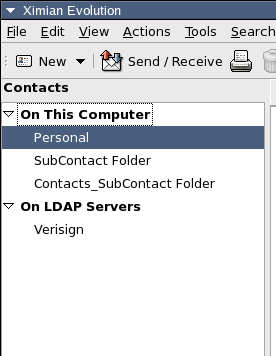
> It seems we need some better visual cue for which component is active.
> We have the toggle buttons, but this isn't where the eye is drawn when
> looking at the sidebar, particularly if you have few folders and a tall
> window.  Since all components have an "On This Computer" group at the
> top, it's even more confusing.
>
> Sooo, I propose we put back something like the gray title bar, only not
> showing the currently selected folder - just showing the currently
> active component.  And limit it to just the sidebar area.
>
> Here's an example:
>
> http://www.hungry.com/~toshok/images/upper-visual-cue.png
>
> We should have the component's icon up there as well, and of course it
> should be layed out a bit better, and probably be slightly larger text
> to differentiate it from the text in the source selector, etc.
>
> thoughts?
>
> Chris
> _______________________________________________
> evolution-hackers maillist  -  [EMAIL PROTECTED]
> http://lists.ximian.com/mailman/listinfo/evolution-hackers

_______________________________________________
evolution-hackers maillist  -  [EMAIL PROTECTED]
http://lists.ximian.com/mailman/listinfo/evolution-hackers