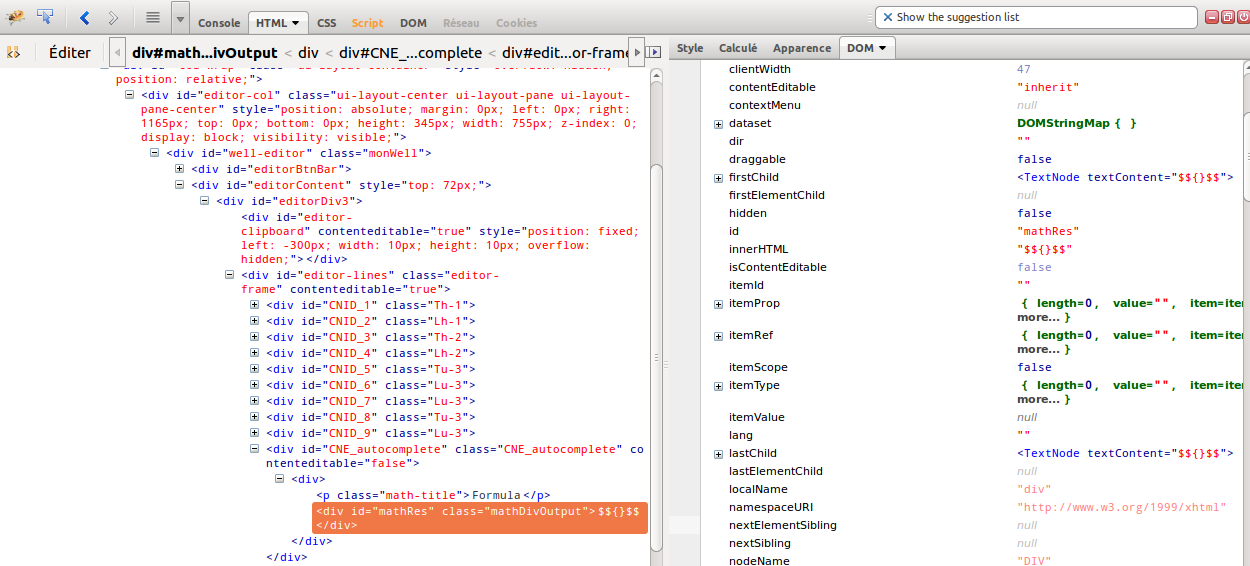
I made different tries and I realized that "light colors" appears only if
you look at the dom while debugging.
It is then quite difficult to export and html file with the pb :-)
No, realy, I don't understand the meaning of these colors... If all
properties were light it might indicates that ... the node is "fresh" ??
(joke)

Le dimanche 8 septembre 2013 01:21:47 UTC+2, Sebastian Zartner a écrit :
>
> Hmm, spontaneously I'd say that's a bug. Do you have a URL and steps, so
> this can be reproduced?
>
> Sebastian
>
> On Saturday, September 7, 2013 8:13:09 PM UTC+2, Benjamin Andre wrote:
>>
>> Hi,
>>
>> I found the meaning of the
>> colors<https://getfirebug.com/wiki/index.php/DOM_Panel#Color_Codes>,
>> but no explanation on why the colors of dom property value is sometimes
>> "light".
>>
>> For exemple, you can see here that the property "clientWidth" is light
>> blue, whereas "hidden" is normal blue.
>>
>>
>> <https://lh4.googleusercontent.com/-e06k1MLjPeg/Uitr9L4kTLI/AAAAAAAAAEw/qFsee2Oqm7k/s1600/firebug.png>
>>
>> Any idea ?
>>
>> (this is important, this difference is the only one I found between a
>> case that works and another cas that doesn't work... :-)
>>
>>
>>
>>
>>
>>

--
You received this message because you are subscribed to the Google Groups
"Firebug" group.
To unsubscribe from this group and stop receiving emails from it, send an email
to [email protected].
To post to this group, send email to [email protected].
Visit this group at http://groups.google.com/group/firebug.
To view this discussion on the web visit
https://groups.google.com/d/msgid/firebug/660dfe06-03d4-4724-9e21-88498bf137ca%40googlegroups.com.
For more options, visit https://groups.google.com/groups/opt_out.