While I haven't yet attempted that layout, here are my thoughts on one
potential path:
You'll need 5 series, with the first one (series 0) being the composite
(as the series are drawn from 0 to n, and if the composite column was
the last one it would draw over the previous columns).

You'll need to adjust the individual series columnWidthRatios and
offsets so that series 0 and series 1 start at the same x position, and
(obviously) series 1-4 take up the space of 5 series columns.

You'll need to have an itemRenderer for series 0. Override
updateDisplayList() and set the unscaledWidth to be wide enough to span
series 1-4.

Here are some potentially helpful links:
1) demonstrates tampering with columnWidthRatio and offsets:
http://www.stretchmedia.ca/code_examples/offset_calculator/SeriesOffsetC\
alculator.html
<http://www.stretchmedia.ca/code_examples/offset_calculator/SeriesOffset\
Calculator.html>

2) QuietlyScheming shows an example of complex stacking which you'll
need since series 0 is a composite:
  http://demo.quietlyscheming.com/ChartSampler/app.html
<http://demo.quietlyscheming.com/ChartSampler/app.html>

That's only a start as you'll still need to also create a custom legend
and deal with the challenge of having the first 4 clusters blue-ish and
the next 4 orange-y.  Having custom itemRenderers should help with that
coloring issue.

Good luck!
-Eddie B.


--- In [email protected], "gmoniey22" <gmonie...@...> wrote:
>
> I haven't been able to find an example of this, or any indication in
the docs of how to do this, but I would imagine it is possible.
>
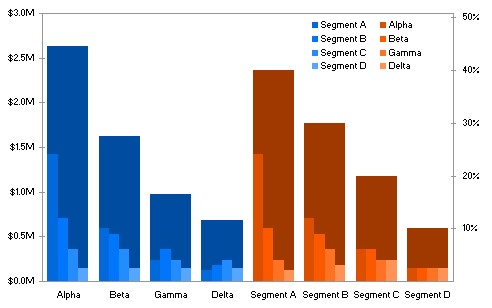
> I want to chart some data that is hierarchical. Essentially each
parent has a few children. I want the children to be clustered columns
inside a big column which indicates the parent (which is the sum of all
the children)
>
> I found this example image which kinda shows what I am thinking of:
> http://peltiertech.com/images/2009-02/MariBar_OverlapColumns.png
>
> Thanks!
>