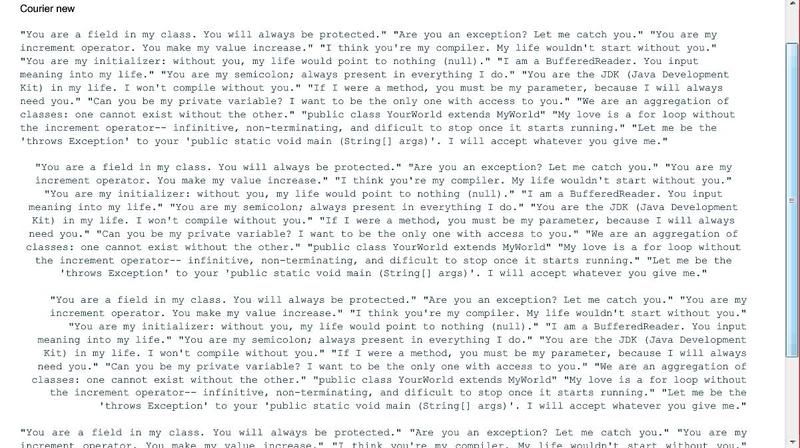
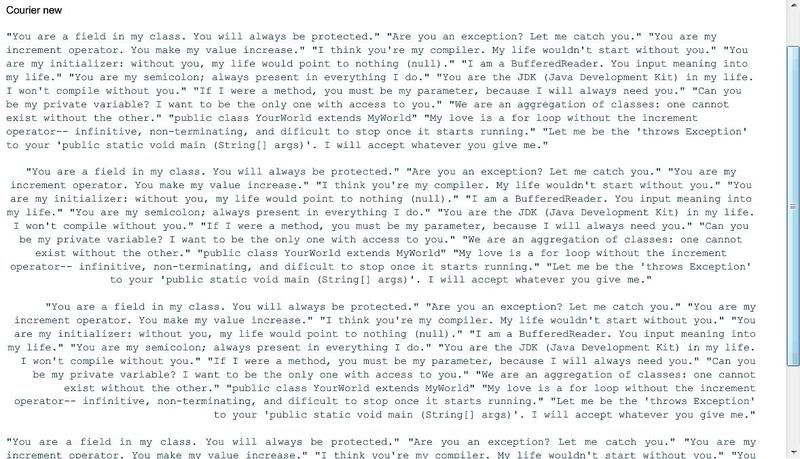
Renz - you say that Courier New works ok? This is a fixed width font. which
has me wondering if this has something to do with how the font packages are
generated. If in the process - each characters advancement is getting
ignored/cheated/mangled one would expect to see something similar to your
screen captures. Can you send me one of your .ttf that is misbehaving? I'd
like to generate the embed on my machine and examine the glyph metrics.
Rick Winscot


From: [email protected] [mailto:[EMAIL PROTECTED] On
Behalf Of Alex Harui
Sent: Friday, April 11, 2008 11:57 PM
To: [email protected]
Subject: RE: [flexcoders] Re: Embedded Fonts and Text Alignment problem in
Text control


Unfortunately, I don't have the time to do any further analysis.  Please
file a bug with your test cases.


Font rendering is sensitive to variances in how the font is described vs
what the glyph data actually dictates.  Common fonts shouldn't have this
problem, but you never know.  There are several rendering adjustments you
can make like antiAliasType and gridFitType.  Maybe those will help.


-Alex


  _____

From: [email protected] [mailto:[EMAIL PROTECTED] On
Behalf Of renzeullo
Sent: Friday, April 11, 2008 8:33 PM
To: [email protected]
Subject: [flexcoders] Re: Embedded Fonts and Text Alignment problem in Text
control


Hi Alex,

Thank you very much for the help.

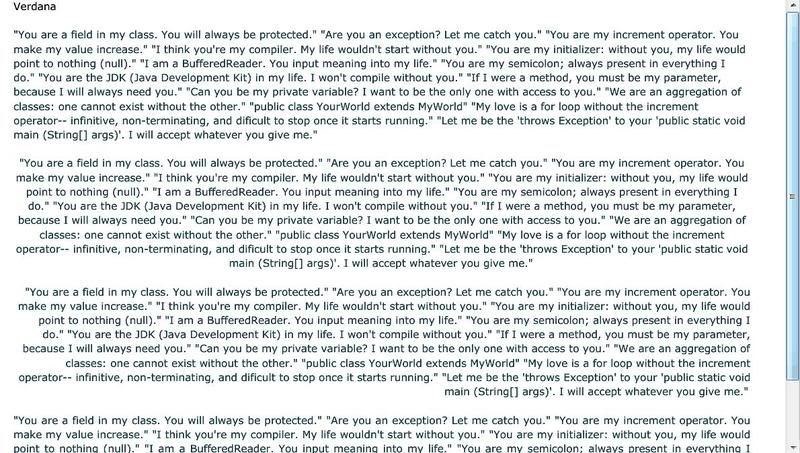
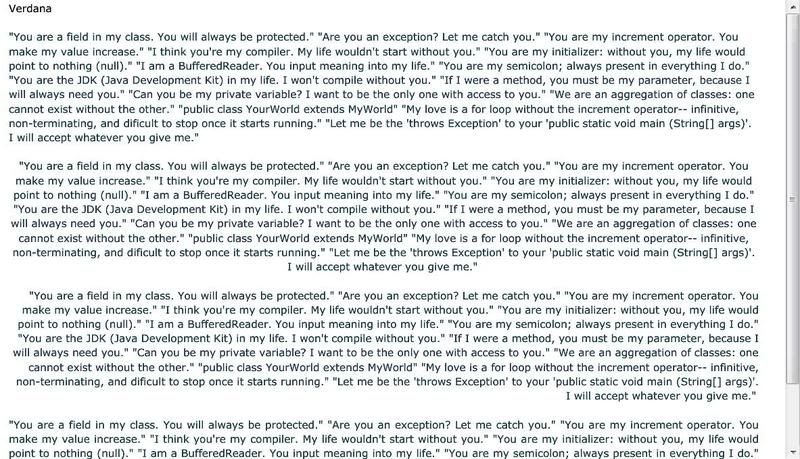
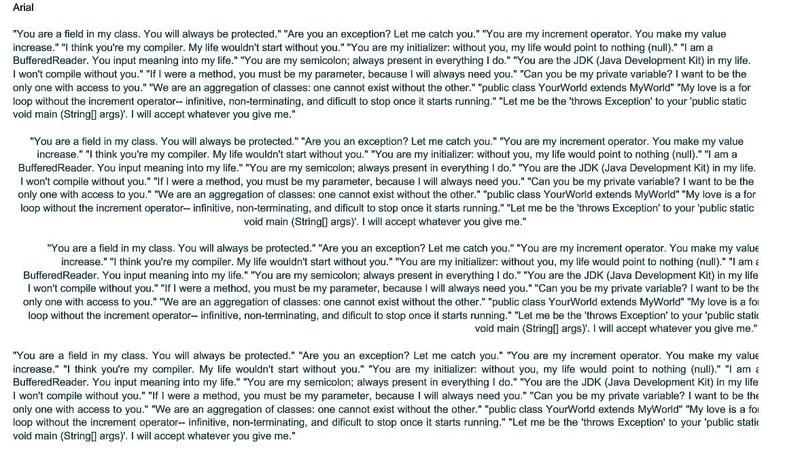
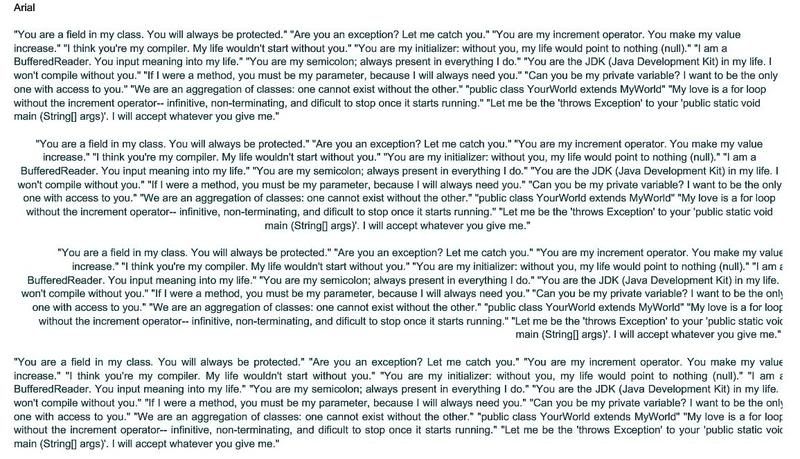
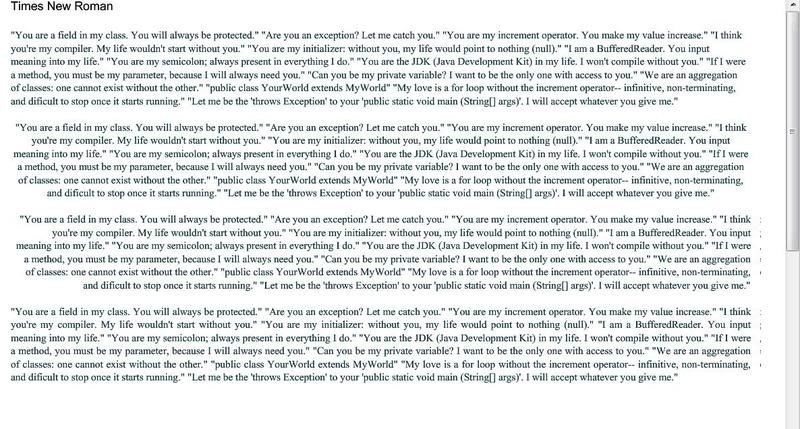
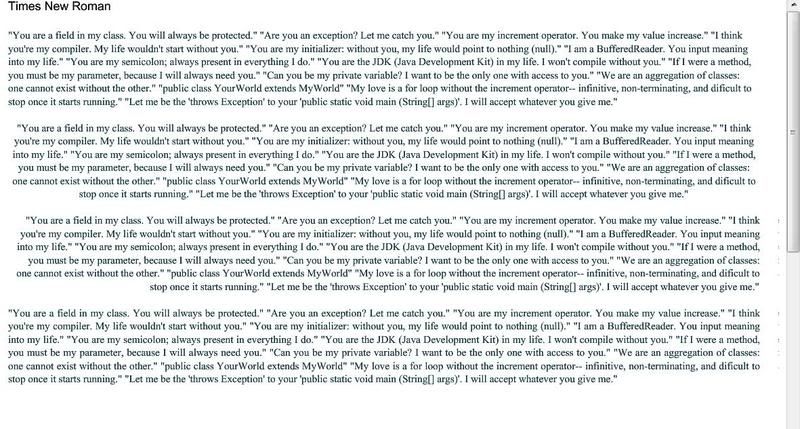
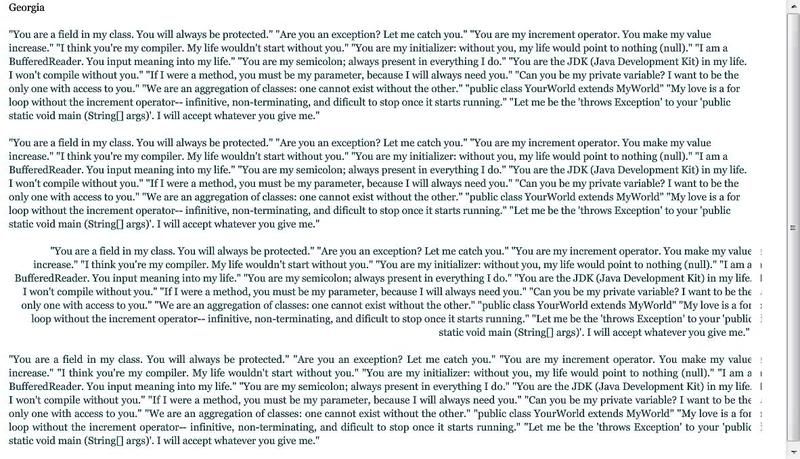
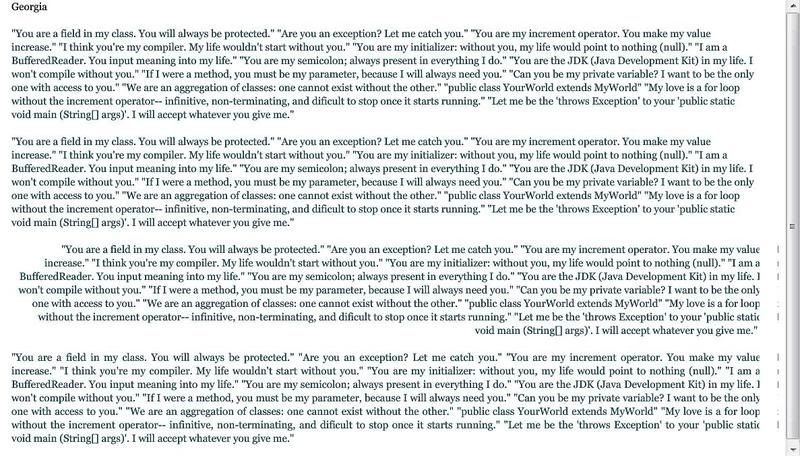
Yes, there was a reflow when the textField.width is adjusted. Please
check the images below for reference. I also tried it using different
fonts. First image is using regular mx:Text, second image is using the
modified code adding 10 to textField.width.

Also, notice that some of the truncated text has bits of the truncated
parts separated from them and gets rendered a few pixels to the right
of the border, but its still not the entirety of the truncated parts.

Verdana
http://i87.photobucket.com/albums/k155/ernieldiaz/Verdana_no_adjust.jpg
http://i87.photobucket.com/albums/k155/ernieldiaz/Verdana_10.jpg

Arial
http://i87.photobucket.com/albums/k155/ernieldiaz/Arial_no_adjust.jpg
http://i87.photobucket.com/albums/k155/ernieldiaz/Arial_10.jpg

Courier New
http://i87.photobucket.com/albums/k155/ernieldiaz/Courier_no_adjust.jpg
http://i87.photobucket.com/albums/k155/ernieldiaz/Courier_10.jpg

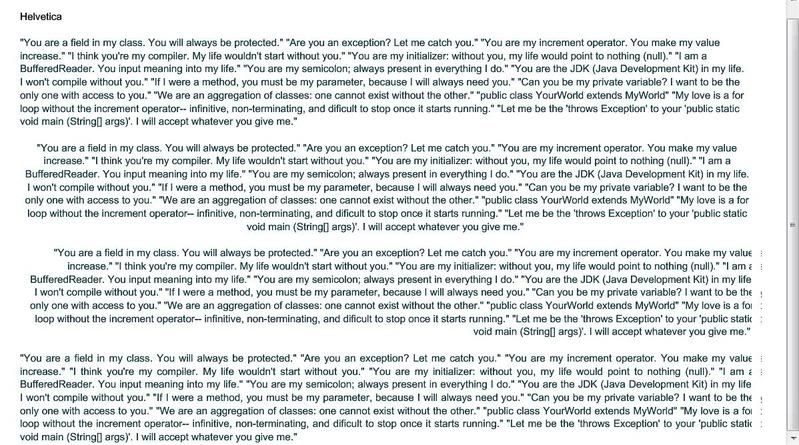
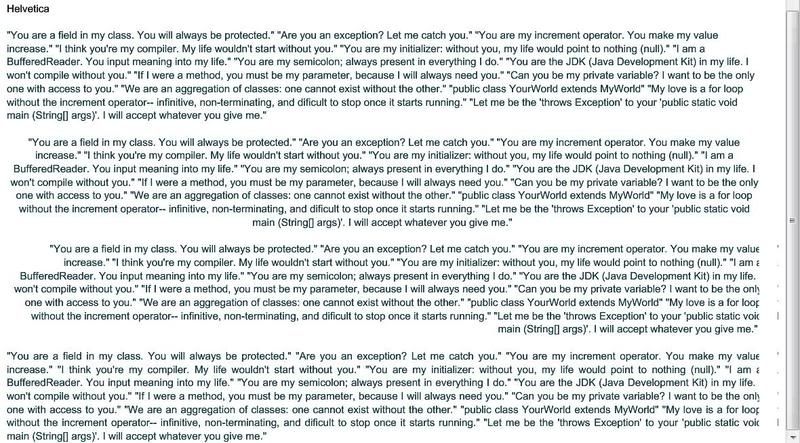
Helvetica
http://i87.photobucket.com/albums/k155/ernieldiaz/Helvetica_no_adjust.jpg
http://i87.photobucket.com/albums/k155/ernieldiaz/Helvetica_10.jpg

Times New Roman
http://i87.photobucket.com/albums/k155/ernieldiaz/TNR_no_adjust.jpg
http://i87.photobucket.com/albums/k155/ernieldiaz/TNR_10.jpg

Georgia
http://i87.photobucket.com/albums/k155/ernieldiaz/Georgia_no_adjust.jpg
http://i87.photobucket.com/albums/k155/ernieldiaz/Georgia_10.jpg

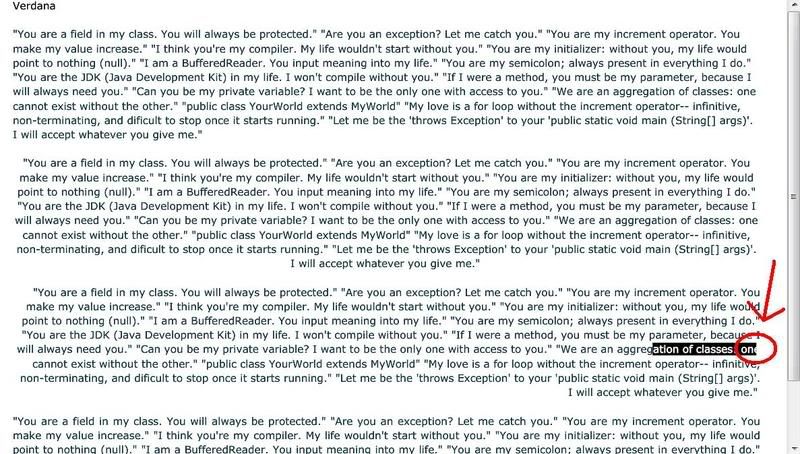
It seems to not happen with Verdana and Courier New. But I also
noticed a highlighting problem that happens with Verdana nonetheless.
Screenshot is found below. It seems that I cannot fully highlight the
last character on the line if it reaches the border. In the picture, I
highlighted "ation of classes, one", but only half of the "e" in "one"
is highlighted. If I copy and paste the text into notepad, it only
pastes "ation of classes, on".

Highlighting problem
http://i87.photobucket.com/albums/k155/ernieldiaz/highlight_problem.jpg

The highlighting problem is not observed when using Courier New.

Do you think the problem is with the calculation of
textField.textWidth? Any way to solve it?

Thanks in advance.

Renz

--- In [email protected] <mailto:flexcoders%40yahoogroups.com> ,
"Alex Harui" <[EMAIL PROTECTED]> wrote:
>
> Try embedding verdana to see if you're having this problem with all
> fonts or just Helvetica.
>
>
>
> Your code looks right. When you made the adjustment, did the text
> reflow and cut off different characters?
>
>
>
> Maybe you can post a simple test case.
>
>
>
> ________________________________
>
> From: [email protected] <mailto:flexcoders%40yahoogroups.com>
[mailto:[email protected] <mailto:flexcoders%40yahoogroups.com> ]
On
> Behalf Of renzeullo
> Sent: Friday, April 11, 2008 12:36 AM
> To: [email protected] <mailto:flexcoders%40yahoogroups.com>
> Subject: [flexcoders] Re: Embedded Fonts and Text Alignment problem in
> Text control
>
>
>
> Hi Alex,
>
> The truncated text looks like this:
> http://i87.photobucket.com/albums/k155/ernieldiaz/embedded_font_truncati
> on.jpg
> <http://i87.photobucket.com/albums/k155/ernieldiaz/embedded_font_truncat
> ion.jpg>
>
> The text uses an embedded Helvetica font. The first paragraph is left
> aligned and is rendered correctly. The succeeding paragraphs are
> centered, right aligned, and justified. They have problems when the
> text reaches the right border.
>
> Any help is appreciated. Thanks in advance.
>
> Renz
>
> --- In [email protected] <mailto:flexcoders%40yahoogroups.com>
<mailto:flexcoders%40yahoogroups.com>
> , "renzeullo" <renzeullo@> wrote:
> >
> > Hi Alex,
> >
> > Thanks for the reply. I tried your suggestion, but it doesn't seem to
> > be working. Am I doing it correctly? Code is:
> >
> > ...
> > ...
> > public class Text extends mx.controls.Text
> > {
> > public function text(){
> > super();
> > }
> >
> > override protected function updateDisplayList(unscaledWidth:Number,
> > unscaledHeight:Number):void {
> > super.updateDisplayList(unscaledWidth, unscaledHeight);
> > textField.width += 10;
> > }
> > }
> >
> > I've tried adding integers from 2 to 20, but still does not seem to
> > have any effect.
> >
> > Any help is appreciated. Thanks in advance.
> >
> > Thanks!
> > Renz
> >
> >
> > --- In [email protected] <mailto:flexcoders%40yahoogroups.com>
> <mailto:flexcoders%40yahoogroups.com> , "Alex Harui" <aharui@> wrote:
> > >
> > > Subclass Text and widen the TextField.
> > >
> > >
> > >
> > > ________________________________
> > >
> > > From: [email protected] <mailto:flexcoders%40yahoogroups.com>

> <mailto:flexcoders%40yahoogroups.com>
> [mailto:[email protected] <mailto:flexcoders%40yahoogroups.com>
<mailto:flexcoders%40yahoogroups.com>
> ] On
> > > Behalf Of renzeullo
> > > Sent: Thursday, April 10, 2008 4:08 AM
> > > To: [email protected] <mailto:flexcoders%40yahoogroups.com>
<mailto:flexcoders%40yahoogroups.com>
>
> > > Subject: [flexcoders] Embedded Fonts and Text Alignment problem in
> Text
> > > control
> > >
> > >
> > >
> > > Hi all,
> > >
> > > Im having a problem with right, center, and justify alignment in a
> > > text control using embedded fonts. The last character in the line is
> > > not shown in full if it touches the right border of the control.
> > >
> > > I have an html-formatted text which I feed into Text.htmlText. The
> > > html-formatted text is taken from a RichTextEditor control. I
> > > substiture the font names inside the html <font> tags with the
> aliases
> > > I assign to the embedded fonts. But when it renders in the Text
> > > control, the character that touches the right border gets cut in
> half.
> > >
> > > This happens with variable sized fonts like Arial. Fixed sized fonts
> > > like Courier New gets generated without problems.
> > >
> > > Anybody know of any solution?
> > >
> > > Thanks in advance.
> > >
> > > Renz
> > >
> >
>
<<image001.jpg>>
<<image002.jpg>>