Renz,
I took a look at the font you sent - and the metrics looks fine. I created a
simple app; embedded font, text area and three paragraphs of "lorem ipsum."
I was able to duplicate your findings easily with every font with all three
justifications. I then ran a series of tests with some other fonts and found
that even fixed width fonts had similar issues. It's much less pronounced -
but it is still a problem. I then checked the Adobe bug-base and found a
scad of entries that had to deal with embedded fonts getting cropped.


https://bugs.adobe.com/jira/browse/SDK-15194

https://bugs.adobe.com/jira/browse/SDK-2752

https://bugs.adobe.com/jira/browse/SDK-3974


I think that this is one to turn over to Adobe. It's obvious that there is
either a problem in the player or flex framework with character advancement
calculation. The only way around this would be to intercept/override the
width calculation of the text and add a 10px padding. and hope for the best.
I apologize for the lack of 'good news.'


Rick Winscot


From: [email protected] [mailto:[EMAIL PROTECTED] On
Behalf Of renzeullo
Sent: Sunday, April 13, 2008 10:10 PM
To: [email protected]
Subject: [flexcoders] Re: Embedded Fonts and Text Alignment problem in Text
control


Hi Rick,

Thanks for taking time to check on this. :). I have sent the
misbehaving font to your email ([EMAIL PROTECTED]
<mailto:rwinscot%40yahoo.com> , correct?).

I am leaning towards believing that this is a problem with the width
values that the fonts are passing to flex. I just don't have an idea
on how to check on it. :(

Thanks in advance.

Renz

@Alex: Thanks too. I appreciate the help. :)

--- In [email protected] <mailto:flexcoders%40yahoogroups.com> ,
"Rick Winscot" <[EMAIL PROTECTED]>
wrote:
>
> Renz - you say that Courier New works ok? This is a fixed width
font. which
> has me wondering if this has something to do with how the font
packages are
> generated. If in the process - each characters advancement is getting
> ignored/cheated/mangled one would expect to see something similar to
your
> screen captures. Can you send me one of your .ttf that is
misbehaving? I'd
> like to generate the embed on my machine and examine the glyph
metrics.
>
>
>
> Rick Winscot
>
>
>
>
>
> From: [email protected] <mailto:flexcoders%40yahoogroups.com>
[mailto:[email protected] <mailto:flexcoders%40yahoogroups.com> ]
On
> Behalf Of Alex Harui
> Sent: Friday, April 11, 2008 11:57 PM
> To: [email protected] <mailto:flexcoders%40yahoogroups.com>
> Subject: RE: [flexcoders] Re: Embedded Fonts and Text Alignment
problem in
> Text control
>
>
>
> Unfortunately, I don't have the time to do any further analysis. Please
> file a bug with your test cases.
>
>
>
> Font rendering is sensitive to variances in how the font is described vs
> what the glyph data actually dictates. Common fonts shouldn't have this
> problem, but you never know. There are several rendering
adjustments you
> can make like antiAliasType and gridFitType. Maybe those will help.
>
>
>
> -Alex
>
>
>
> _____
>
> From: [email protected] <mailto:flexcoders%40yahoogroups.com>
[mailto:[email protected] <mailto:flexcoders%40yahoogroups.com> ]
On
> Behalf Of renzeullo
> Sent: Friday, April 11, 2008 8:33 PM
> To: [email protected] <mailto:flexcoders%40yahoogroups.com>
> Subject: [flexcoders] Re: Embedded Fonts and Text Alignment problem
in Text
> control
>
>
>
> Hi Alex,
>
> Thank you very much for the help.
>
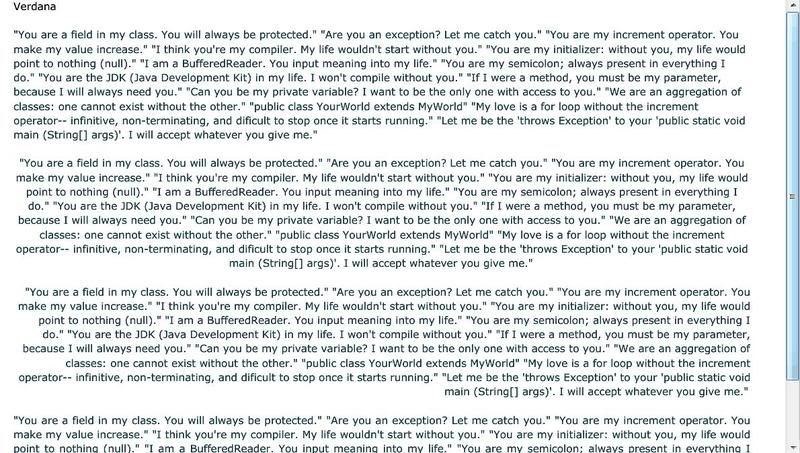
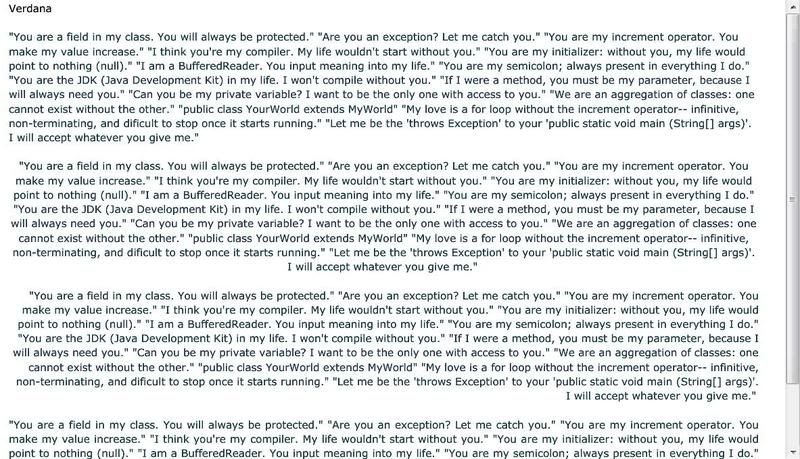
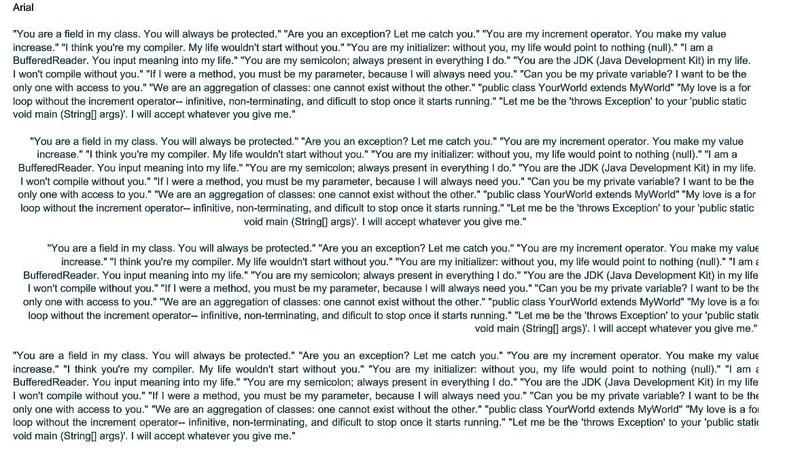
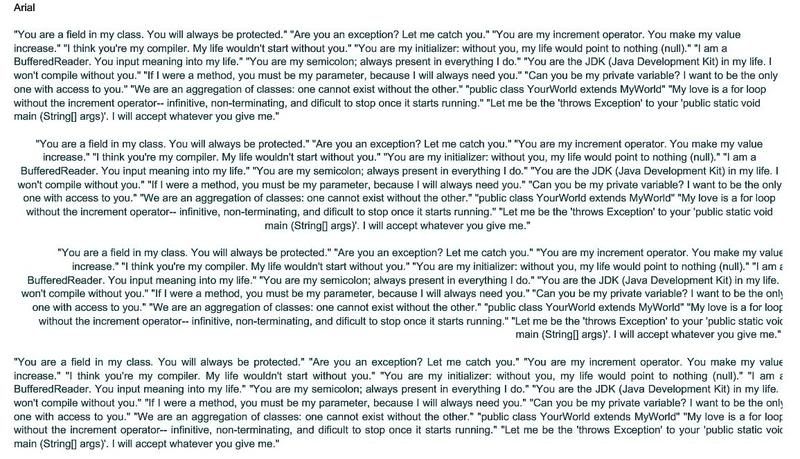
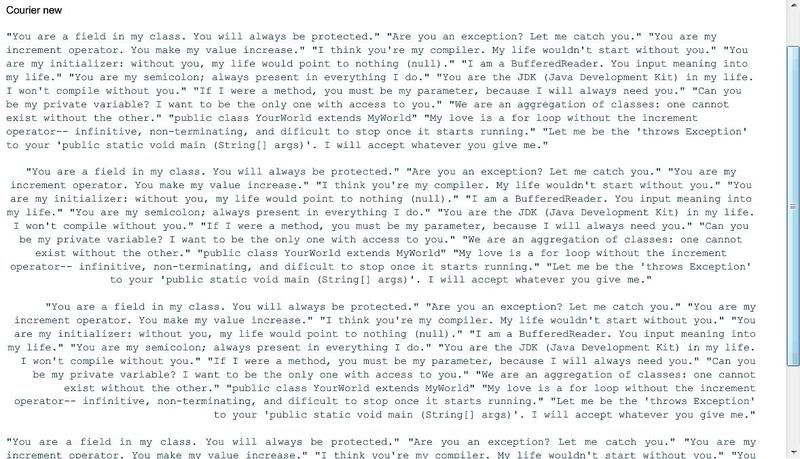
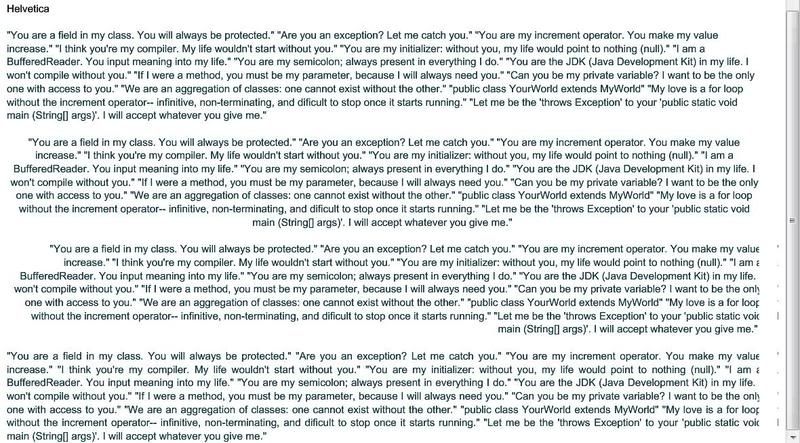
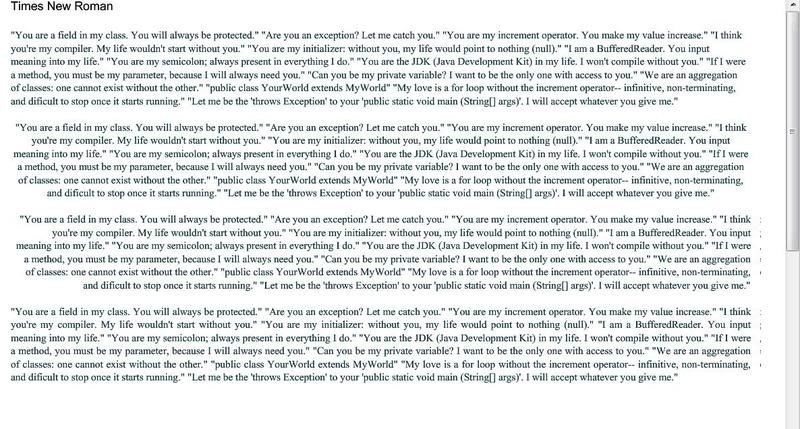
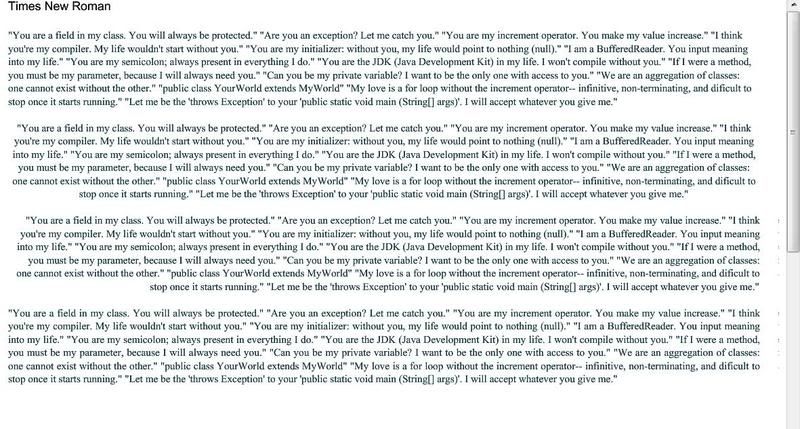
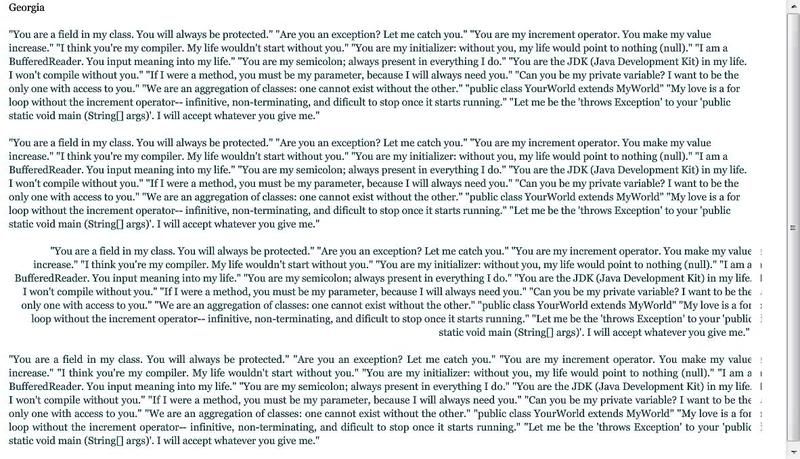
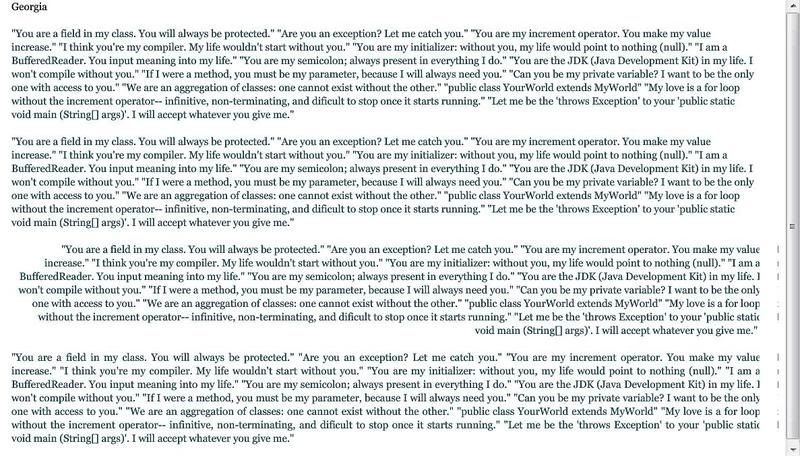
> Yes, there was a reflow when the textField.width is adjusted. Please
> check the images below for reference. I also tried it using different
> fonts. First image is using regular mx:Text, second image is using the
> modified code adding 10 to textField.width.
>
> Also, notice that some of the truncated text has bits of the truncated
> parts separated from them and gets rendered a few pixels to the right
> of the border, but its still not the entirety of the truncated parts.
>
> Verdana
> http://i87.photobucket.com/albums/k155/ernieldiaz/Verdana_no_adjust.jpg
> http://i87.photobucket.com/albums/k155/ernieldiaz/Verdana_10.jpg
>
> Arial
> http://i87.photobucket.com/albums/k155/ernieldiaz/Arial_no_adjust.jpg
> http://i87.photobucket.com/albums/k155/ernieldiaz/Arial_10.jpg
>
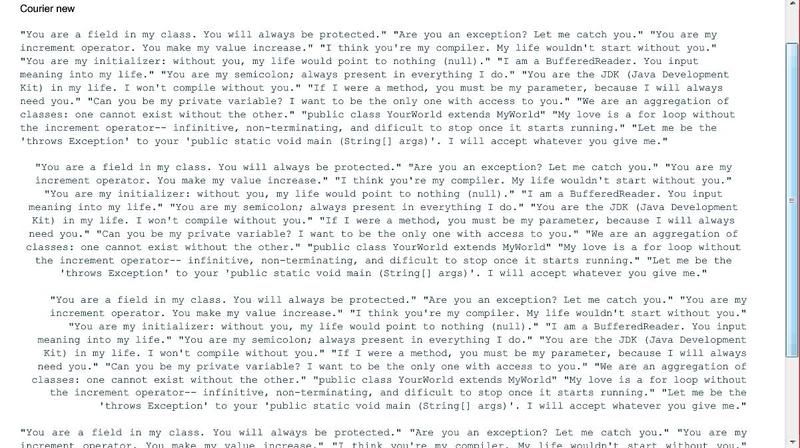
> Courier New
> http://i87.photobucket.com/albums/k155/ernieldiaz/Courier_no_adjust.jpg
> http://i87.photobucket.com/albums/k155/ernieldiaz/Courier_10.jpg
>
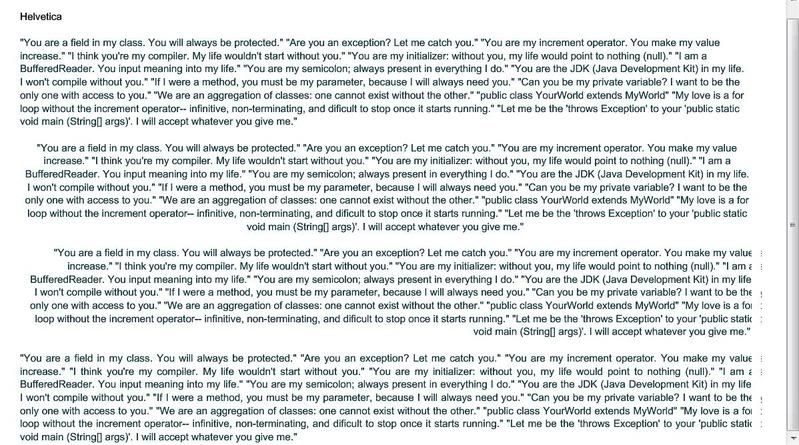
> Helvetica
>
http://i87.photobucket.com/albums/k155/ernieldiaz/Helvetica_no_adjust.jpg
> http://i87.photobucket.com/albums/k155/ernieldiaz/Helvetica_10.jpg
>
> Times New Roman
> http://i87.photobucket.com/albums/k155/ernieldiaz/TNR_no_adjust.jpg
> http://i87.photobucket.com/albums/k155/ernieldiaz/TNR_10.jpg
>
> Georgia
> http://i87.photobucket.com/albums/k155/ernieldiaz/Georgia_no_adjust.jpg
> http://i87.photobucket.com/albums/k155/ernieldiaz/Georgia_10.jpg
>
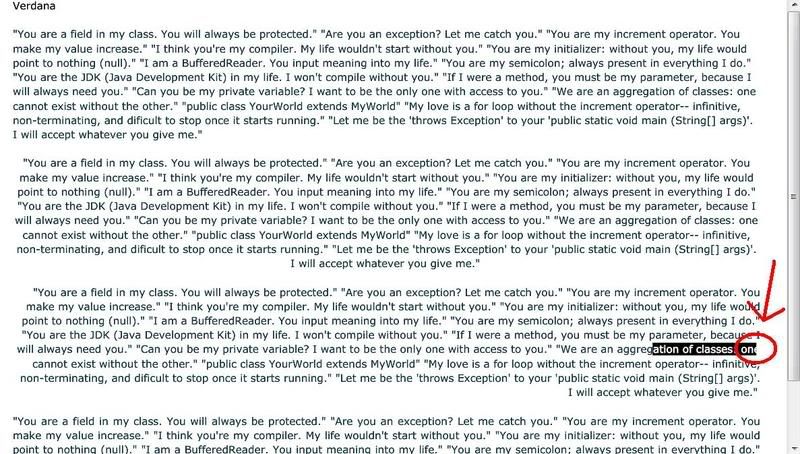
> It seems to not happen with Verdana and Courier New. But I also
> noticed a highlighting problem that happens with Verdana nonetheless.
> Screenshot is found below. It seems that I cannot fully highlight the
> last character on the line if it reaches the border. In the picture, I
> highlighted "ation of classes, one", but only half of the "e" in "one"
> is highlighted. If I copy and paste the text into notepad, it only
> pastes "ation of classes, on".
>
> Highlighting problem
> http://i87.photobucket.com/albums/k155/ernieldiaz/highlight_problem.jpg
>
> The highlighting problem is not observed when using Courier New.
>
> Do you think the problem is with the calculation of
> textField.textWidth? Any way to solve it?
>
> Thanks in advance.
>
> Renz
>
> --- In [email protected] <mailto:flexcoders%40yahoogroups.com>
<mailto:flexcoders%40yahoogroups.com> ,
> "Alex Harui" <aharui@> wrote:
> >
> > Try embedding verdana to see if you're having this problem with all
> > fonts or just Helvetica.
> >
> >
> >
> > Your code looks right. When you made the adjustment, did the text
> > reflow and cut off different characters?
> >
> >
> >
> > Maybe you can post a simple test case.
> >
> >
> >
> > ________________________________
> >
> > From: [email protected] <mailto:flexcoders%40yahoogroups.com>
<mailto:flexcoders%40yahoogroups.com>
> [mailto:[email protected] <mailto:flexcoders%40yahoogroups.com>
<mailto:flexcoders%40yahoogroups.com> ]
> On
> > Behalf Of renzeullo
> > Sent: Friday, April 11, 2008 12:36 AM
> > To: [email protected] <mailto:flexcoders%40yahoogroups.com>
<mailto:flexcoders%40yahoogroups.com>
> > Subject: [flexcoders] Re: Embedded Fonts and Text Alignment problem in
> > Text control
> >
> >
> >
> > Hi Alex,
> >
> > The truncated text looks like this:
> >
http://i87.photobucket.com/albums/k155/ernieldiaz/embedded_font_truncati
> > on.jpg
> >
<http://i87.photobucket.com/albums/k155/ernieldiaz/embedded_font_truncat
> > ion.jpg>
> >
> > The text uses an embedded Helvetica font. The first paragraph is left
> > aligned and is rendered correctly. The succeeding paragraphs are
> > centered, right aligned, and justified. They have problems when the
> > text reaches the right border.
> >
> > Any help is appreciated. Thanks in advance.
> >
> > Renz
> >
> > --- In [email protected] <mailto:flexcoders%40yahoogroups.com>
<mailto:flexcoders%40yahoogroups.com>
> <mailto:flexcoders%40yahoogroups.com>
> > , "renzeullo" <renzeullo@> wrote:
> > >
> > > Hi Alex,
> > >
> > > Thanks for the reply. I tried your suggestion, but it doesn't
seem to
> > > be working. Am I doing it correctly? Code is:
> > >
> > > ...
> > > ...
> > > public class Text extends mx.controls.Text
> > > {
> > > public function text(){
> > > super();
> > > }
> > >
> > > override protected function updateDisplayList(unscaledWidth:Number,
> > > unscaledHeight:Number):void {
> > > super.updateDisplayList(unscaledWidth, unscaledHeight);
> > > textField.width += 10;
> > > }
> > > }
> > >
> > > I've tried adding integers from 2 to 20, but still does not seem to
> > > have any effect.
> > >
> > > Any help is appreciated. Thanks in advance.
> > >
> > > Thanks!
> > > Renz
> > >
> > >
> > > --- In [email protected]
<mailto:flexcoders%40yahoogroups.com>
<mailto:flexcoders%40yahoogroups.com>
> > <mailto:flexcoders%40yahoogroups.com> , "Alex Harui" <aharui@> wrote:
> > > >
> > > > Subclass Text and widen the TextField.
> > > >
> > > >
> > > >
> > > > ________________________________
> > > >
> > > > From: [email protected]
<mailto:flexcoders%40yahoogroups.com>
<mailto:flexcoders%40yahoogroups.com>
>
> > <mailto:flexcoders%40yahoogroups.com>
> > [mailto:[email protected] <mailto:flexcoders%40yahoogroups.com>

<mailto:flexcoders%40yahoogroups.com>
> <mailto:flexcoders%40yahoogroups.com>
> > ] On
> > > > Behalf Of renzeullo
> > > > Sent: Thursday, April 10, 2008 4:08 AM
> > > > To: [email protected] <mailto:flexcoders%40yahoogroups.com>

<mailto:flexcoders%40yahoogroups.com>
> <mailto:flexcoders%40yahoogroups.com>
> >
> > > > Subject: [flexcoders] Embedded Fonts and Text Alignment problem in
> > Text
> > > > control
> > > >
> > > >
> > > >
> > > > Hi all,
> > > >
> > > > Im having a problem with right, center, and justify alignment in a
> > > > text control using embedded fonts. The last character in the
line is
> > > > not shown in full if it touches the right border of the control.
> > > >
> > > > I have an html-formatted text which I feed into Text.htmlText. The
> > > > html-formatted text is taken from a RichTextEditor control. I
> > > > substiture the font names inside the html <font> tags with the
> > aliases
> > > > I assign to the embedded fonts. But when it renders in the Text
> > > > control, the character that touches the right border gets cut in
> > half.
> > > >
> > > > This happens with variable sized fonts like Arial. Fixed sized
fonts
> > > > like Courier New gets generated without problems.
> > > >
> > > > Anybody know of any solution?
> > > >
> > > > Thanks in advance.
> > > >
> > > > Renz
> > > >
> > >
> >
>
<<image001.jpg>>
<<image002.jpg>>