On 01/20/12 14:42, Paul R wrote:
>>> Can the text editor be tweaked in this way?
>>
>>      The text editor already supports colors very easily.
>>      See this simple example:
>>      http://seriss.com/people/erco/fltk/#Fl_Text_DisplayStyle
>>
>>      You can specify an optional 'style buffer' to the Fl_Text_*
>>      widget which parallels the 'text buffer'.
>>
>>      FLTK's own code editor (within fluid) makes use of this feature
>>      to enable syntax highlighting of the C++ code, so that code is
>>      syntax-colored as you type.
>
> Thats great, thanks a lot, I knew i was being a bit lazy asking
> directly without checking first there, but carpe diem... and all that..
>
> One thing though is i think a background highlighting effect would
> be nice, like if it was in notepad++ and you wrote some bash stuff:
>
> a statement like: var=${#fNames[*]} would have a light colour to the
> text background in the curly braces.
>
> Like i say, i am not directly checking up on this right now, apologies!
> I just assume FLTK will easily support this type of thing also.
>
> The only other thing i would say is my initial idea, and certainly for
> simplicity is to not allow writing. Would i be better to start code
> with a widget other than text editor in this case?
        Adding background colors to Fl_Text_* might be easy, not sure.

        You'd basically add a new background color field to the style class,
        and if it's anything other than the widget's bgcolor, you'd first
        draw a filled rectangle in the new color before drawing the text
        over it.

        Fl_Browser has some color abilities, but the built in stuff
        is limited to color and font for the entire line, IIRC.

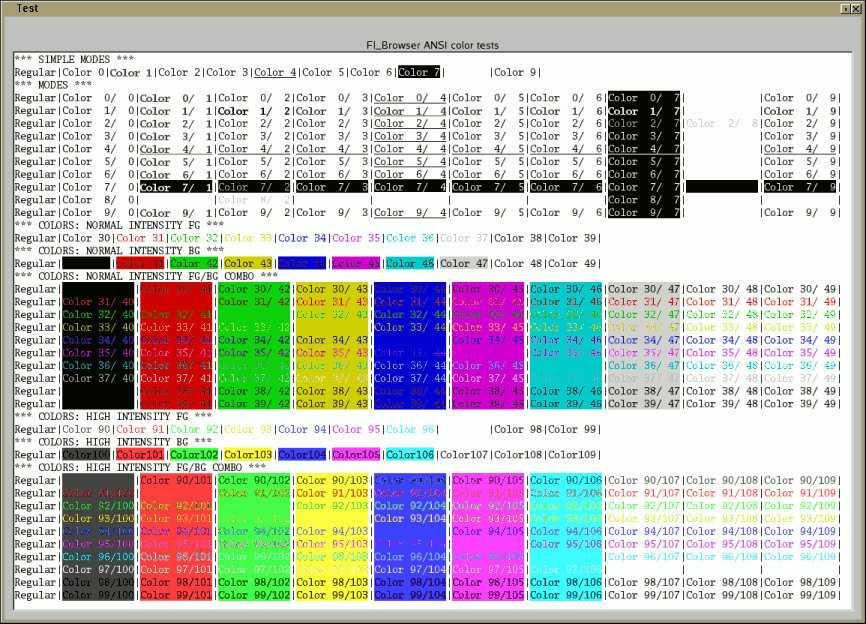
        Some time ago I posted a small patch for Fl_Browser that
        enables ANSI sequences (similar to Xterm terminal color codes)
        so that one can change the color and font on a per-character basis.
        See: http://fltk.org/newsgroups.php?gfltk.development+v:5540

        A screenshot from the patch's test program:
        http://seriss.com/people/erco/fltk/tmp/Fl_Browser-ansi-test.png

        However, Fl_Browser is not really optimal for general text presentation;
        you can only highlight entire lines, not individual characters.
        Therefore, it's probably best to tweak Fl_Text_* to your liking.

        Just take a copy of FLTK's code for that widget, change the name
        of the classes, then customize to taste and use in your own app.
        Post the code when you have something working, as we might want
        to merge it into the existing widget.
_______________________________________________
fltk mailing list
[email protected]
http://lists.easysw.com/mailman/listinfo/fltk