On 03/03/13 15:32, Ian MacArthur wrote:
> Here's the sample code; it turned out longer than I initially thought...
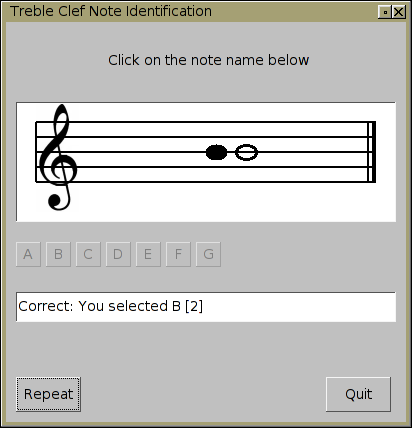
        Here's a small diff to Ian's code that draws an actual g-clef
        into the staff using a hard coded 1 byte-per-pixel image of
        a g clef.. screenshot:
        http://seriss.com/people/erco/fltk/tmp/g-clef-app-snapshot.png

        In addition to the below diff, you need the following g_clef.h file:
        http://seriss.com/people/erco/fltk/tmp/g_clef.h

        The include file (an image of a g-clef as C++ code in hex)
        was created with these steps:

                1) gimp to grab an image of a g clef from the web
                2) scale it to size needed by the app
                3) save it as a grayscale png
                4) dumped it as hex using this app from my cheat page:
                   http://seriss.com/people/erco/fltk/#Fl_PNG_Hex_Dump
                   The output of that app is the contents of the .h file

        Here's the diff for Ian's code to enable this g clef image:

--- foo-orig.cxx        2013-03-03 16:47:49.000000000 -0800
+++ foo.cxx     2013-03-03 16:45:18.000000000 -0800
@@ -1,3 +1,4 @@
+
 //
 // Test demo - draw a staff
 //
@@ -14,6 +15,7 @@
 #include <stdlib.h>
 #include <stdio.h>
 #include <time.h>
+#include "g_clef.h"

 // some widgets we will use...
 static Fl_Double_Window *main_win = 0;
@@ -41,7 +43,6 @@
 };

 void staff_view::draw() {
-       static char clef[2] = {'G', 0}; // a G clef... sort of...
        Fl_Box::draw(); // draw the base-class box first to give us an outline
to fill...

        // determine some limits for us to daw of staff lines into
@@ -55,6 +56,9 @@
        int gap = 15; // space between the lines...
        int ht = gap * 4; // 5 lines, 4 gaps...

+        // draw the G clef
+       fl_draw_image(g_clef_img,xo,yo-18,43,108,1);
+
        fl_color(FL_BLACK); // set the colour first
        fl_line_style(FL_SOLID, 2); // then set the line style

@@ -73,14 +77,6 @@
                yl += gap;
        }

-       // draw the clef; A big letter G here...
-       fl_font(FL_TIMES, ht);
-       // measure the clef symbol, so we can figure out where to draw it...
-       int dx, dy, cw, ch;
-       fl_text_extents(clef, dx, dy, cw, ch);
-       int y_nudge = (ht - ch) / 2; // roughly centre the G in the staff -
wrong, but looks OK...
-       fl_draw(clef, xo + dx, yo + ht + dy + ch - y_nudge);
-
        // draw the note... I really ought to do this better, but for now, just
draw
        // a filled ellipse and pretend it is a breve...!
        int note_width = (int)(gap * 1.4);
@@ -169,12 +165,12 @@
        repeat_bt->callback((Fl_Callback*)cb_repeat_bt);

        // shows the staff
-       staff = new staff_view(10, 104, 380, 100);
+       staff = new staff_view(10, 80, 380, 120);
        staff->box(FL_THIN_DOWN_BOX);
        staff->color(FL_BACKGROUND2_COLOR);

        // show the "instructions" text
-       Fl_Box* instructions = new Fl_Box(20, 14, 365, 67, "Click on the note
name below");
+       Fl_Box* instructions = new Fl_Box(20, 14, 365, 50, "Click on the note
name below");
        instructions->box(FL_FLAT_BOX);

        // make a set of note-name buttons here...

_______________________________________________
fltk mailing list
[email protected]
http://lists.easysw.com/mailman/listinfo/fltk