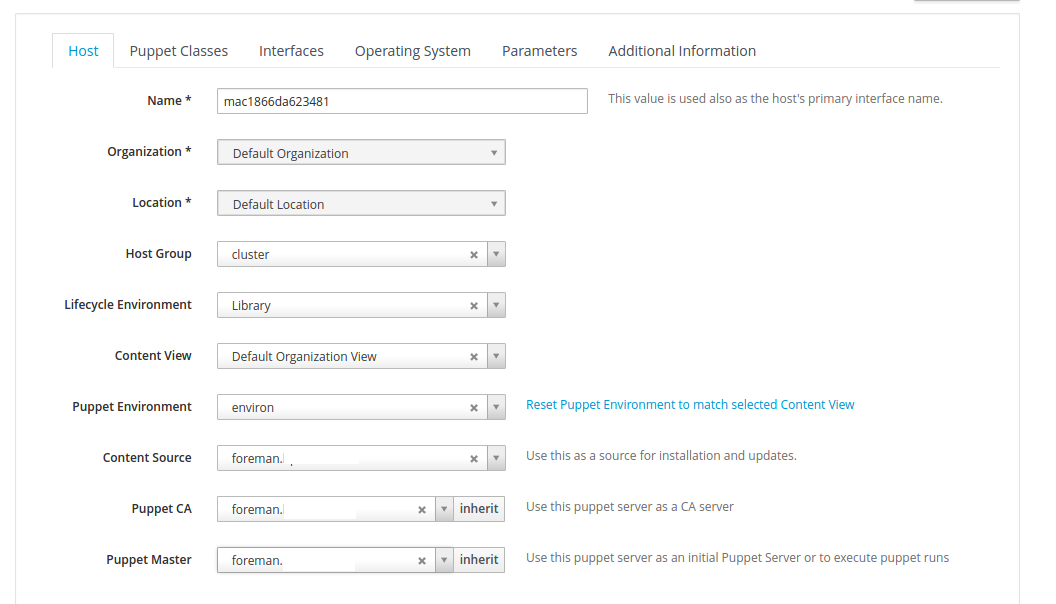
But when the host is installed and ready, no puppet is installed.
<https://lh3.googleusercontent.com/-i5XIAoB0h4g/V_LbGjJVVBI/AAAAAAAAcCQ/v6eh_wujvKQn1fRTa-ZjK7JYmIgTdBK3ACLcB/s1600/puppet2.png>

<https://lh3.googleusercontent.com/-ijp4iOlld50/V_LbEFaCOPI/AAAAAAAAcCM/Wj0izVWdzpY_pzJO41rsmru2A3iHzHvfACLcB/s1600/puppet3.png>


tirsdag 4. oktober 2016 00.25.19 UTC+2 skrev Einar Næss Jensen følgende:
>
>
> <https://lh3.googleusercontent.com/-lYsimCCqHh4/V_LauNHMBrI/AAAAAAAAcCI/SL44-XHZtfQBiEIHq8n3i15h4hXFxfwTwCLcB/s1600/puppet3.png>
> I get to choose puppet master and ca when host is discovered
>
> mandag 3. oktober 2016 23.02.25 UTC+2 skrev Einar Næss Jensen følgende:
>>
>> Hello.
>>
>> I'm currently trying out katello for provisioning and config management
>>
>> I have successfully been able to provisioning new hosts, but the puppet
>> agent doesn't get installed,
>>
>> any pointer in a direction to what I'm missing?
>>
>>
>> the provisioning template look like this:
>>
>>
>>
>>
>> install
>> url --url
>> http://foreman.somedomain.com/pulp/repos/Default_Organization/Library/custom/CentOS_7_2_uninett/x86_64/
>> lang en_US.UTF-8
>> selinux --enforcing
>> keyboard us
>> skipx
>>
>>
>> network --bootproto dhcp --hostname
>> mac1866da6b5507.foreman.somedomain.com --device=18:66:da:6b:55:07
>> rootpw --iscrypted
>> $5$F8PB/F4r$SMMmuT5fdXxnGQIEw0YwUecYtM9FLPW6FaEw5K6BcAT1
>> firewall --service=ssh
>> authconfig --useshadow --passalgo=sha256 --kickstart
>> timezone --utc UTC
>>
>> bootloader --location=mbr --append="nofb quiet splash=quiet"
>>
>>
>>
>> zerombr
>> clearpart --all --initlabel
>> autopart
>>
>>
>>
>> text
>> reboot
>>
>> %packages --ignoremissing
>> yum
>> dhclient
>> ntp
>> wget
>> @Core
>> %end
>>
>> %post --nochroot
>> exec < /dev/tty3 > /dev/tty3
>> #changing to VT 3 so that we can see whats going on....
>> /usr/bin/chvt 3
>> (
>> cp -va /etc/resolv.conf /mnt/sysimage/etc/resolv.conf
>> /usr/bin/chvt 1
>> ) 2>&1 | tee /mnt/sysimage/root/install.postnochroot.log
>> %end
>>
>> %post
>> logger "Starting anaconda mac1866da6b5507.foreman.somedomain.com
>> postinstall"
>> exec < /dev/tty3 > /dev/tty3
>> #changing to VT 3 so that we can see whats going on....
>> /usr/bin/chvt 3
>> (
>>
>>
>>
>>
>>
>>
>>
>>
>>
>>
>> # eno3 interface
>> real=`ip -o link | grep 18:66:da:6b:55:07 | awk '{print $2;}' | sed
>> s/:$//`
>>
>> # ifcfg files are ignored by NM if their name contains colons so we
>> convert colons to underscore
>> sanitized_real=$real
>>
>> cat << EOF > /etc/sysconfig/network-scripts/ifcfg-$sanitized_real
>> BOOTPROTO="dhcp"
>> DEVICE=$real
>> HWADDR="18:66:da:6b:55:07"
>> ONBOOT=yes
>> PEERDNS=yes
>> PEERROUTES=yes
>> EOF
>>
>>
>>
>>
>> #update local time
>> echo "updating system time"
>> /usr/sbin/ntpdate -sub 0.fedora.pool.ntp.org
>> /usr/sbin/hwclock --systohc
>>
>>
>>
>>
>> # update all the base packages from the updates repository
>> yum -t -y -e 0 update
>>
>>
>> # SSH keys setup snippet for Remote Execution plugin
>> #
>> # Parameters:
>> #
>> # remote_execution_ssh_keys: public keys to be put in
>> ~/.ssh/authorized_keys
>> #
>> # remote_execution_ssh_user: user for which remote_execution_ssh_keys
>> will be
>> #                            authorized
>> #
>> # This template sets up SSH keys in any host so that as long as your
>> public
>> # SSH key is in remote_execution_ssh_keys, you can SSH into a host. This
>> only
>> # works in combination with Remote Execution plugin.
>>
>> # A personal recomendation: create a global parameter
>> remote_execution_ssh_keys
>> # and put your keys there, so that you can access any newly provisioned
>> host
>> # without having to set up the parameter on every host or host group.
>>
>>
>>
>>
>>
>>
>>
>> sync
>>
>> # Inform the build system that we are done.
>> echo "Informing Foreman that we are built"
>> wget -q -O /dev/null --no-check-certificate
>> http://foreman.somedomain.com/unattended/built
>> ) 2>&1 | tee /root/install.post.log
>> exit 0
>>
>> %end
>>
>

--
You received this message because you are subscribed to the Google Groups
"Foreman users" group.
To unsubscribe from this group and stop receiving emails from it, send an email
to [email protected].
To post to this group, send email to [email protected].
Visit this group at https://groups.google.com/group/foreman-users.
For more options, visit https://groups.google.com/d/optout.