Thanks for input.

My issue had to do with organisastions and locations.
Once all my templates, os, subnets etc was tied to same organisation, all
was well.


Regards
EInar


tirsdag 4. oktober 2016 11.08.48 UTC+2 skrev Daniel Lobato følgende:
>
> From what I see in this Kickstart, nothing is installing Puppet.
> If you go to Hosts > Provisioning templates, and choose the 'Katello
> ckickstart default', you will see there are a few lines like this:
>
>                 <% if puppet_enabled %>
>                 # and add the puppet package
>                 yum -t -y -e 0 install puppet
>
>                 echo "Configuring puppet"
>                 cat > /etc/puppet/puppet.conf << EOF
>                 <%= snippet 'puppet.conf' %>
>                 EOF
>
>                 # Setup puppet to run on system reboot
>                 /sbin/chkconfig --level 345 puppet on
>
>                 /usr/bin/puppet agent --config /etc/puppet/puppet.conf -o
> --tags no_such_tag <%= @host.puppetmaster.blank? ? '' : "--server
> #{@host.puppetmaster}" %> --no-daemonize
>                 <% end -%>
>
> puppet_enabled is set at the beginning of the template. It's set via
>
>   pm_set = @host.puppetmaster.empty? ? false : true
>   puppet_enabled = pm_set || @host.params['force-puppet']
>
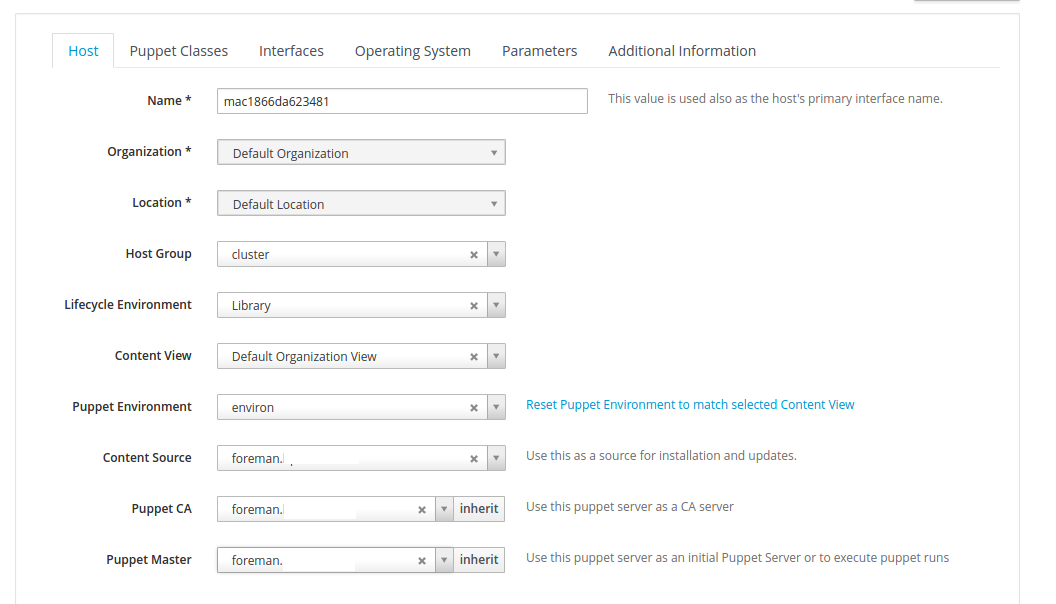
> So your host needs to have a puppetmaster set at build time. From what I
> see on your screenshot puppet2.png your host does *not* have that Puppet
>  master set at some point.
>
> Please set it, submit the host, and rebuild it (cancel build and build
> it again) - after that I think it should work. You can also 'Preview' the
> template rendering in Host > Provisioning templates, which should show
> the lines above for that host (yum install puppet and so forth).
>
> Hope that works!
>
>
> On 10/03, Einar Næss Jensen wrote:
> >
> >
> > But when the host is installed and ready, no puppet is installed.
> >
> >
> >
> > <
> https://lh3.googleusercontent.com/-i5XIAoB0h4g/V_LbGjJVVBI/AAAAAAAAcCQ/v6eh_wujvKQn1fRTa-ZjK7JYmIgTdBK3ACLcB/s1600/puppet2.png>
>
>
> >
> > <
> https://lh3.googleusercontent.com/-ijp4iOlld50/V_LbEFaCOPI/AAAAAAAAcCM/Wj0izVWdzpY_pzJO41rsmru2A3iHzHvfACLcB/s1600/puppet3.png>
>
>
> >
> >
> > tirsdag 4. oktober 2016 00.25.19 UTC+2 skrev Einar Næss Jensen følgende:
> > >
> > >
> > > <
> https://lh3.googleusercontent.com/-lYsimCCqHh4/V_LauNHMBrI/AAAAAAAAcCI/SL44-XHZtfQBiEIHq8n3i15h4hXFxfwTwCLcB/s1600/puppet3.png>
>
>
> > > I get to choose puppet master and ca when host is discovered
> > >
> > > mandag 3. oktober 2016 23.02.25 UTC+2 skrev Einar Næss Jensen
> følgende:
> > >>
> > >> Hello.
> > >>
> > >> I'm currently trying out katello for provisioning and config
> management
> > >>
> > >> I have successfully been able to provisioning new hosts, but the
> puppet
> > >> agent doesn't get installed,
> > >>
> > >> any pointer in a direction to what I'm missing?
> > >>
> > >>
> > >> the provisioning template look like this:
> > >>
> > >>
> > >>
> > >>
> > >> install
> > >> url --url
> > >>
> http://foreman.somedomain.com/pulp/repos/Default_Organization/Library/custom/CentOS_7_2_uninett/x86_64/
>
> > >> lang en_US.UTF-8
> > >> selinux --enforcing
> > >> keyboard us
> > >> skipx
> > >>
> > >>
> > >> network --bootproto dhcp --hostname
> > >> mac1866da6b5507.foreman.somedomain.com --device=18:66:da:6b:55:07
> > >> rootpw --iscrypted
> > >> $5$F8PB/F4r$SMMmuT5fdXxnGQIEw0YwUecYtM9FLPW6FaEw5K6BcAT1
> > >> firewall --service=ssh
> > >> authconfig --useshadow --passalgo=sha256 --kickstart
> > >> timezone --utc UTC
> > >>
> > >> bootloader --location=mbr --append="nofb quiet splash=quiet"
> > >>
> > >>
> > >>
> > >> zerombr
> > >> clearpart --all --initlabel
> > >> autopart
> > >>
> > >>
> > >>
> > >> text
> > >> reboot
> > >>
> > >> %packages --ignoremissing
> > >> yum
> > >> dhclient
> > >> ntp
> > >> wget
> > >> @Core
> > >> %end
> > >>
> > >> %post --nochroot
> > >> exec < /dev/tty3 > /dev/tty3
> > >> #changing to VT 3 so that we can see whats going on....
> > >> /usr/bin/chvt 3
> > >> (
> > >> cp -va /etc/resolv.conf /mnt/sysimage/etc/resolv.conf
> > >> /usr/bin/chvt 1
> > >> ) 2>&1 | tee /mnt/sysimage/root/install.postnochroot.log
> > >> %end
> > >>
> > >> %post
> > >> logger "Starting anaconda mac1866da6b5507.foreman.somedomain.com
> > >> postinstall"
> > >> exec < /dev/tty3 > /dev/tty3
> > >> #changing to VT 3 so that we can see whats going on....
> > >> /usr/bin/chvt 3
> > >> (
> > >>
> > >>
> > >>
> > >>
> > >>
> > >>
> > >>
> > >>
> > >>
> > >>
> > >> # eno3 interface
> > >> real=`ip -o link | grep 18:66:da:6b:55:07 | awk '{print $2;}' | sed
> > >> s/:$//`
> > >>
> > >> # ifcfg files are ignored by NM if their name contains colons so we
> > >> convert colons to underscore
> > >> sanitized_real=$real
> > >>
> > >> cat << EOF > /etc/sysconfig/network-scripts/ifcfg-$sanitized_real
> > >> BOOTPROTO="dhcp"
> > >> DEVICE=$real
> > >> HWADDR="18:66:da:6b:55:07"
> > >> ONBOOT=yes
> > >> PEERDNS=yes
> > >> PEERROUTES=yes
> > >> EOF
> > >>
> > >>
> > >>
> > >>
> > >> #update local time
> > >> echo "updating system time"
> > >> /usr/sbin/ntpdate -sub 0.fedora.pool.ntp.org
> > >> /usr/sbin/hwclock --systohc
> > >>
> > >>
> > >>
> > >>
> > >> # update all the base packages from the updates repository
> > >> yum -t -y -e 0 update
> > >>
> > >>
> > >> # SSH keys setup snippet for Remote Execution plugin
> > >> #
> > >> # Parameters:
> > >> #
> > >> # remote_execution_ssh_keys: public keys to be put in
> > >> ~/.ssh/authorized_keys
> > >> #
> > >> # remote_execution_ssh_user: user for which remote_execution_ssh_keys
> > >> will be
> > >> #                            authorized
> > >> #
> > >> # This template sets up SSH keys in any host so that as long as your
> > >> public
> > >> # SSH key is in remote_execution_ssh_keys, you can SSH into a host.
> This
> > >> only
> > >> # works in combination with Remote Execution plugin.
> > >>
> > >> # A personal recomendation: create a global parameter
> > >> remote_execution_ssh_keys
> > >> # and put your keys there, so that you can access any newly
> provisioned
> > >> host
> > >> # without having to set up the parameter on every host or host group.
> > >>
> > >>
> > >>
> > >>
> > >>
> > >>
> > >>
> > >> sync
> > >>
> > >> # Inform the build system that we are done.
> > >> echo "Informing Foreman that we are built"
> > >> wget -q -O /dev/null --no-check-certificate
> > >> http://foreman.somedomain.com/unattended/built
> > >> ) 2>&1 | tee /root/install.post.log
> > >> exit 0
> > >>
> > >> %end
> > >>
> > >
> >
> > --
> > You received this message because you are subscribed to the Google
> Groups "Foreman users" group.
> > To unsubscribe from this group and stop receiving emails from it, send
> an email to [email protected] <javascript:>.
> > To post to this group, send email to [email protected]
> <javascript:>.
> > Visit this group at https://groups.google.com/group/foreman-users.
> > For more options, visit https://groups.google.com/d/optout.
>
>
> --
> Daniel Lobato Garcia
>
> @dLobatog
> blog.daniellobato.me
> daniellobato.me
>
> GPG: http://keys.gnupg.net/pks/lookup?op=get&search=0x7A92D6DD38D6DE30
> Keybase: https://keybase.io/elobato
>

--
You received this message because you are subscribed to the Google Groups
"Foreman users" group.
To unsubscribe from this group and stop receiving emails from it, send an email
to [email protected].
To post to this group, send email to [email protected].
Visit this group at https://groups.google.com/group/foreman-users.
For more options, visit https://groups.google.com/d/optout.