On Mar 9, 2009, at 4:44 PM, Dan the listmom wrote:
>
> I'm hoping to install a dual 1.8 GHz Giga Designs CPU (picked up
> secondhand) in a dual 500 MHz G4 'Mystic' Power Mac. I have version
> 3.0.1 software on the original installer CD, and every time I run the
> "Install Giga Designs Updater" app, it goes so far and then stays
> there. It never finishes the process.
>
> I have tried Mac OS X 10.3.9, 10.4.11, and 10.5.6, and the problem
> persists - although the progress bar doesn't seem to go as far with
> later versions. I have also tried installing in Safe Mode - no change.
>
> Any suggestions?
>
> Thanks in advance!

Have you tried putting the Giga cpu in, and then running the
installer ... Sonnet cpu folks usually say software install first,
then hardware install, but ...

It might run without a cache enabled or something ... then on
Software Install & a Restart, might be fully functional.

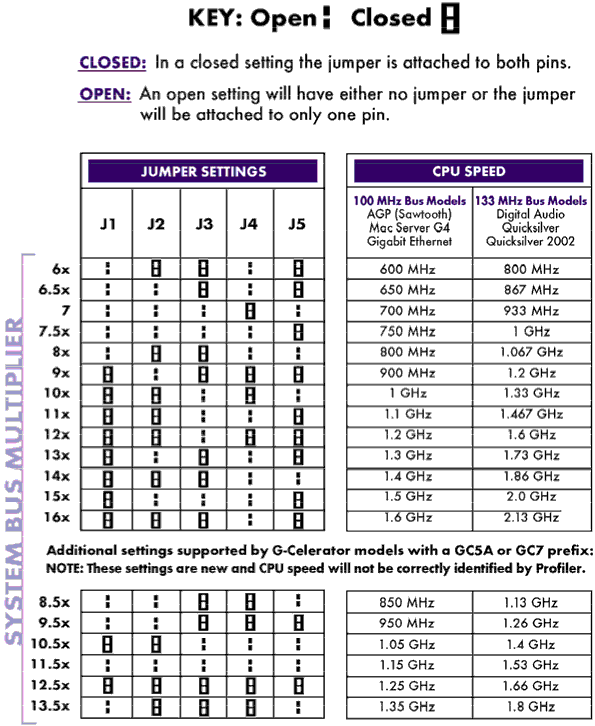
Only thing macsales has on giga is a jumper setting page:
http://eshop.macsales.com/images/Items/GigaDesign1.2Settings72.gif

Just guessing at a solution ...

Bill Connelly
artsite: http://mysite.verizon.net/moonstoneartstudio
myspace: http://www.myspace.com/moonstoneartstudio


--~--~---------~--~----~------------~-------~--~----~
You received this message because you are subscribed Low End Mac's G3-5 List, a
group for those using G3, G4, and G5 desktop Macs - with a particular focus on
Power Macs.
The list FAQ is at http://lowendmac.com/lists/g-list.shtml and our netiquette
guide is at http://www.lowendmac.com/lists/netiquette.shtml
To post to this group, send email to [email protected]
To unsubscribe from this group, send email to
[email protected]
For more options, visit this group at
http://groups.google.com/group/g3-5-list?hl=en
Low End Mac RSS feed at feed://lowendmac.com/feed.xml
-~----------~----~----~----~------~----~------~--~---