On Mar 9, 2009, at 5:40 PM, insightinmind wrote:
>
>
> On Mar 9, 2009, at 4:44 PM, Dan the listmom wrote:
>
>>
>> I'm hoping to install a dual 1.8 GHz Giga Designs CPU (picked up
>> secondhand) in a dual 500 MHz G4 'Mystic' Power Mac. I have version
>> 3.0.1 software on the original installer CD, and every time I run the
>> "Install Giga Designs Updater" app, it goes so far and then stays
>> there. It never finishes the process.
>>
>> I have tried Mac OS X 10.3.9, 10.4.11, and 10.5.6, and the problem
>> persists - although the progress bar doesn't seem to go as far with
>> later versions. I have also tried installing in Safe Mode - no
>> change.
>>
>> Any suggestions?
>>
>> Thanks in advance!
>
> Have you tried putting the Giga cpu in, and then running the
> installer ... Sonnet cpu folks usually say software install first,
> then hardware install, but ...
>
> It might run without a cache enabled or something ... then on
> Software Install & a Restart, might be fully functional.
>
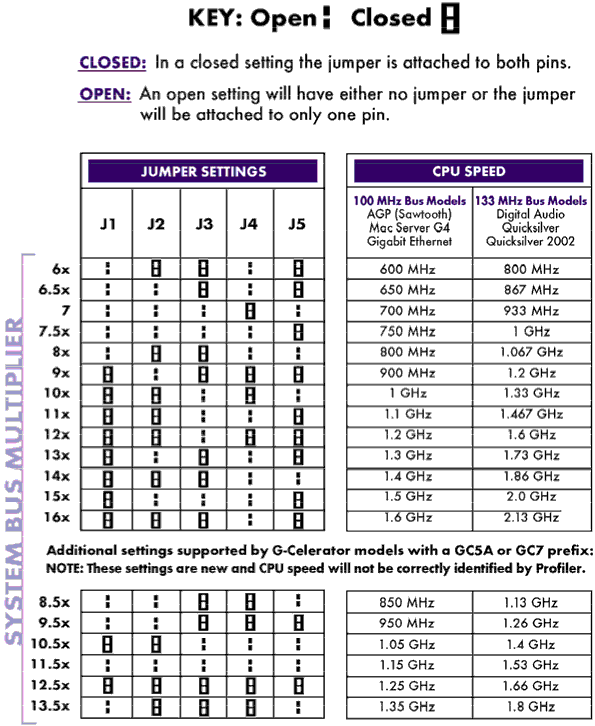
> Only thing macsales has on giga is a jumper setting page:
> http://eshop.macsales.com/images/Items/GigaDesign1.2Settings72.gif
>
> Just guessing at a solution ...

More guesses:

Firmware update:
http://docs.info.apple.com/article.html?artnum=120068
Installation Guide:
http://www.xlr8yourmac.com/G4CARDS/giga_designs_125Ghz/index5.html

--~--~---------~--~----~------------~-------~--~----~
You received this message because you are subscribed Low End Mac's G3-5 List, a
group for those using G3, G4, and G5 desktop Macs - with a particular focus on
Power Macs.
The list FAQ is at http://lowendmac.com/lists/g-list.shtml and our netiquette
guide is at http://www.lowendmac.com/lists/netiquette.shtml
To post to this group, send email to [email protected]
To unsubscribe from this group, send email to
[email protected]
For more options, visit this group at
http://groups.google.com/group/g3-5-list?hl=en
Low End Mac RSS feed at feed://lowendmac.com/feed.xml
-~----------~----~----~----~------~----~------~--~---