when you say youre seeing thison a web page,
can i ask what type of system yure serving the pages with?
wordpress etc? or is it an image generation with php or something?
thanks
dan
On Sun, May 31, 2015 at 4:25 PM, Jay Smith <[email protected]> wrote:

> Greetings fellow Gimp Users,
>
> I make images using Gimp, but I assume that this question is not really
> Gimp specific.
>
> I have tens of thousands of images (postage stamps) on my site.  Every now
> and then when I am looking at a page I discover that the image (a JPEG) has
> had is colors "sort of inverted".  The JPEGs were created in large batches
> by a script from UNcompressed TIFF images.  When I go back and look at the
> the original TIFF, I discover that its colors are "sort of inverted" --
> thus the JPEG is a correct rendition of the appearance of its TIFF source.
>
> Thus the problem is in the TIFF.  But, the problem happens now and then,
> over the course of years.  The TIFFs are _not_ being intentionally
> manipulated in that time.  The images was originally okay, now its not.  It
> seems to be completely random, just one image here and there.
>
> Somehow the TIFF is getting corrupted.  I am assuming by a memory error or
> a disk/RAID controller error, or such.  The images are still openable in
> Gimp.
>
> This is only happening to one out perhaps one out of five thousand images,
> every five years.  (I am just *guessing* at the error rate because I only
> find out about them by randomly coming across them.) But, if I have 40,000
> images, that is eight images destroyed every five years.  (And often I am
> not able to replace the image because I no longer have the item.)
>
> This example image was originally created in 2006.  I suspect (mostly
> guessing) that it was corrupted sometime since 2010.  There is no reason
> that it would have been edited since that time and file modification
> information shows nothing since 2006.
>
> On Ubuntu Linux, using "identify -verbose filename.tif" I can read the
> header information.  The only odd thing (to my eye) is that the create date
> is 2011 and the modification date is 2006:
>
> Properties:
>     date:create: 2011-09-13T11:30:24-04:00
>     date:modify: 2006-12-21T00:53:03-05:00
>
> I am guessing that means the corruption may have happened in 2011, even
> though the filesystems own file datestamp is 2006 and the lsattr command
> shows nothing unusual.
>
>
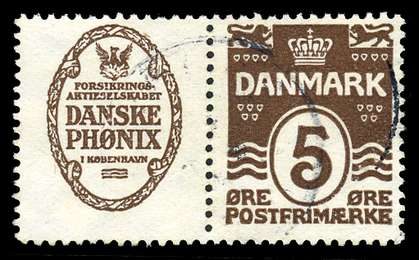
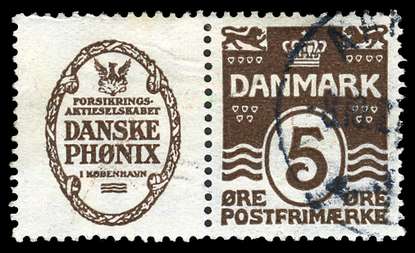
> Here is example of a) the resulting JPEG (just to illustrate the nature of
> the corruption); b) a similar JPEG to show generally what it is supposed to
> look like; c) the corrupted TIFF.
>
> Corrupted:
>
> http://jsa.viewimage.net/jsa/web/Lists/Denmark/AdPairs/Spec/re02-pair_used-vf-b_136468_r_l.jpg
>
> Correct image of a similar, but different item:
>
> http://jsa.viewimage.net/jsa/web/Lists/Denmark/AdPairs/Spec/re02-pair_used-vf-a_136467_r_l.jpg
>
> This is the TIFF file (corrupted, but viewable in Gimp; colors are
> sort-of-inverted)  Size 496 KB:
> http://jsa.viewimage.net/temp/gimp/re02-pair_used-vf-b_136468.tif
>
> My primary question is whether there is a "particular bit that is getting
> flipped" that could be "unflipped" by some sort of non-visual editing of
> the source TIFF file?
>
> My secondary question is whether or not other people have seen this type
> of problem crop up in large image libraries and what the causes have been?
>
> Any thoughts appreciated.
>
> Jay
> _______________________________________________
> gimp-user-list mailing list
> List address:    [email protected]
> List membership: https://mail.gnome.org/mailman/listinfo/gimp-user-list
> List archives:   https://mail.gnome.org/archives/gimp-user-list
>
_______________________________________________
gimp-user-list mailing list
List address:    [email protected]
List membership: https://mail.gnome.org/mailman/listinfo/gimp-user-list
List archives:   https://mail.gnome.org/archives/gimp-user-list