>I meant *image*, not map. Sorry. Yeah the image is a map. A Minecraft
>map, specifically of an unusually large world. I didn't want to say
>that, but I don't really want my wording to be misunderstood at this
>point.
Looking at your posts on IM-users, you have plenty of resources, maybe not
enough disk space, so why not move that big file out to usb storage and accept
some long processing times.

Apart from that, I think some of the problem is self-inflicted. Changing IM
folder name etc...not a good idea.

While I still do not think IM will work for a 1GB png image, since it is
installed you can get some information which might assist others to help.

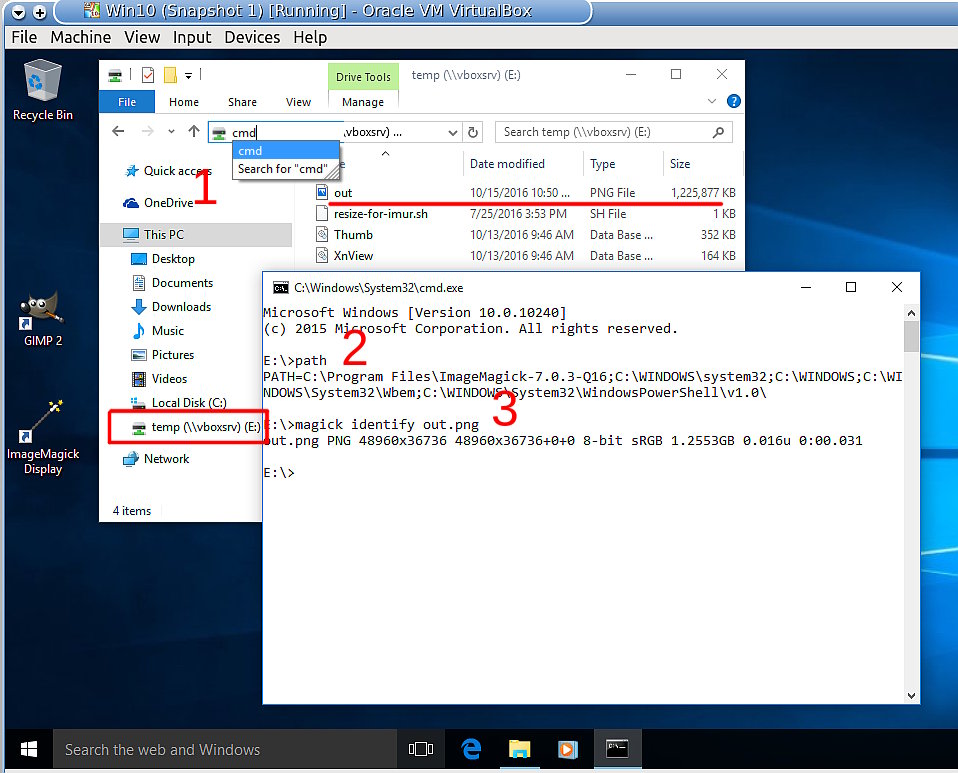
Look at the attached screenshot:

Open the (lame) Win10 file manager in the folder containing the large png.

1. Up at the top in the location, type cmd then enter. This will open a terminal
in that folder.

2. At the prompt \> type path (enter) and check that IM is in the correct place.
(otherwise uninstall/re-install)

3. type in the command using your image name
magick identify myimage.png

Does it show something like the screenshot? Is it really a png? Is it broken?

Post the information and hope someone will assist. I do know that nip2 will work
with very limited resources in Win10, but you have to be patient.

Attachments:
* http://www.gimpusers.com/system/attachments/296/original/win10terminal.jpg

--
rich2005 (via www.gimpusers.com/forums)
_______________________________________________
gimp-user-list mailing list
List address:    [email protected]
List membership: https://mail.gnome.org/mailman/listinfo/gimp-user-list
List archives:   https://mail.gnome.org/archives/gimp-user-list

![[Gimp-user] Can't open extremely large .PNG](/search?l=gimp-user-list@gnome.org&q=subject:%22%5C%5BGimp%5C-user%5C%5D+Can%27t+open+extremely+large+.PNG%22&o=newest)