>Good morning, The platform I'm working on is Windows 10, when I export
>TIFF files from NX2, I simply put them in a folder on the hard drive
>under Pictures. I then use Windows file manager to organise them.
>
>I've tried right clicking and using the  "open with" option, but GIMP
>is not an available option. I have some files saved in the folder in
>.xcf format, if I right click on these, GIMP appears in the "open
>with" options.
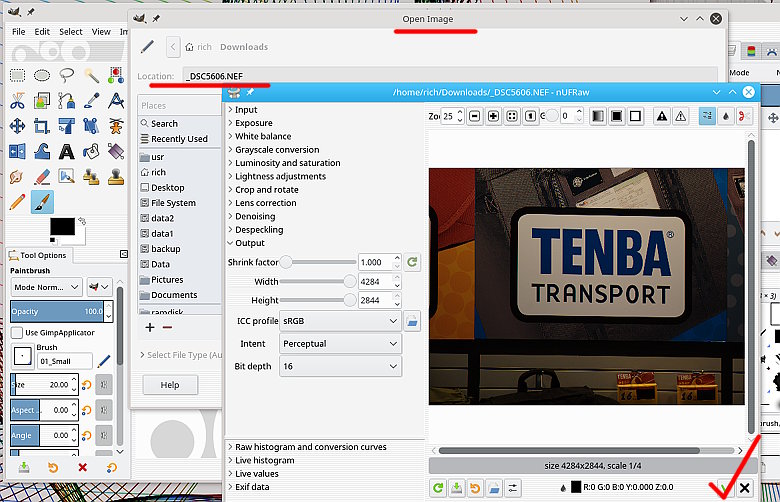
To open a RAW file directly in Gimp 2.9.x you need a plugin.

The example using a sample NEF file is in my linux Gimp 2.9.7 using the nUFRaw
plugin which I had to compile myself because of changes to the Gimp 2.9 package.

For Windows, AFAIK the Partha version of Gimp 2.9.6 comes with nUFRaw
pre-installed. see www.partha.com

Otherwise the two applications that Gimp recognises by default and will use, are
Rawtherapee and Darktable. Both are monsters that will take over your computer,
but the place to ask question on this is not here, but https://discuss.pixls.us/

rich: www.gimp-forum.net

Attachments:
* http://www.gimpusers.com/system/attachments/732/original/nufraw.jpg

--
rich404 (via www.gimpusers.com/forums)
_______________________________________________
gimp-user-list mailing list
List address:    [email protected]
List membership: https://mail.gnome.org/mailman/listinfo/gimp-user-list
List archives:   https://mail.gnome.org/archives/gimp-user-list