snip
>I created this by using the spacebar and
>breaking lines with enter. Now I need to increase the font size and it
>throws off everything. With this new text box I'm hoping to create, I
>assume I can change the text size and font without having to redo all
>the spacebars, etc.

snip

Wrong assumption. Gimp is not a word processor

There is no easy way with Gimp it is a bitmap editor not a universal graphics
tool.

I thought the old text tool might make things easier for you, obviously not. So
forget that.

I am using Gimp 2.10.2 so little bits like the text box handles (little squares
in the corners) look different but the operation is the same.

Draw the text box, paste the text in. If the length of the text is too large
with the set font size, there is no easy way. Reduce the size of the font,
**start again**.

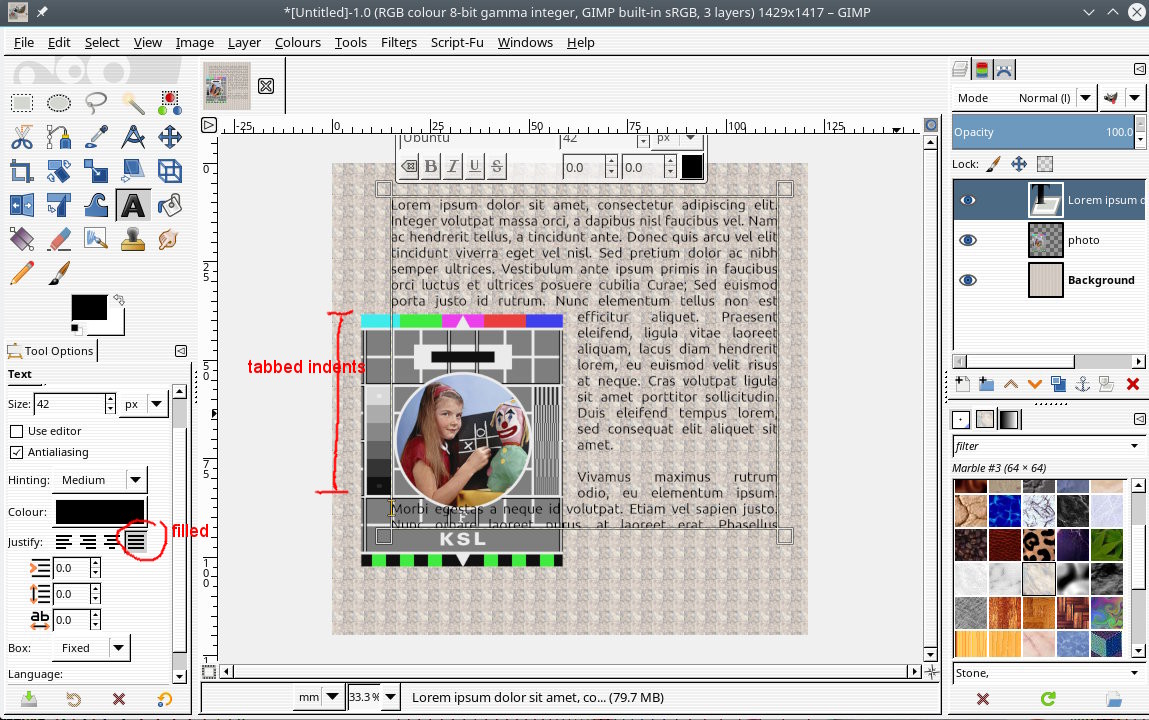
Your inverted L is actually easier than most.

Paste the text in

Set the justification to filled.

Go to the start of each line in turn and use the TAB key to indent the text.
Just keep tapping TAB until the text moves. Should not be any need to use Enter
to break a line.

That is about the best I can advise. While you can do this in Gimp, the correct
tool for the job is the freeware DTP application Scribus.


Attachments:
* http://www.gimpusers.com/system/attachments/978/original/01-shaped_text.jpg

--
rich404 (via www.gimpusers.com/forums)
_______________________________________________
gimp-user-list mailing list
List address:    [email protected]
List membership: https://mail.gnome.org/mailman/listinfo/gimp-user-list
List archives:   https://mail.gnome.org/archives/gimp-user-list