There are a lot of Lookup operations in the system. But I am not able to
find why. Could you check the output of
# gluster volume heal <volname> info | grep -i number

it should print all zeros.

On Fri, Aug 17, 2018 at 1:49 PM Hu Bert <[email protected]> wrote:

> I don't know what you exactly mean with workload, but the main
> function of the volume is storing (incl. writing, reading) images
> (from hundreds of bytes up to 30 MBs, overall ~7TB). The work is done
> by apache tomcat servers writing to / reading from the volume. Besides
> images there are some text files and binaries that are stored on the
> volume and get updated regularly (every x hours); we'll try to migrate
> the latter ones to local storage asap.
>
> Interestingly it's only one process (and its threads) of the same
> brick on 2 of the gluster servers that consumes the CPU.
>
> gluster11: bricksdd1; not healed; full CPU
> gluster12: bricksdd1; got healed; normal CPU
> gluster13: bricksdd1; got healed; full CPU
>
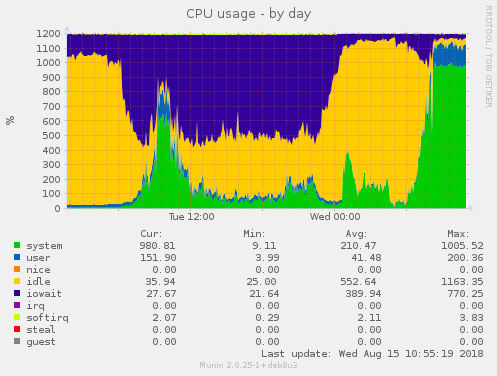
> Besides: performance during heal (e.g. gluster12, bricksdd1) was way
> better than it is now. I've attached 2 pngs showing the differing cpu
> usage of last week before/after heal.
>
> 2018-08-17 9:30 GMT+02:00 Pranith Kumar Karampuri <[email protected]>:
> > There seems to be too many lookup operations compared to any other
> > operations. What is the workload on the volume?
> >
> > On Fri, Aug 17, 2018 at 12:47 PM Hu Bert <[email protected]> wrote:
> >>
> >> i hope i did get it right.
> >>
> >> gluster volume profile shared start
> >> wait 10 minutes
> >> gluster volume profile shared info
> >> gluster volume profile shared stop
> >>
> >> If that's ok, i've attached the output of the info command.
> >>
> >>
> >> 2018-08-17 8:31 GMT+02:00 Pranith Kumar Karampuri <[email protected]
> >:
> >> > Please do volume profile also for around 10 minutes when CPU% is high.
> >> >
> >> > On Fri, Aug 17, 2018 at 11:56 AM Pranith Kumar Karampuri
> >> > <[email protected]> wrote:
> >> >>
> >> >> As per the output, all io-threads are using a lot of CPU. It is
> better
> >> >> to
> >> >> check what the volume profile is to see what is leading to so much
> work
> >> >> for
> >> >> io-threads. Please follow the documentation at
> >> >>
> >> >>
> https://gluster.readthedocs.io/en/latest/Administrator%20Guide/Monitoring%20Workload/
> >> >> section: "
> >> >>
> >> >> Running GlusterFS Volume Profile Command"
> >> >>
> >> >> and attach output of  "gluster volume profile info",
> >> >>
> >> >> On Fri, Aug 17, 2018 at 11:24 AM Hu Bert <[email protected]>
> >> >> wrote:
> >> >>>
> >> >>> Good morning,
> >> >>>
> >> >>> i ran the command during 100% CPU usage and attached the file.
> >> >>> Hopefully it helps.
> >> >>>
> >> >>> 2018-08-17 7:33 GMT+02:00 Pranith Kumar Karampuri
> >> >>> <[email protected]>:
> >> >>> > Could you do the following on one of the nodes where you are
> >> >>> > observing
> >> >>> > high
> >> >>> > CPU usage and attach that file to this thread? We can find what
> >> >>> > threads/processes are leading to high usage. Do this for say 10
> >> >>> > minutes
> >> >>> > when
> >> >>> > you see the ~100% CPU.
> >> >>> >
> >> >>> > top -bHd 5 > /tmp/top.${HOSTNAME}.txt
> >> >>> >
> >> >>> > On Wed, Aug 15, 2018 at 2:37 PM Hu Bert <[email protected]>
> >> >>> > wrote:
> >> >>> >>
> >> >>> >> Hello again :-)
> >> >>> >>
> >> >>> >> The self heal must have finished as there are no log entries in
> >> >>> >> glustershd.log files anymore. According to munin disk latency
> >> >>> >> (average
> >> >>> >> io wait) has gone down to 100 ms, and disk utilization has gone
> >> >>> >> down
> >> >>> >> to ~60% - both on all servers and hard disks.
> >> >>> >>
> >> >>> >> But now system load on 2 servers (which were in the good state)
> >> >>> >> fluctuates between 60 and 100; the server with the formerly
> failed
> >> >>> >> disk has a load of 20-30.I've uploaded some munin graphics of the
> >> >>> >> cpu
> >> >>> >> usage:
> >> >>> >>
> >> >>> >> https://abload.de/img/gluster11_cpu31d3a.png
> >> >>> >> https://abload.de/img/gluster12_cpu8sem7.png
> >> >>> >> https://abload.de/img/gluster13_cpud7eni.png
> >> >>> >>
> >> >>> >> This can't be normal. 2 of the servers under heavy load and one
> not
> >> >>> >> that much. Does anyone have an explanation of this strange
> >> >>> >> behaviour?
> >> >>> >>
> >> >>> >>
> >> >>> >> Thx :-)
> >> >>> >>
> >> >>> >> 2018-08-14 9:37 GMT+02:00 Hu Bert <[email protected]>:
> >> >>> >> > Hi there,
> >> >>> >> >
> >> >>> >> > well, it seems the heal has finally finished. Couldn't see/find
> >> >>> >> > any
> >> >>> >> > related log message; is there such a message in a specific log
> >> >>> >> > file?
> >> >>> >> >
> >> >>> >> > But i see the same behaviour when the last heal finished: all
> CPU
> >> >>> >> > cores are consumed by brick processes; not only by the formerly
> >> >>> >> > failed
> >> >>> >> > bricksdd1, but by all 4 brick processes (and their threads).
> Load
> >> >>> >> > goes
> >> >>> >> > up to > 100 on the 2 servers with the not-failed brick, and
> >> >>> >> > glustershd.log gets filled with a lot of entries. Load on the
> >> >>> >> > server
> >> >>> >> > with the then failed brick not that high, but still ~60.
> >> >>> >> >
> >> >>> >> > Is this behaviour normal? Is there some post-heal after a heal
> >> >>> >> > has
> >> >>> >> > finished?
> >> >>> >> >
> >> >>> >> > thx in advance :-)
> >> >>> >
> >> >>> >
> >> >>> >
> >> >>> > --
> >> >>> > Pranith
> >> >>
> >> >>
> >> >>
> >> >> --
> >> >> Pranith
> >> >
> >> >
> >> >
> >> > --
> >> > Pranith
> >
> >
> >
> > --
> > Pranith
>


--
Pranith
_______________________________________________
Gluster-users mailing list
[email protected]
https://lists.gluster.org/mailman/listinfo/gluster-users