Attachments in Gmail, now with the power of Google
Drive<http://feedproxy.google.com/~r/GoogleDriveBlog/~3/Dx8bXLrovKo/attachments-in-gmail-now-with-power-of.html>
Nov 12th 2013, 16:00, by A
Googler<https://plus.google.com/100630705629414352418>
*Cross-posted on the Official Google Blog
<http://googleblog.blogspot.com/2013/11/attachments-in-gmail-now-with-power-of.html>
and Gmail
Blog
<http://gmailblog.blogspot.com/2013/11/attachments-in-gmail-now-with-power-of.html>*

You're probably used to downloading email attachments, but each of those
files takes time to download, eats up space on your device, and can get
buried deep inside your "Downloads" folder. With today's update to Gmail,
you can skip that whole process. Instead, you can view attachments *and* save
files directly to Google Drive without ever leaving Gmail, making it easy
to access them later from whatever device you’re on—computer, phone or
tablet.

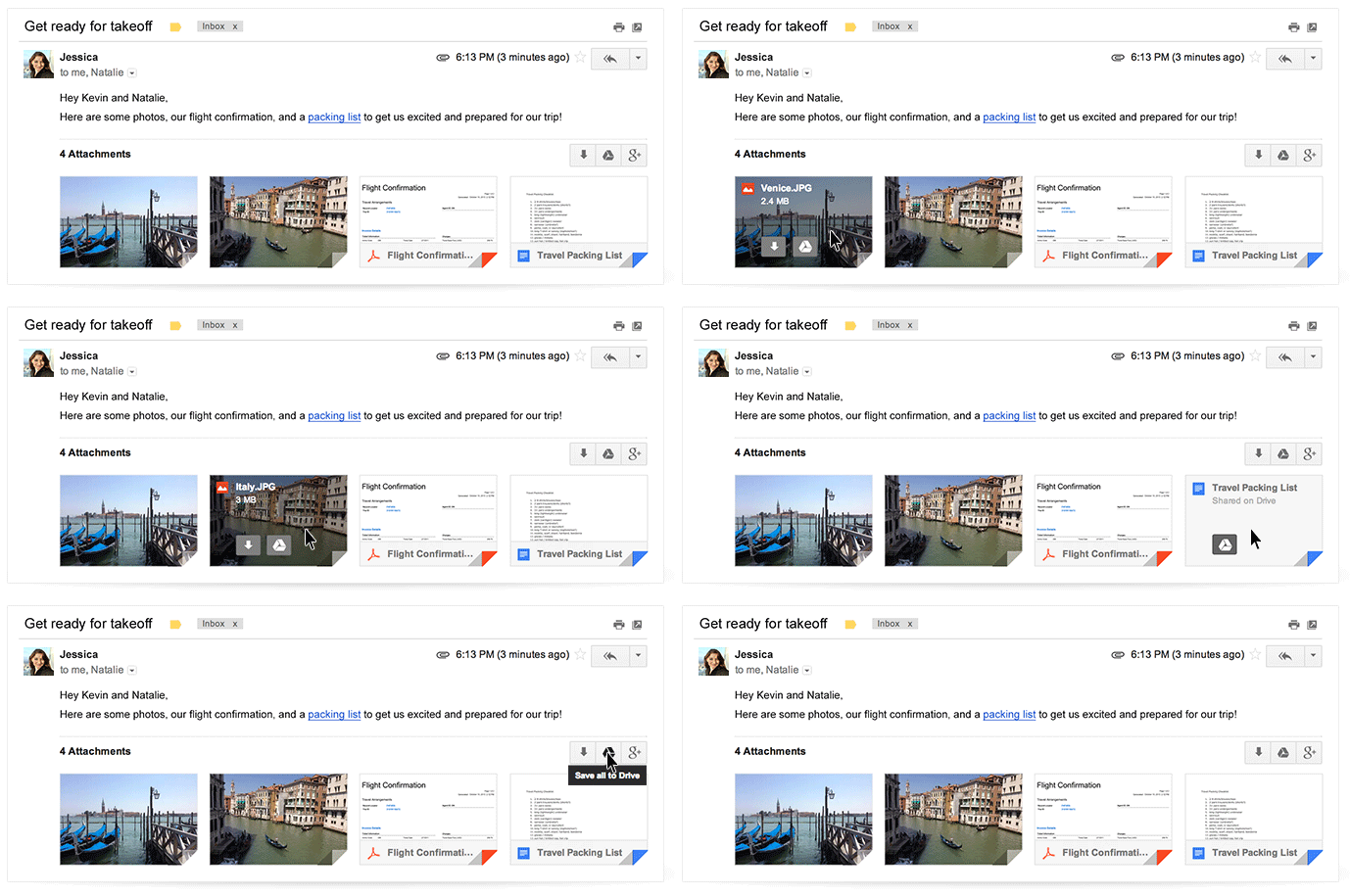
The next time you open an email with attachments, you’ll see new previews
of the files at the bottom of the email, from photos and videos to
spreadsheets and PDFs.
<http://2.bp.blogspot.com/-ySimQgB47BY/UoF86kUOE9I/AAAAAAAABJw/SaKgyyr1wao/s1600/Attachments.gif>
When you click on one of those previews, a full-screen view of the image or
document will appear. You can read, search for a particular phrase, and
even browse through multiple attachments right in Gmail.
<http://3.bp.blogspot.com/-GYD2qEDYMAg/UoF9lxrZ9vI/AAAAAAAABKA/3BGgqHTvpO8/s1600/Attachment2.png>
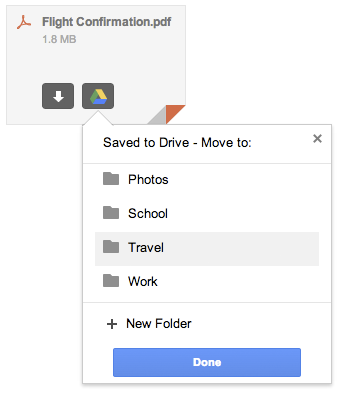
You can now also save your attachments directly to Drive simply by clicking
the Drive button that appears when you hover over the preview. Of course,
if you prefer to download the attachment to your computer, you can—just
click the arrow button.
<http://1.bp.blogspot.com/-szBJdjSF8ps/UoF99WZpN8I/AAAAAAAABKQ/zFyaRUqC4lM/s1600/Attachment3.png>
This new attachment experience is available on desktop and will be rolling
out over the next week. If you’re one of the more than 120 million active
Drive users, you know that saving your files to Drive lets you get to them
from any computer, phone or tablet. And if you aren’t taking advantage of
Drive just yet, give it a try with your next Gmail attachment.

Posted by Scott Johnston, Director of Product Management

--
You received this message because you are subscribed to the Google Groups
"Gmail-Users" group.
To unsubscribe from this group and stop receiving emails from it, send an email
to [email protected].
To post to this group, send email to [email protected].
Visit this group at http://groups.google.com/group/gmail-users.
For more options, visit https://groups.google.com/groups/opt_out.