Testing continues with the File --> Open menu option:
- I'm not sure if this is intended but just in case it is not I
  wanted to mention it:
  When I have the main Accounts window open I see the following
  sub menus listed
     Open...
     Open Budget
     Open Account
     Open Subaccounts
  When I have a Budget tab active I only see the sub menus:
     Open...
     Open Budget
  It may be desirable to being able to select and open an account
  from the Budget window as well.
- In the Accounts window, when I select an account without sub accounts
  the 'Open Subaccounts' option is available.
  I would have expected this option not to be available for accounts
  without a sub account.  However, if this option is supposed to
  provide a way to open an account in the Journal View then it should
  probably just do that.

- The following item is probably more related to the Budget Preferences
  but it shows up when opening a budget:
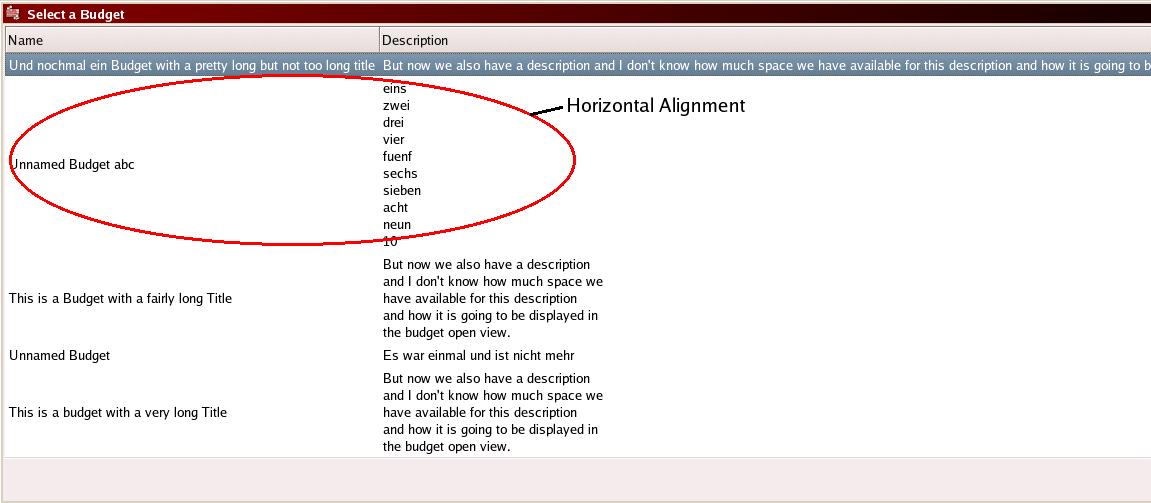
  When entering a long description for a budget without specifically
  entering line breaks, the 'Select a Budget' window extends over the
  width of the screen.  It may be better to restrict the description to
  something like 40 to 60 characters or provide horizontal scroll bars.
  Please see
      http://www.englisch.us/~volker/G2_Testing/BudgetOpen.jpg
  The image displays the entire screen width.

- The same is true for long 'vertical descriptions'.

- The vertical alignment for the budget name in the 'Select a Budget'
  window is set to 'center'.  Personally, I would prefer this to be
  aligned to the top.

- Also, at the moment the splash screen is displayed _behind_ the
  active window

--
Thanks

    Volker Englisch

mailto:[EMAIL PROTECTED]    (h)

_______________________________________________
gnucash-devel mailing list
[email protected]
https://lists.gnucash.org/mailman/listinfo/gnucash-devel