Thanks for your comments John and Eric.

   I have again reviewed the gnucash help documentation and cannot see
   where I am going wrong. In addition to having installed Online Price
   Retrieval and entered my API key, I have now also double checked that
   the "use trading accounts" option is checked which it is.
   In the price database window the currencies I use are listed. There is
   an option to delete all previous prices but I presume I don't want to
   do that as they record the currency exchange rates used for each of my
   past transactions.

   I am beginning to think I must take a backward step and use manual
   price entry ... where am I going wrong, when I used to be able to use
   the automatic option and all seems to be set up as before?

   All help gratefully received.

   --
   Samantha Payn

   On 16 July 2020 11:38 [1][email protected] wrote:

   Send gnucash-user mailing list submissions to

   [2][email protected]

   To subscribe or unsubscribe via the World Wide Web, visit

   [3]https://lists.gnucash.org/mailman/listinfo/gnucash-user

   or, via email, send a message with subject or body 'help' to

   [4][email protected]

   You can reach the person managing the list at

   [5][email protected]

   When replying, please edit your Subject line so it is more specific

   than "Re: Contents of gnucash-user digest..."

   Today's Topics:

   1. Difficulty with online price retrieval (Samantha Payn)

   2. Re: Reconcile also opens Interest Payment box? (Jean Laroche)

   3. Re: Difficulty with online price retrieval (Eric Coates)

   4. GnuCash 4.0 printing on MacOS (Flyeta)

   5. Re: Difficulty with online price retrieval (John Ralls)

   6. Re: GnuCash 4.0 printing on MacOS (John Ralls)

   7. Get Online Quotes (Ruaraidh Sackville Hamilton)

   8. gnucash cannot see printer (Gio Bacareza)

   ----------------------------------------------------------------------

   Message: 1

   Date: Wed, 15 Jul 2020 17:24:49 +0100 (BST)

   From: Samantha Payn < [6][email protected]>

   To: " [7][email protected]" < [8][email protected]>

   Subject: [GNC] Difficulty with online price retrieval

   Message-ID: < [9][email protected]>

   Content-Type: text/plain; charset="UTF-8"

   I did post this question before but am still having the same problem.

   I have successfully used Gnucash for a couple of years for

   multicurrency invoice processing using the Strawberry perl plug in (by

   clicking on Install online price retrieval in the Gnucash section of

   the start menu) and an #Alpha Vantage access key. I use Windows 10.

   Recently I had to upgrade my hardware and since installing gnucash on

   the new machine I've not been able to make the price retrieval work.

   I have tried installing gnucash, adding the API key, and then adding

   Strawberry perl; and I have tried uninstalling everything and then

   installing gnucash, adding Strawberry perl and then adding the API key.

   No joy.

   Where am I going wrong?

   All help gratefully received.

   Thanks.

   ------------------------------

   Message: 2

   Date: Wed, 15 Jul 2020 09:39:43 -0700

   From: Jean Laroche < [10][email protected]>

   To: [11][email protected]

   Subject: Re: [GNC] Reconcile also opens Interest Payment box?

   Message-ID: < [12][email protected]>

   Content-Type: text/plain; charset=utf-8; format=flowed

   I'd like a preference somewhere to activate/inactivate the Interest
   Payment

   pop-up appearing automatically on an account by account basis. I'd like
   the

   "Enter Interest Payment ..." button to remain as I have used it a
   couple of

   times, but that when it has been used it won't then mean it appears

   automatically the next time, which would remove the need for the "No

   Automatic Interest Payment" button.

   Just my two penny worth.

   Alan A Holmes

   BTW, that's exactly what the current Pull Request implements: per

   account option, and the option isn't set silently if you decide to
   click

   "enter interest payment".

   [13]https://github.com/Gnucash/gnucash/pull/753

   I think it's a reasonable compromise that keeps the feature around, but

   much better behaved.

   ------------------------------

   Message: 3

   Date: Wed, 15 Jul 2020 17:44:33 +0100

   From: Eric Coates < [14][email protected]>

   To: [15][email protected]

   Subject: Re: [GNC] Difficulty with online price retrieval

   Message-ID: < [16][email protected]>

   Content-Type: text/plain; charset=utf-8; format=flowed

   A few days ago it was reported that AlphaVantage was no longer serving

   price information (something to do with them not having the appropriate

   licences apparently). The general advice seems to be use Yahoo as JSON?

   which works fine for me perhaps it would for you.

   Eric

   =============================

   On 15/07/2020 17:24, Samantha Payn wrote:

   I did post this question before but am still having the same problem.

   I have successfully used Gnucash for a couple of years for

   multicurrency invoice processing using the Strawberry perl plug in (by

   clicking on Install online price retrieval in the Gnucash section of

   the start menu) and an #Alpha Vantage access key. I use Windows 10.

   Recently I had to upgrade my hardware and since installing gnucash on

   the new machine I've not been able to make the price retrieval work.

   I have tried installing gnucash, adding the API key, and then adding

   Strawberry perl; and I have tried uninstalling everything and then

   installing gnucash, adding Strawberry perl and then adding the API key.

   No joy.

   Where am I going wrong?

   All help gratefully received.

   Thanks.

   _______________________________________________

   gnucash-user mailing list

   [17][email protected]

   To update your subscription preferences or to unsubscribe:

   [18]https://lists.gnucash.org/mailman/listinfo/gnucash-user

   If you are using Nabble or Gmane, please see
   [19]https://wiki.gnucash.org/wiki/Mailing_Lists for more information.

   -----

   Please remember to CC this list on all your replies.

   You can do this by using Reply-To-List or Reply-All.

   ------------------------------

   Message: 4

   Date: Wed, 15 Jul 2020 19:08:07 -0400

   From: Flyeta < [20][email protected]>

   To: [21][email protected]

   Subject: [GNC] GnuCash 4.0 printing on MacOS

   Message-ID: < [22][email protected]>

   Content-Type: text/plain; charset=utf-8

   Puzzled by this and can?t see an obvious reason, but GnuCash 4.0 does
   not recognize any printers in my setup (MacOS 10.14.6 Mojave). The
   Print dialog shows an empty box with no printers, the Print button is
   greyed out. The ?Page Setup? dialog from the File menu, next to
   ?Format,? shows only ?Any Printer for Portable Documents? and a printer
   cannot be chosen from there.

   All this works fine in 3.8, with the same file.

   I rarely print, so hadn?t noticed this until now, but after 2 days the
   light hasn?t dawned on me; feels like I?m missing something obvious.

   Thank you for any suggestions.

   Andrew

   ------------------------------

   Message: 5

   Date: Wed, 15 Jul 2020 17:52:10 -0700

   From: John Ralls < [23][email protected]>

   To: Eric Coates < [24][email protected]>

   Cc: [25][email protected]

   Subject: Re: [GNC] Difficulty with online price retrieval

   Message-ID: < [26][email protected]>

   Content-Type: text/plain; charset=us-ascii

   But not for currency rates, which F::Q has hard-coded to use
   alphavantage. Plus Alphavantage currency rates seem to still be
   working:

   /Applications/Gnucash.app/Contents/Resources/bin/gnc-fq-dump currency
   USD GBP

   1 USD = 0.79411 GBP

   Regards,

   John Ralls

   On Jul 15, 2020, at 9:44 AM, Eric Coates via gnucash-user <
   [27][email protected]> wrote:

   A few days ago it was reported that AlphaVantage was no longer serving
   price information (something to do with them not having the appropriate
   licences apparently). The general advice seems to be use Yahoo as JSON
   which works fine for me perhaps it would for you.

   Eric

   =============================

   On 15/07/2020 17:24, Samantha Payn wrote:

   I did post this question before but am still having the same problem.

   I have successfully used Gnucash for a couple of years for

   multicurrency invoice processing using the Strawberry perl plug in (by

   clicking on Install online price retrieval in the Gnucash section of

   the start menu) and an #Alpha Vantage access key. I use Windows 10.

   Recently I had to upgrade my hardware and since installing gnucash on

   the new machine I've not been able to make the price retrieval work.

   I have tried installing gnucash, adding the API key, and then adding

   Strawberry perl; and I have tried uninstalling everything and then

   installing gnucash, adding Strawberry perl and then adding the API key.

   No joy.

   Where am I going wrong?

   All help gratefully received.

   Thanks.

   _______________________________________________

   gnucash-user mailing list

   [28][email protected]

   To update your subscription preferences or to unsubscribe:

   [29]https://lists.gnucash.org/mailman/listinfo/gnucash-user

   If you are using Nabble or Gmane, please see
   [30]https://wiki.gnucash.org/wiki/Mailing_Lists for more information.

   -----

   Please remember to CC this list on all your replies.

   You can do this by using Reply-To-List or Reply-All.

   _______________________________________________

   gnucash-user mailing list

   [31][email protected]

   To update your subscription preferences or to unsubscribe:

   [32]https://lists.gnucash.org/mailman/listinfo/gnucash-user

   If you are using Nabble or Gmane, please see
   [33]https://wiki.gnucash.org/wiki/Mailing_Lists for more information.

   -----

   Please remember to CC this list on all your replies.

   You can do this by using Reply-To-List or Reply-All.

   ------------------------------

   Message: 6

   Date: Wed, 15 Jul 2020 17:54:47 -0700

   From: John Ralls < [34][email protected]>

   To: Flyeta < [35][email protected]>

   Cc: [36][email protected]

   Subject: Re: [GNC] GnuCash 4.0 printing on MacOS

   Message-ID: < [37][email protected]>

   Content-Type: text/plain; charset=utf-8

   On Jul 15, 2020, at 4:08 PM, Flyeta via gnucash-user <
   [38][email protected]> wrote:

   Puzzled by this and can?t see an obvious reason, but GnuCash 4.0 does
   not recognize any printers in my setup (MacOS 10.14.6 Mojave). The
   Print dialog shows an empty box with no printers, the Print button is
   greyed out. The ?Page Setup? dialog from the File menu, next to
   ?Format,? shows only ?Any Printer for Portable Documents? and a printer
   cannot be chosen from there.

   All this works fine in 3.8, with the same file.

   I rarely print, so hadn?t noticed this until now, but after 2 days the
   light hasn?t dawned on me; feels like I?m missing something obvious.

   [39]https://bugs.gnucash.org/show_bug.cgi?id=797831

   On which you'll find a workaround.

   Regards,

   John Ralls

   ------------------------------

   Message: 7

   Date: Thu, 16 Jul 2020 11:33:13 +0100

   From: Ruaraidh Sackville Hamilton < [40][email protected]>

   To: Gnucash Users < [41][email protected]>

   Subject: [GNC] Get Online Quotes

   Message-ID:

   <
   [42]cagnqtpgc9th3pyrcwk9kffw5aerrccbbu5db7pqxgzkn0sb...@mail.gmail.com>

   Content-Type: text/plain; charset="UTF-8"

   Is there a way to toggle off and on "Get Online Quotes" for a stock or
   fund

   without GnuCash forgetting the associated settings?

   To get quotes for a UK fund, I switch on Get Online Quotes, select
   Multiple

   sources, scroll down to the bottom of the list of sources, and select
   "U.K.

   Funds ...". So far so good. Three mouse clicks and one scroll-down is
   not

   bad, if you only do it once for a single fund.

   Sometimes I switch it off temporarily, to make it easier to
   troubleshoot

   problems getting quotes for other stocks and funds.

   The problem is, when the troubleshooting is over and I switch it on
   again,

   it comes on with the default settings (Single source Alphavantage), so
   I

   have to reselect Multiple / U.K. Funds.

   It's not a big problem. It's just tedious when there are a lot of funds
   to

   do. It would be much easier if I could simply toggle on/off without

   changing settings.

   I suppose an alternative could be to leave it on all the time instead
   of

   toggling off/on, but then each troubleshooting test would build up
   another

   set of unwanted prices in the price database.

   I have tried to look for an answer online, but failed, so hope someone
   can

   help.

   Ruaraidh

   >

   ------------------------------

   Message: 8

   Date: Thu, 16 Jul 2020 18:38:37 +0800

   From: Gio Bacareza < [43][email protected]>

   To: GnuCash Users < [44][email protected]>

   Subject: [GNC] gnucash cannot see printer

   Message-ID:

   <
   [45]caec3bmsv1r5xv0tc_c4sq1z4vyznarj5qgcnwwizq+3+b8z...@mail.gmail.com>

   Content-Type: text/plain; charset="utf-8"

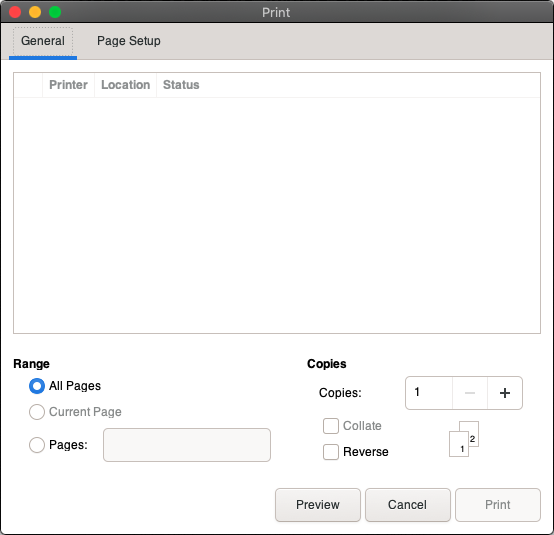
   Just fresh installed a new mac. installed gnucash. it can't seem to
   find

   the printer (see screenshot). Help!

   [image: image.png]

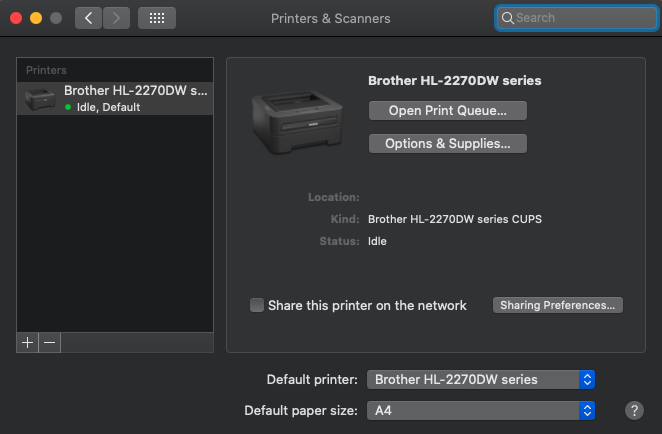
   when printer is set up properly (see screenshot)

   [image: image.png]

   Hardware: MacAir Mid 2013

   OSX Catalina 10.15.5

   Gnucash Version: 4.0

   --

   cheers,

   Gio

   -------------- next part --------------

   A non-text attachment was scrubbed...

   Name: image.png

   Type: image/png

   Size: 39452 bytes

   Desc: not available

   URL: <
   [46]http://lists.gnucash.org/pipermail/gnucash-user/attachments/2020071
   6/509f7e15/attachment.png>

   -------------- next part --------------

   A non-text attachment was scrubbed...

   Name: image.png

   Type: image/png

   Size: 57249 bytes

   Desc: not available

   URL: <
   [47]http://lists.gnucash.org/pipermail/gnucash-user/attachments/2020071
   6/509f7e15/attachment-0001.png>

   ------------------------------

   Subject: Digest Footer

   _______________________________________________

   gnucash-user mailing list

   [48][email protected]

   To update your subscription preferences or to unsubscribe:

   [49]https://lists.gnucash.org/mailman/listinfo/gnucash-user

   If you are using Nabble or Gmane, please see
   [50]https://wiki.gnucash.org/wiki/Mailing_Lists for more information.

   -----

   Please remember to CC this list on all your replies.

   You can do this by using Reply-To-List or Reply-All.

   ------------------------------

   End of gnucash-user Digest, Vol 208, Issue 51

   *********************************************

References

   1. mailto:[email protected]
   2. mailto:[email protected]
   3. https://lists.gnucash.org/mailman/listinfo/gnucash-user
   4. mailto:[email protected]
   5. mailto:[email protected]
   6. mailto:[email protected]
   7. mailto:[email protected]
   8. mailto:[email protected]
   9. mailto:[email protected]
  10. mailto:[email protected]
  11. mailto:[email protected]
  12. mailto:[email protected]
  13. https://github.com/Gnucash/gnucash/pull/753
  14. mailto:[email protected]
  15. mailto:[email protected]
  16. mailto:[email protected]
  17. mailto:[email protected]
  18. https://lists.gnucash.org/mailman/listinfo/gnucash-user
  19. https://wiki.gnucash.org/wiki/Mailing_Lists
  20. mailto:[email protected]
  21. mailto:[email protected]
  22. mailto:[email protected]
  23. mailto:[email protected]
  24. mailto:[email protected]
  25. mailto:[email protected]
  26. mailto:[email protected]
  27. mailto:[email protected]
  28. mailto:[email protected]
  29. https://lists.gnucash.org/mailman/listinfo/gnucash-user
  30. https://wiki.gnucash.org/wiki/Mailing_Lists
  31. mailto:[email protected]
  32. https://lists.gnucash.org/mailman/listinfo/gnucash-user
  33. https://wiki.gnucash.org/wiki/Mailing_Lists
  34. mailto:[email protected]
  35. mailto:[email protected]
  36. mailto:[email protected]
  37. mailto:[email protected]
  38. mailto:[email protected]
  39. https://bugs.gnucash.org/show_bug.cgi?id=797831
  40. mailto:[email protected]
  41. mailto:[email protected]
  42. mailto:cagnqtpgc9th3pyrcwk9kffw5aerrccbbu5db7pqxgzkn0sb...@mail.gmail.com
  43. mailto:[email protected]
  44. mailto:[email protected]
  45. mailto:caec3bmsv1r5xv0tc_c4sq1z4vyznarj5qgcnwwizq+3+b8z...@mail.gmail.com
  46.
http://lists.gnucash.org/pipermail/gnucash-user/attachments/20200716/509f7e15/attachment.png
  47.
http://lists.gnucash.org/pipermail/gnucash-user/attachments/20200716/509f7e15/attachment-0001.png
  48. mailto:[email protected]
  49. https://lists.gnucash.org/mailman/listinfo/gnucash-user
  50. https://wiki.gnucash.org/wiki/Mailing_Lists
_______________________________________________
gnucash-user mailing list
[email protected]
To update your subscription preferences or to unsubscribe:
https://lists.gnucash.org/mailman/listinfo/gnucash-user
If you are using Nabble or Gmane, please see
https://wiki.gnucash.org/wiki/Mailing_Lists for more information.
-----
Please remember to CC this list on all your replies.
You can do this by using Reply-To-List or Reply-All.