Hi,
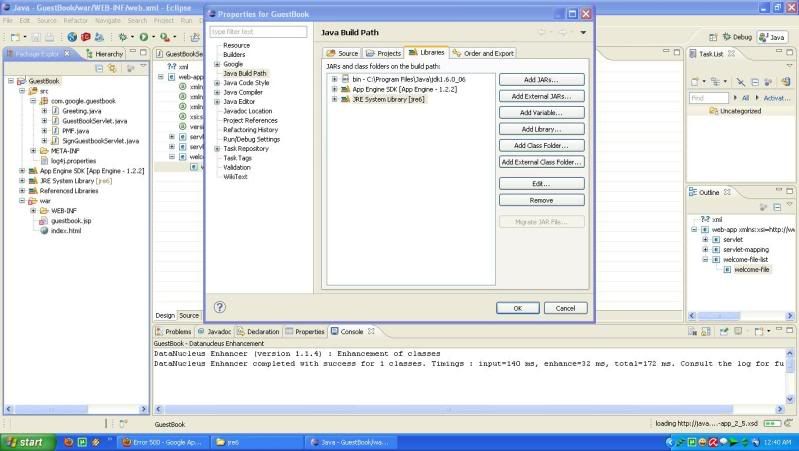
You can't add a JDK by adding the JDK's bin path to your classpath. What you
need to do is go into the Java Build Path dialog, and select the "JRE System
Library" entry. Then, click "Edit". A dialog will pop up, giving you the
option to select an alternate JRE. However, you probably have not registered
the JDK you downloaded with Eclipse, so you'll have to click on the
"Installed JREs" button. You'll be presented with another dialog where
you'll be able to add your JDK, then when you go back to the previous
dialog, you can choose the JDK that you just installed.
Let me know if you run into any trouble.


Rajeev

On Mon, Aug 24, 2009 at 7:58 AM, HC <[email protected]> wrote:

>
> Can U explain with picture step by step ? Sorry i have try ur
> instruction
>
> " By right clicking either on the error in the Problems tab or
> by right clicking on the project in the package explorer, find Build
> path.  I don't know if the next step was necessary, but under Java
> Build Path, I included a new folder and mapped a new folder to my jdk
> [version]/bin folder.  Then under Libraries if you click on JRE System
> Library and then select Edit on the right, you will then be presented
> with the option of using an Alternate JRE, which is where I was able
> to select jdk[version]. "
>
> i try adding JDK
> http://i61.photobucket.com/albums/h79/hc_reborn/hah.jpg
>
>
> but still the white cross in the red box didn't went away @.@
>
> THX.
> >
>

--~--~---------~--~----~------------~-------~--~----~
You received this message because you are subscribed to the Google Groups
"Google App Engine for Java" group.
To post to this group, send email to [email protected]
To unsubscribe from this group, send email to
[email protected]
For more options, visit this group at
http://groups.google.com/group/google-appengine-java?hl=en
-~----------~----~----~----~------~----~------~--~---