Finally , thx.

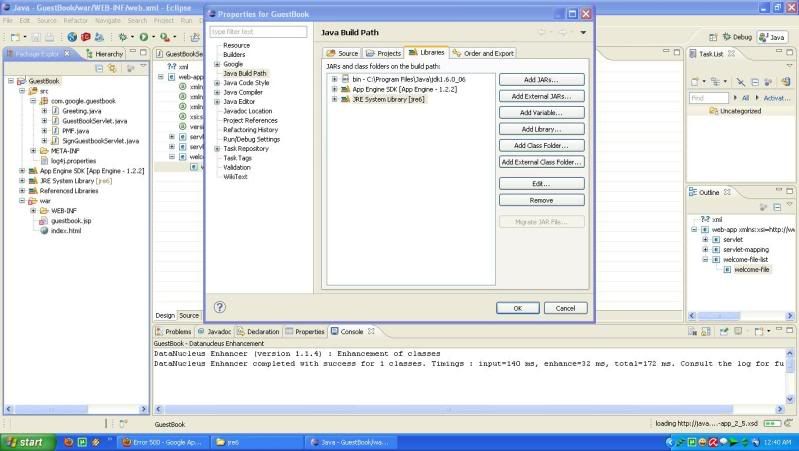
here i made a screen shot for maybe someone who have problem like
here.
what U need is following this


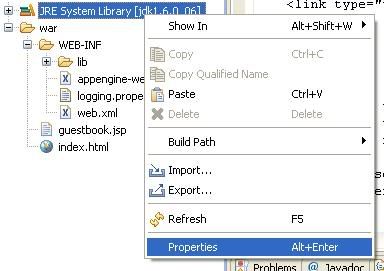
1. Right click on JRE System Library , and chose properties
(http://i61.photobucket.com/albums/h79/hc_reborn/Step1.jpg)


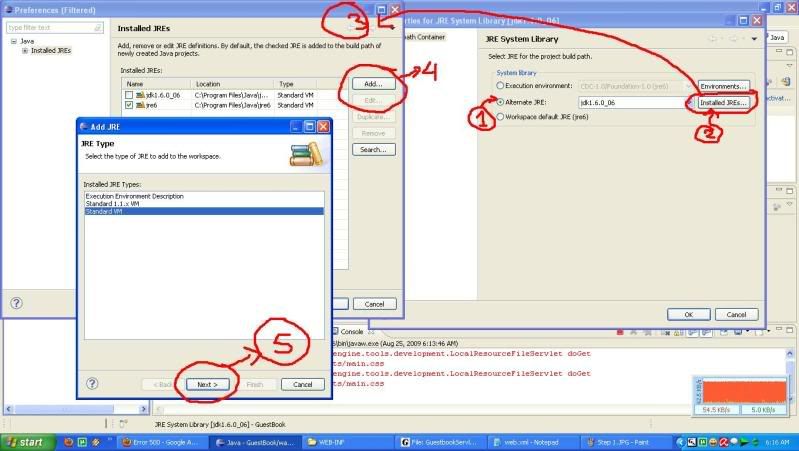
2. Follow the number


(http://i61.photobucket.com/albums/h79/hc_reborn/Step2.jpg)
note: ignore the word "JDK [version]" lol because i made this after i
finish.


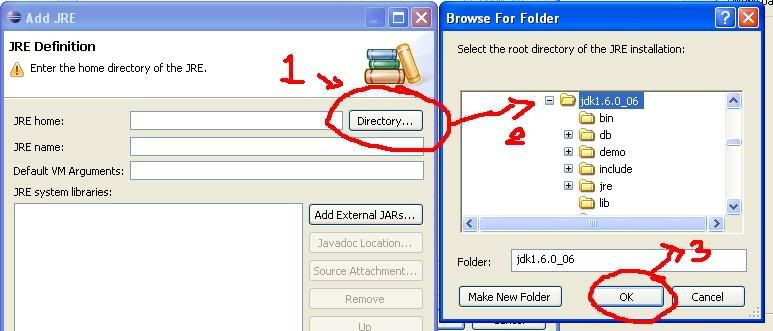
3.Follow the number (again) until u can found your JDK directory
(http://i61.photobucket.com/albums/h79/hc_reborn/Step3.jpg)


4.Klik Finish , and change alternate Jre into ur new what U add.


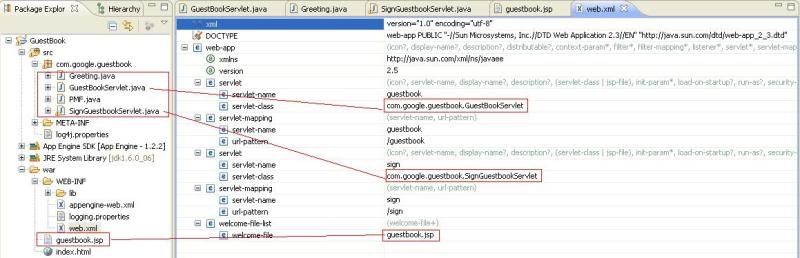
For U who have problem is where is " /sign" ?? the step is easy u must
change ur web.xml into like this
(http://i61.photobucket.com/albums/h79/hc_reborn/Step4.jpg)

for web.xml like that U can found in ( [your directory] appengine-java-
sdk\demos\guestbook\war\WEB-INF).
Note don't forget the name MUST SAME...


--Fin---

i hope this can help other people.


On Aug 24, 8:51 am, Rajeev Dayal <[email protected]> wrote:
> Hi,
> You can't add a JDK by adding the JDK's bin path to your classpath. What you
> need to do is go into the Java Build Path dialog, and select the "JRE System
> Library" entry. Then, click "Edit". A dialog will pop up, giving you the
> option to select an alternate JRE. However, you probably have not registered
> the JDK you downloaded with Eclipse, so you'll have to click on the
> "Installed JREs" button. You'll be presented with another dialog where
> you'll be able to add your JDK, then when you go back to the previous
> dialog, you can choose the JDK that you just installed.
>
> Let me know if you run into any trouble.
>
> Rajeev
>
> On Mon, Aug 24, 2009 at 7:58 AM, HC <[email protected]> wrote:
>
> > Can U explain with picture step by step ? Sorry i have try ur
> > instruction
>
> > " By right clicking either on the error in the Problems tab or
> > by right clicking on the project in the package explorer, find Build
> > path.  I don't know if the next step was necessary, but under Java
> > Build Path, I included a new folder and mapped a new folder to my jdk
> > [version]/bin folder.  Then under Libraries if you click on JRE System
> > Library and then select Edit on the right, you will then be presented
> > with the option of using an Alternate JRE, which is where I was able
> > to select jdk[version]. "
>
> > i try adding JDK
> >http://i61.photobucket.com/albums/h79/hc_reborn/hah.jpg
>
> > but still the white cross in the red box didn't went away @.@
>
> > THX.
--~--~---------~--~----~------------~-------~--~----~
You received this message because you are subscribed to the Google Groups
"Google App Engine for Java" group.
To post to this group, send email to [email protected]
To unsubscribe from this group, send email to
[email protected]
For more options, visit this group at
http://groups.google.com/group/google-appengine-java?hl=en
-~----------~----~----~----~------~----~------~--~---