I haven't been able to reproduce this.  could you send a code snippet or a
link to a live example?
On Mon, Aug 31, 2009 at 10:58 AM, the_lorax <[email protected]>wrote:

>
> I'm using the pie chart from from here
>
> http://code.google.com/apis/visualization/documentation/gallery/piechart.html
>
> Here is any example of what happens, hope it helps:
>
> [URL=http://www.picturepush.com/public/2196460][IMG]http://<http://www.picturepush.com/public/2196460%5D%5BIMG%5Dhttp://>
> www2.picturepush.com/photo/a/2196460/220/2196460.png[/IMG][/URL]<http://www2.picturepush.com/photo/a/2196460/220/2196460.png%5B/IMG%5D%5B/URL%5D>
>
> Thanks for your response
> the_lorax
>
> On Aug 31, 2:02 am, MC Get Vizzy <[email protected]> wrote:
> > are you using google.visualization.ImagePieChart?
> >
> >
> >
> > On Sun, Aug 30, 2009 at 8:43 AM, the_lorax <[email protected]>
> wrote:
> >
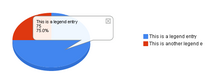
> > > I have been using the Pie Chart using the Google Visualization API and
> > > have noticed that when the length of the text in the legend exceeds a
> > > certain length, part of the text gets cut off. The only way to make
> > > sure that all the text is included in the legend is to not define
> > > width of the chart and just let it go to full. However, even having
> > > full width charts is a problem because it floats the legend to the far
> > > right of the chart, leaving a large gap of whitespace between the
> > > legend and the chart itself.
> >
> > > Has anyone else experiences this problem and found a solution or is it
> > > just a bug with the API?
> >
> > > Thanks
> > > the_lorax
> >
>

--~--~---------~--~----~------------~-------~--~----~
You received this message because you are subscribed to the Google Groups
"Google Visualization API" group.
To post to this group, send email to [email protected]
To unsubscribe from this group, send email to
[email protected]
For more options, visit this group at
http://groups.google.com/group/google-visualization-api?hl=en
-~----------~----~----~----~------~----~------~--~---