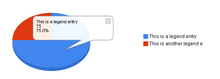
Basically, the thing that causes this problem is the increase in
legendFontSize. The reason I increased the font size is because the
legend text is otherwise unreadable.Try removing the legendFontSize
option from the query as well to see what happens. It would be great
if google could make options to better manipulate the legend and chart
separately.
---------------------CODE START---------------------
<html>
  <head>
    <script type="text/javascript" src="http://www.google.com/jsapi";></
script>
    <script type="text/javascript">
      google.load("visualization", "1", {packages:["piechart"]});
      google.setOnLoadCallback(drawChart);
      function drawChart() {
        var data = new google.visualization.DataTable();
        data.addColumn('string', 'Task');
        data.addColumn('number', 'Hours per Day');
        data.addRows(5);
        data.setValue(0, 0, 'Work - this is some extra text');
        data.setValue(0, 1, 11);
        data.setValue(1, 0, 'Eat - this is some extra text');
        data.setValue(1, 1, 2);
        data.setValue(2, 0, 'Commute - this is some extra text');
        data.setValue(2, 1, 2);
        data.setValue(3, 0, 'Watch TV - this is some extra text');
        data.setValue(3, 1, 2);
        data.setValue(4, 0, 'Sleep - this is some extra text');
        data.setValue(4, 1, 7);

        var chart = new google.visualization.PieChart
(document.getElementById('chart_div'));
        chart.draw(data, {width: 400, height: 240, is3D: true, title:
'My Daily Activities',

legendFontSize:12});
      }
    </script>
  </head>

  <body>
    <div id="chart_div"></div>
  </body>
</html>

---------------------CODE END---------------------

Hope this helps
Thanks Again
the_lorax

>
On Aug 31, 9:56 pm, MC Get Vizzy <[email protected]> wrote:
> I haven't been able to reproduce this.  could you send a code snippet or a
> link to a live example?
>
> On Mon, Aug 31, 2009 at 10:58 AM, the_lorax <[email protected]>wrote:
>
>
>
>
>
> > I'm using the pie chart from from here
>
> >http://code.google.com/apis/visualization/documentation/gallery/piech...
>
> > Here is any example of what happens, hope it helps:
>
> > [URL=http://www.picturepush.com/public/2196460][IMG]http://<http://www.picturepush.com/public/2196460%5D%5BIMG%5Dhttp://>
> > www2.picturepush.com/photo/a/2196460/220/2196460.png[/IMG][/URL]<http://www2.picturepush.com/photo/a/2196460/220/2196460.png%5B/IMG%5D...>
>
> > Thanks for your response
> > the_lorax
>
> > On Aug 31, 2:02 am, MC Get Vizzy <[email protected]> wrote:
> > > are you using google.visualization.ImagePieChart?
>
> > > On Sun, Aug 30, 2009 at 8:43 AM, the_lorax <[email protected]>
> > wrote:
>
> > > > I have been using the Pie Chart using the Google Visualization API and
> > > > have noticed that when the length of the text in the legend exceeds a
> > > > certain length, part of the text gets cut off. The only way to make
> > > > sure that all the text is included in the legend is to not define
> > > > width of the chart and just let it go to full. However, even having
> > > > full width charts is a problem because it floats the legend to the far
> > > > right of the chart, leaving a large gap of whitespace between the
> > > > legend and the chart itself.
>
> > > > Has anyone else experiences this problem and found a solution or is it
> > > > just a bug with the API?
>
> > > > Thanks
> > > > the_lorax
--~--~---------~--~----~------------~-------~--~----~
You received this message because you are subscribed to the Google Groups
"Google Visualization API" group.
To post to this group, send email to [email protected]
To unsubscribe from this group, send email to
[email protected]
For more options, visit this group at
http://groups.google.com/group/google-visualization-api?hl=en
-~----------~----~----~----~------~----~------~--~---