Hi Don,

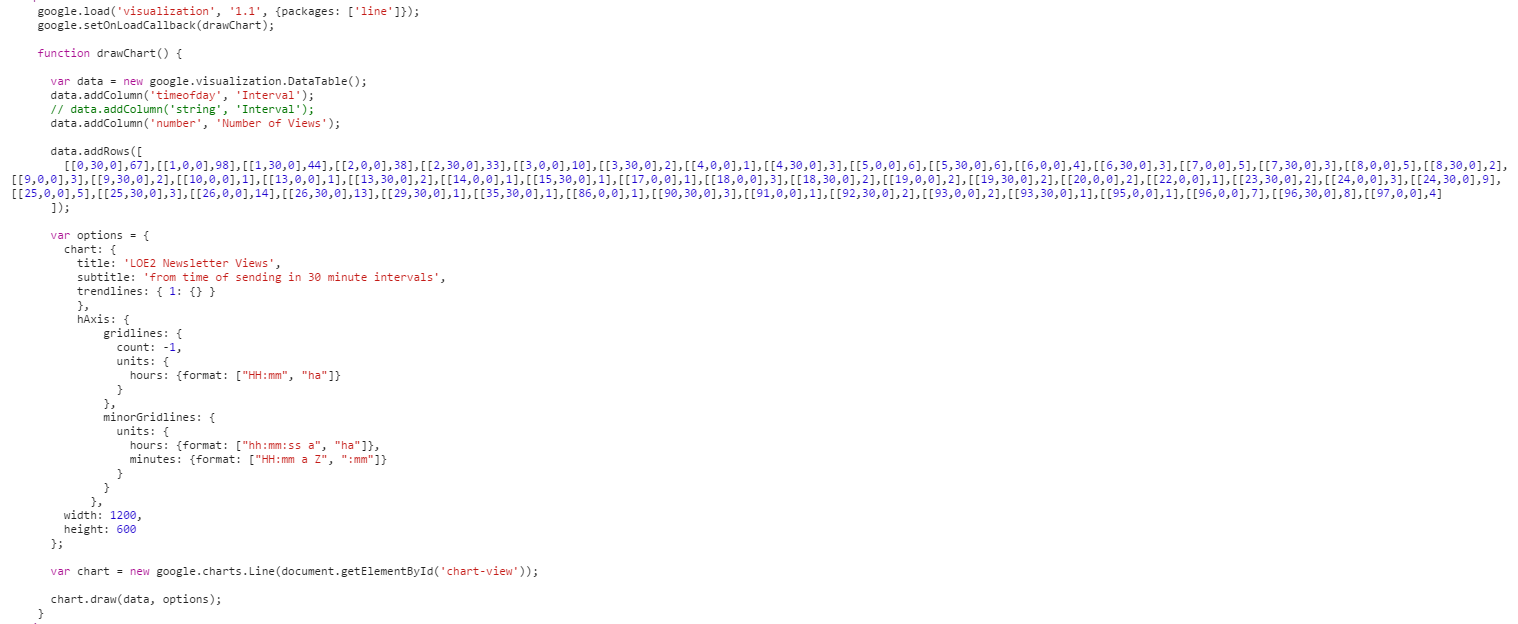
In the future, please post your code in *text*, and not a screenshot. This
will make it easier for us to reproduce your issue and help you. I had to
run your screenshot through an OCR website, and do a number of manual
corrections in order to play around with it.
The red error box is a bug, so thank you for reporting it. If you're
curious, it occurs when formatting options for a date-based axis are
omitted. It will be fixed with our next release.

Also, it appears that custom formatting for date-based axes (including
timeofday) is completely broken in the Material Charts. This will also be
fixed with the next release.

Another thing I noticed is that you're using the old-style of options,
without converting them (via google.charts.Line.convertOptions), which
means that most of your options are currently being ignored. Another thing
is that the Material Charts do not yet support most of the options that
you're used to (like trendlines, minorGridlines, gridline.count (although
we do support pixelsPerTick, but you'll have to specify it using the new
options structure; but that's neither here nor there since you're just
using the automatic tick algorithm (which is also not supported)), and
unit-based ticks).

On Mon, Mar 2, 2015 at 4:19 PM Don Norman <[email protected]> wrote:

> Sorry if this is a double post, I forget if I submitted it already or not.
>
> So I tried the 'timeofday' column type, and changed the data from being
> formatted as 00:00:00 to an array of hours, minutes and seconds.
>
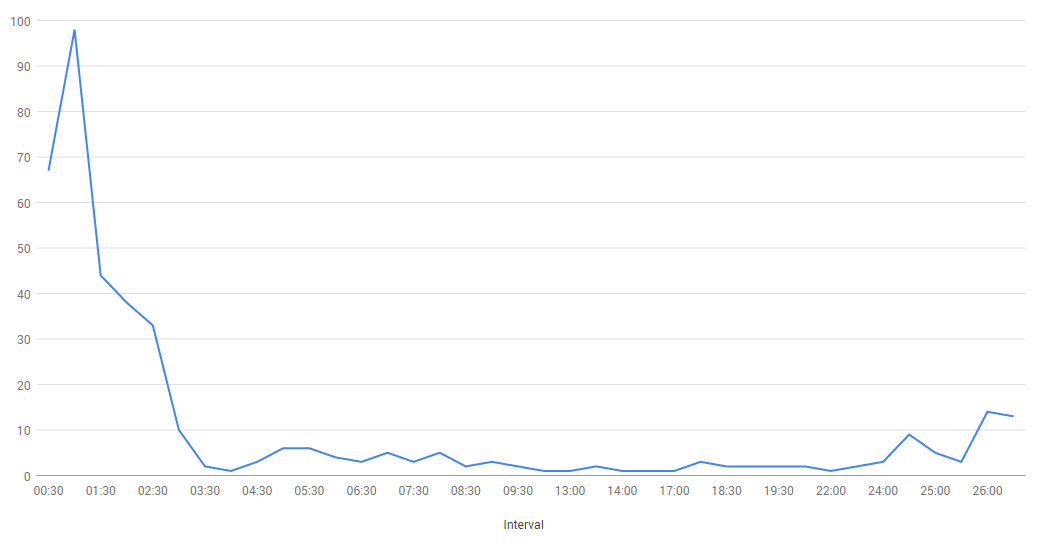
> No matter where I put the hAxis formatting options I can't get the labels
> to show as time intervals as opposed to being a day or part of a day.
>
> Here's a snippet of the code:
>
>
> <https://lh4.googleusercontent.com/-V6DwKcMAiIM/VPR7TptVf7I/AAAAAAAAACE/Hjo3DEzAKsc/s1600/line%2Bgraph%2Btimeofday%2Bcode.PNG>
>
> Here's how it renders in the browser:
>
>
> <https://lh5.googleusercontent.com/-w4veHrC9180/VPR7nNYsSII/AAAAAAAAACM/Z_SHQoKD9YE/s1600/line%2Bgraph%2Btimeofday.PNG>
> Also, now hovering over the data points causes a red error box to appear
> above the chart, but there's no information sent to the javascript console.
>
> Any thoughts as to what I am doing wrong?  I thought using 'timeofday'
> would render like my intervals when they were strings, i.e. '00:30:00',
> '1:30:00', etc.
>
> This is the documentation that I am going off of:
> https://developers.google.com/chart/interactive/docs/
> datesandtimes#timeofday
>
> Thanks,
>
> -Don
>
>
> On Friday, February 27, 2015 at 4:24:34 PM UTC-5, Sergey wrote:
>
>> That's exactly what the purpose of the 'timeofday' format is. It models a
>> time relative to some arbitrary 0:00. If you did want to model it anchored
>> to a specific point in time, you would use the 'datetime' type, which is
>> simply a Date object with time in it.
>>
>> On Fri, Feb 27, 2015 at 3:42 PM Don Norman <[email protected]> wrote:
>>
>>> Hi Sergey,
>>>
>>> I had originally thought that 'timeofday' wouldn't be appropriate
>>> because I assumed it was related to a specific point in time.  The 30
>>> minute intervals that I am working with aren't really related to any
>>> specific point in time, because the events that I am tracking could start
>>> at a different time on any given day.  And rather than have different start
>>> times for them all, I was plotting them along intervals in which they
>>> happened from a 00:00 starting point; regardless of when that actual
>>> starting point happened.
>>>
>>> I'll try it though and see how it turns out.  I may just have to
>>> normalize the time range of the events so they sit nicely on top of each
>>> other in a graph.
>>>
>>> Thanks!
>>>
>>> -Don
>>>
>>>
>>> On Friday, February 27, 2015 at 2:55:23 PM UTC-5, Sergey wrote:
>>>
>>>> Hi Don,
>>>>
>>>> I think timeofday is what you want, but you need to match the format
>>>> that it expects, which is not a string. It expects an array of numbers.
>>>> Take a look at this documentation page for an example of how to use it:
>>>> https://developers.google.com/chart/interactive/docs/dat
>>>> esandtimes#timeofday
>>>>
>>>> On Fri, Feb 27, 2015 at 2:49 PM Don Norman <[email protected]> wrote:
>>>>
>>> Hello,
>>>>>
>>>>> I have a line graph set up using time intervals and I would like to
>>>>> use a trending line, however those are only available with continuous
>>>>> axes.
>>>>>
>>>>> https://developers.google.com/chart/interactive/docs/customi
>>>>> zing_axes#Discrete_vs_Continuous
>>>>>
>>>>> There is already 'number', 'date', 'datetime' and 'timeofday'
>>>>> available as a continuous axis, it would be really nice to have 'interval'
>>>>> added as a continuous axis as well.
>>>>>
>>>>> Here's an example of the graph that I have, it's showing a number of
>>>>> events across an interval of time.
>>>>>
>>>>>
>>>>> <https://lh6.googleusercontent.com/-pqMA5zXqHPE/VPDFgO-BFiI/AAAAAAAAABs/OJ-LFTvVtYk/s1600/line%2Bgraph.PNG>
>>>>>
>>>>> The intervals are technically continuous since they are every 30
>>>>> minutes, but are not displayed that way due to 'string' being the only
>>>>> column type that the API will allow me to use with them.
>>>>>
>>>>> Is there a way to achieve this with the currently available API
>>>>> options?  I was thinking that I could use 'timeofday' but it did not like
>>>>> the input values (00:00, 00:30) for that type.
>>>>>
>>>>> Thanks,
>>>>>
>>>>> -Don
>>>>>
>>>>> --
>>>>> You received this message because you are subscribed to the Google
>>>>> Groups "Google Visualization API" group.
>>>>> To unsubscribe from this group and stop receiving emails from it, send
>>>>> an email to [email protected].
>>>>>
>>>> To post to this group, send email to [email protected].
>>>>
>>>>
>>>>> Visit this group at http://groups.google.com/group
>>>>> /google-visualization-api.
>>>>> For more options, visit https://groups.google.com/d/optout.
>>>>>
>>>>  --
>>> You received this message because you are subscribed to the Google
>>> Groups "Google Visualization API" group.
>>> To unsubscribe from this group and stop receiving emails from it, send
>>> an email to [email protected].
>>> To post to this group, send email to [email protected].
>>> Visit this group at http://groups.google.com/group
>>> /google-visualization-api.
>>> For more options, visit https://groups.google.com/d/optout.
>>>
>>  --
> You received this message because you are subscribed to the Google Groups
> "Google Visualization API" group.
> To unsubscribe from this group and stop receiving emails from it, send an
> email to [email protected].
> To post to this group, send email to google-visualization-api@
> googlegroups.com.
> Visit this group at http://groups.google.com/
> group/google-visualization-api.
> For more options, visit https://groups.google.com/d/optout.
>

--
You received this message because you are subscribed to the Google Groups
"Google Visualization API" group.
To unsubscribe from this group and stop receiving emails from it, send an email
to [email protected].
To post to this group, send email to [email protected].
Visit this group at http://groups.google.com/group/google-visualization-api.
For more options, visit https://groups.google.com/d/optout.