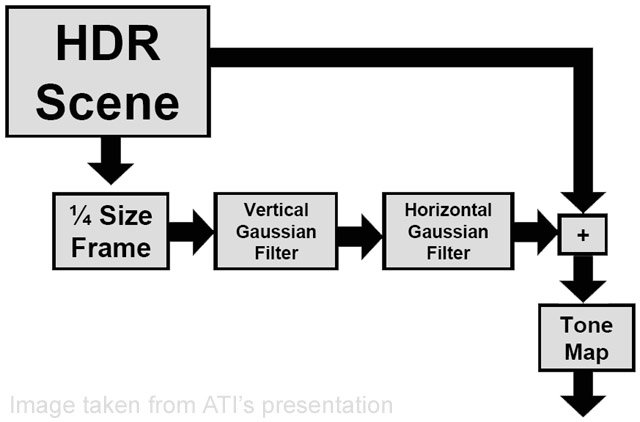
This is a pretty advanced topic... I suggest learning HLSL (or finding a
coder capable of doing it for you)
Regardless here are some links

http://www.gamedev.net/columns/hardcore/hdrrendering/
specifically :
http://images.gamedev.net/columns/hardcore/hdrrendering/Image2-HDRprocess.jpg

Look at how render targets in source work, and check out the already
existing (but non functional) bloom function DoScreenSpaceBloom() in
view_scene.cpp to get a feel for whats required

Or just wait for lost coast and mess around with what we get from that

example of a bloom in source:
http://www.jakoavain.net/helk/mybloom.jpg

all you'd have to do is split up additional render targets on a per entity
basis to get the restricted glowing you want.
From: Nick <[EMAIL PROTECTED]>
Reply-To: [email protected]
To: [email protected]
Subject: Re: [hlcoders] Can you add "glow shells" to a model in hl2?
Date: Sun, 7 Aug 2005 15:12:16 -0500

On 8/7/05, Maurino Berry <[EMAIL PROTECTED]> wrote:
> Render only the models/materials of models that are supposed to glow, to
a
> seperate render target, then run a fullscreen effect on them(bloom),
then
> render that buffer over the finished scene.
>

I have no idea how to even start doing that. Is there even a tutorial
that can help me get started?

_______________________________________________
To unsubscribe, edit your list preferences, or view the list archives,
please visit:
http://list.valvesoftware.com/mailman/listinfo/hlcoders
_________________________________________________________________
Is your PC infected? Get a FREE online computer virus scan from McAfee®
Security. http://clinic.mcafee.com/clinic/ibuy/campaign.asp?cid=3963


_______________________________________________
To unsubscribe, edit your list preferences, or view the list archives, please
visit:
http://list.valvesoftware.com/mailman/listinfo/hlcoders