Hi Carlos,

Thank you again for your answer. I think that I need to invest in something
like this:
http://www.ebay.co.uk/itm/SUNWAYFOTO-DDP-64S-Low-Profile-Indexing-Rotator-Tripod-Head-HDR-Panorama-/251368998052?pt=UK_Tripods_Heads_Stablisers&hash=item3a86c284a4
 -
which is just a left-right rotating head. One plane rotating head this is
what I need I think.
Also, thank you very much for your help with Hugin - I will try this at
night, when I am at home.

Thanks a lot.


On Thursday, 20 March 2014 12:10:02 UTC, Cartola wrote:

> Hi Pawel,
>
> to optimize d and e you first have to choose the Expert interface at the
> menu Interface / Expert
>
> Then you go to the Photos tab and at the Geometric combo in the Optimise
> section (bottom part of the window) you choose "Custom parameters". When
> choosing this a new tab "Optimizer" will appear and there you will be able
> to optimize every variable separatedly.
>
> The bold underlined items will be optimized. You can toggle an item
> optimization by clicking it with Ctrl key pressed. 'd' and 'e' are lens
> parameters, which are shown below the image parameters.
>
> On the 'calibration of your head' subject, you can also test it by doing
> the 'tape on the window' test or anything equivalent. Here a good link
> about testing it:
>
> http://www.johnhpanos.com/epcalib.htm
>
> I think that looking at the lens pupil from front is less precise but can
> be an easier first test. And don't forget to do tilt to test, cause at that
> link they don't do that and this is probably your possible main problem
> with using a ball head.
>
> Cheers,
>
>
> Carlos E G Carvalho (Cartola)
> http://cartola.org/360
> http://www.panoforum.com.br/
>
>
> 2014-03-20 8:13 GMT-03:00 Pawel Rozenek <[email protected]<javascript:>
> >:
>
>> Brandan,
>>
>> Thank you for your amazing answer. The ball head is always lock and I do
>> NOT use it at all. To rotate left-right I use a head feature - connection,
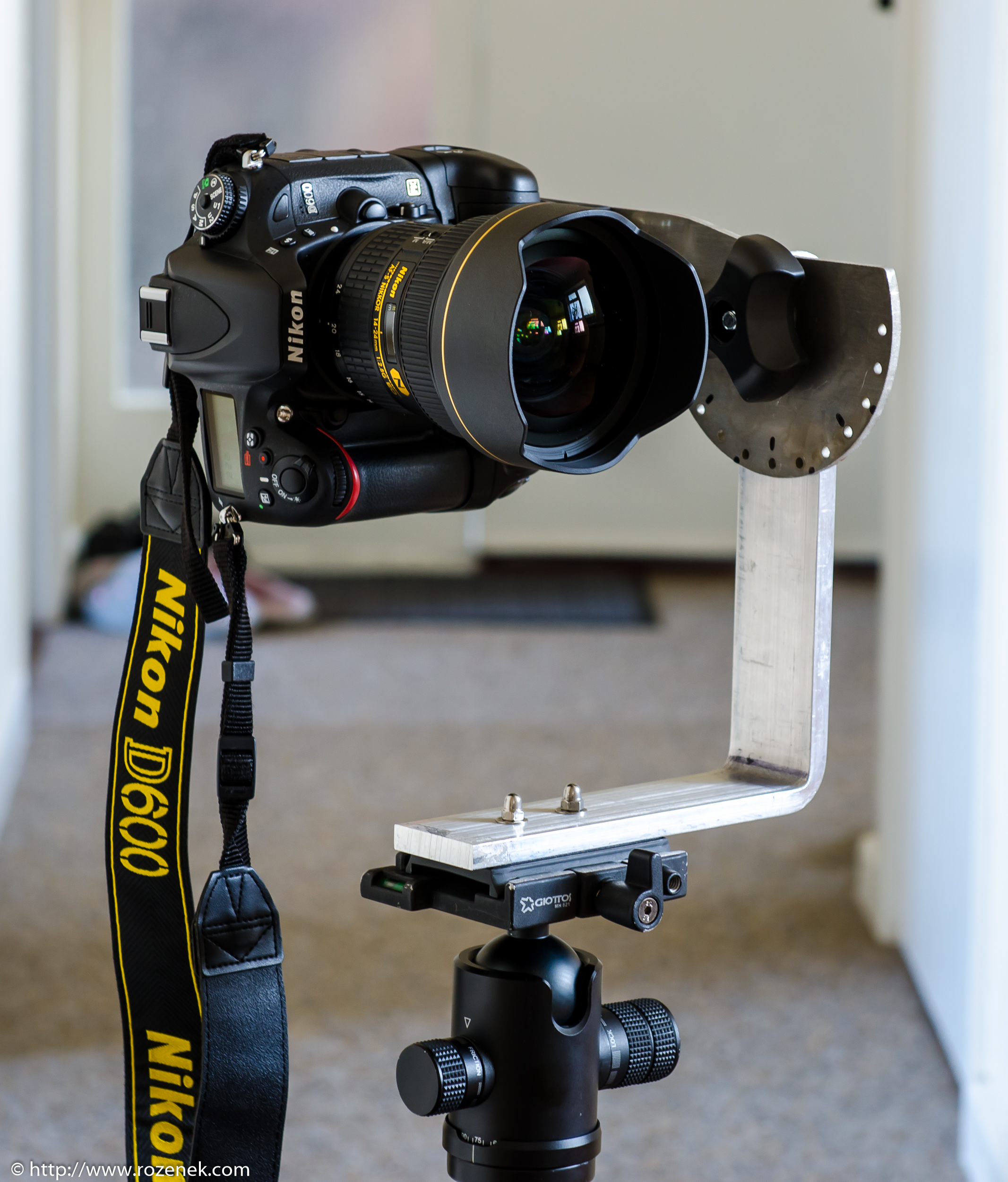
>> which is under a ball head. My L bracket in NOT adjustable. Has been
>> designed by me and cut on CNC machine especially to my camera, grip and
>> accessories. There is no way than the lens is not in nodal point apart of
>> one detail, which I just realised today:
>>
>> If I tilted forward or backward my L bracket on my ball head, they the
>> nodal point will be moved. I always adjust the L bracket on my ball head by
>> eye! It could be an issue!!! If I use a tripod without any head the nodal
>> point will be in perfect position then!
>>
>> To answer your question I pan up or down my camera without using the ball
>> head. I do it by changing position of plate which is attached to the L
>> bracket - you can see this on the photo below:
>>
>> So I think I need to change my tripod or pay more attention to adjusting
>> the head ball.
>>
>>
>>
>>
>> <http://www.rozenek.com/wp-content/uploads/2014/03/2013.09.09-Panoramic-Bracket-02.jpg>
>>
>>
>>
>> Anyway, I still do not know what are the Hugin settings for:
>>
>>
>> <https://lh4.googleusercontent.com/-qfB_1LJIipE/UyrNOYYIIvI/AAAAAAAAArw/qFHUVFRzV9A/s1600/hugin2.jpg>
>>
>>
>>
>> On Thursday, 20 March 2014 10:57:23 UTC, Brandan wrote:
>>
>>> How do you pan up and down? If you use the ball then it will change the
>>> nodal point quite a bit. If the ball stays locked and has no wiggle then I
>>> do not see how the ball can hurt anything and it would give you the option
>>> to do things at slants, which could be handy once in a while.
>>>
>>> If you are using the arm that you built into the panohead and you tilt
>>> up and down, it should work if you have things set right.
>>>
>>> I see that you did not build any side to side adjustments, but sounds
>>> like you are confident that you put the holes in the right spot. I can not
>>> tell from your photos if you have adjustments so that you can move the
>>> camera forward and back on the arm or not. If you do, check them. I find
>>> the arm to be a bugger to adjust, but well worth it if you can figure out
>>> how. Another thing to keep in mind when you build them is that the pivot
>>> point of the arm needs to be inline with the pivot point on the ball head.
>>> Get it out of line, then perfect adjustment forward to back will be wrong
>>> for side to side and vise verse.(In your build if in the main chunk both
>>> sets of holes are in the center of the metal and the corner has a good bend
>>> it should be good.)
>>>
>>>
>>> As far as making hugin work better, have you tried adding the control
>>> points by hand on one set and seeing the results? That would be an easy way
>>> to check if it is hugin or your camera set up. If it is hugin, I often
>>> select the problem photos and set the control points just on those 2-how
>>> ever many at that one place at a time. It is slow figuring out which photos
>>> to select to run CPfind on just them, but it often beats looking for
>>> control points by hand.
>>>
>>  --
>> A list of frequently asked questions is available at:
>> http://wiki.panotools.org/Hugin_FAQ
>> ---
>> You received this message because you are subscribed to the Google Groups
>> "hugin and other free panoramic software" group.
>> To unsubscribe from this group and stop receiving emails from it, send an
>> email to [email protected] <javascript:>.
>> To view this discussion on the web visit
>> https://groups.google.com/d/msgid/hugin-ptx/9bd1d7f9-22b8-4948-a443-603b702472da%40googlegroups.com<https://groups.google.com/d/msgid/hugin-ptx/9bd1d7f9-22b8-4948-a443-603b702472da%40googlegroups.com?utm_medium=email&utm_source=footer>
>> .
>>
>> For more options, visit https://groups.google.com/d/optout.
>>
>
>

--
A list of frequently asked questions is available at:
http://wiki.panotools.org/Hugin_FAQ
---
You received this message because you are subscribed to the Google Groups
"hugin and other free panoramic software" group.
To unsubscribe from this group and stop receiving emails from it, send an email
to [email protected].
To view this discussion on the web visit
https://groups.google.com/d/msgid/hugin-ptx/73451cd6-3f57-4564-a2ab-ba2a67887941%40googlegroups.com.
For more options, visit https://groups.google.com/d/optout.