I’ve been pulling my hair out trying to figure out how to use Hugin to
correct for lens distortion. I’m using the Mac 2013.0.0 build (but I’ve
also tried 2012.0.0 and 2014.0.0-RC4). I’ve first tried using the
CalibrateLensGui app as I’ve had some success with it in the past. But
unfortunately it doesn’t seem to detect intersecting lines so I can’t use
the images I’ve taken with a calibration chart such as this one:
<https://lh5.googleusercontent.com/-i4DqqHCtz9Y/U_7vS763yJI/AAAAAAAABgQ/FnPQNLFuXfE/s1600/DSC09994.small.jpg>

If I force the *Minimum Line Length* to something very small then it will
detect lines but “optimize” very poor correction parameters (I only want
the a, b & c parameters). At least it actually does something though. I’ve
searched around for tutorials on how to use Hugin for this purpose and
think I’ve more or less figured out the process, but I can’t seem to get
any results:


   1. I’ve defined control points using the “add new line” method to define
   multiple points for each line of control points. (I’ve tried different
   permutations of defining points for 2 lines, 3 lines & 4 lines, each with
   about 5 points per line. None of them have worked.)
   2. The lens type is set to Rectilinear.
   3. I go to the Optimizer tab and only enable the a, b & c parameters for
   optimization.
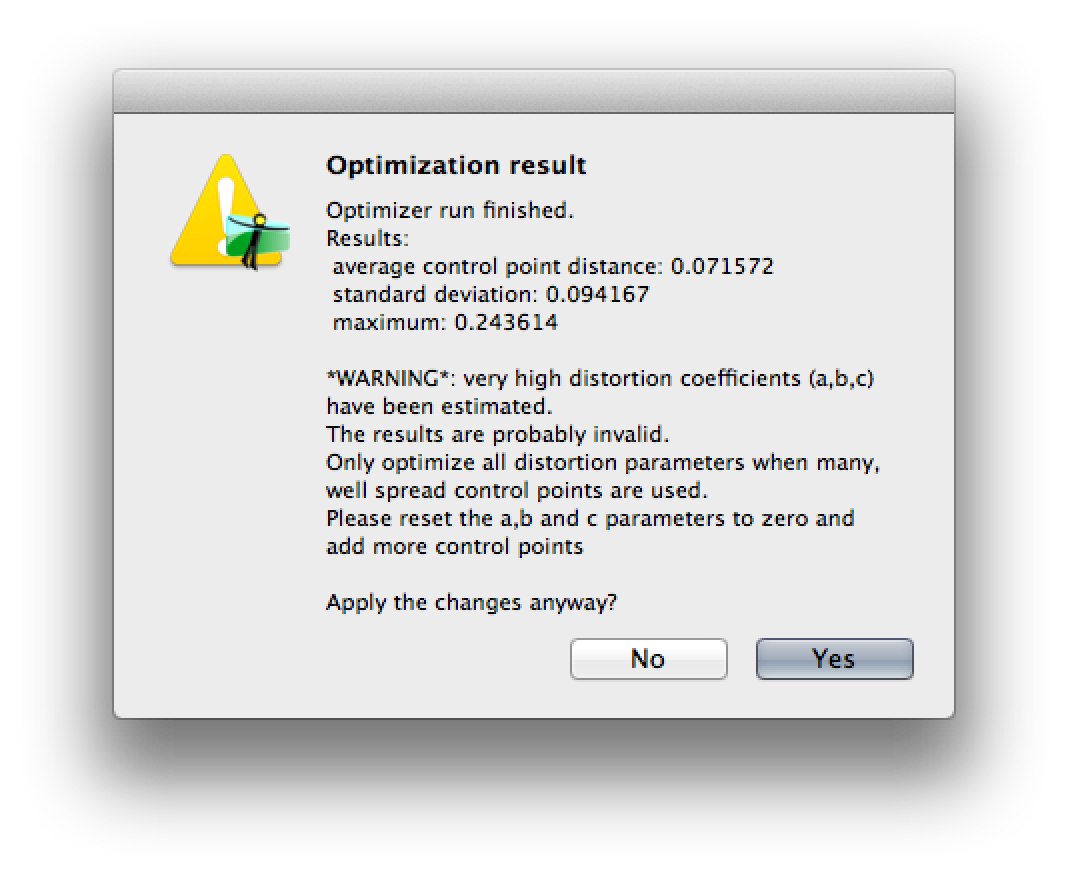
   4. When I optimize I often get a warning (see screenshot) with
   the “optimized” parameters set to very large (and very extreme) values such
   as: a = 315.2, b = 2061.9, c = 13,759.1.


<https://lh6.googleusercontent.com/-Dnw7YsUxyzQ/U_7sZLwvgKI/AAAAAAAABgE/tMh_rHOeGAY/s1600/Screen%2BShot%2B2014-08-28%2Bat%2B1.44.17%2BAM.png>
   5. If I enable the *edit script before optimizing* checkbox then I can
   see that the values in the GUI don’t get copied properly into the script.
   For example, the GUI will show a = b = c = 0, but the values in the scrip
   will be a1e-05 b1e-05 c1e-05.
   6. If I manually correct those values in the script then the optimizer
   will do nothing and set a = b = c = 0.

Does anyone have any suggestions?

Here’s the full text of the script that Hugin is creating. Does anyone see
what’s wrong or know how to fix it?

Thanks!

# PTOptimizer script, written by hugin


p f0 w3000 h2028 v50  n"TIFF_m c:LZW r:CROP"
m g1 i0 f0 m2 p0.00784314


# image lines
#-hugin  cropFactor=2.72727
i w5496 h3672 f0 v50 r0 p0 y0 TrX0 TrY0 TrZ0 a0 b0 c0 d0 e0 g0 t0  n"/Lens
Charts/DSC09994.tiff"


# specify variables that should be optimized
v a0
v b0
v c0
v


# control points
c n0 N0 x72 y287 X72 Y286 t3
c n0 N0 x1502 y195 X1501.99870237282 Y194.99938673054 t3
c n0 N0 x2781 y162 X2781.00029095988 Y161.998663015188 t3
c n0 N0 x4051 y206 X4050.99823271141 Y206.000735219853 t3
c n0 N0 x5464 y305 X5463.99811267938 Y305.001046487068 t3
c n0 N0 x106 y3360 X106 Y3360 t4
c n0 N0 x1518 y3452 X1518.00019921348 Y3452.01545669996 t4
c n0 N0 x2772 y3486 X2771.99878319084 Y3486.01808107785 t4
c n0 N0 x4027 y3452 X4026.99979692598 Y3452.01619932263 t4
c n0 N0 x5432 y3359 X5432.00103397834 Y3358.99965878955 t4


#hugin_optimizeReferenceImage 0
#hugin_blender enblend
#hugin_remapper nona
#hugin_enblendOptions
#hugin_enfuseOptions
#hugin_hdrmergeOptions -m avg -c
#hugin_outputLDRBlended true
#hugin_outputLDRLayers false
#hugin_outputLDRExposureRemapped false
#hugin_outputLDRExposureLayers false
#hugin_outputLDRExposureBlended false
#hugin_outputLDRStacks false
#hugin_outputLDRExposureLayersFused false
#hugin_outputHDRBlended false
#hugin_outputHDRLayers false
#hugin_outputHDRStacks false
#hugin_outputLayersCompression LZW
#hugin_outputImageType tif
#hugin_outputImageTypeCompression LZW
#hugin_outputJPEGQuality 90
#hugin_outputImageTypeHDR exr
#hugin_outputImageTypeHDRCompression LZW
#hugin_outputStacksMinOverlap 0.7
#hugin_outputLayersExposureDiff 0.5
#hugin_optimizerMasterSwitch 0
#hugin_optimizerPhotoMasterSwitch 0


--
A list of frequently asked questions is available at:
http://wiki.panotools.org/Hugin_FAQ
---
You received this message because you are subscribed to the Google Groups
"hugin and other free panoramic software" group.
To unsubscribe from this group and stop receiving emails from it, send an email
to [email protected].
To view this discussion on the web visit
https://groups.google.com/d/msgid/hugin-ptx/8f0f5cf0-e53b-4663-ac4e-83ccbe0abf76%40googlegroups.com.
For more options, visit https://groups.google.com/d/optout.