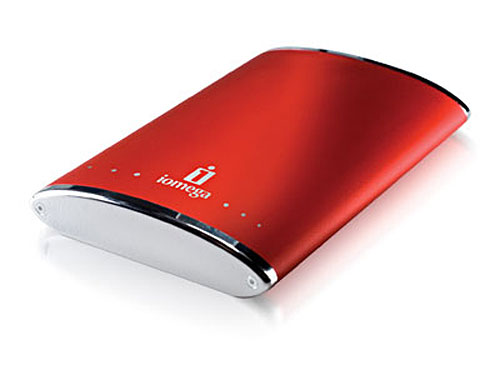
That's pretty neat. Unfortunately, mine is metal, and probably about 1/3 the
size of those WD's or whatever those are...
It would be pretty difficult to attach a fan:
http://www.slipperybrick.com/wp-content/uploads/2007/06/iomega-ego-160.jpg
        -Elliott Price

Quoit - Macintosh Computer Services
hobbittech.com/quoit

On Mar 11, 2010, at 6:20 PM, Christian Wacker wrote:

> Well... I did the mod a few weeks ago now
> Basically zip-tied an old "Penta-cool" fan from a Pentium 266mhz
> overclocking kit onto the metal "mesh" grille thing that was
> protecting the electrical half of the drive, and wired the red to red,
> and black to black. Took the case to my uncle's house where we
> dremeled it, beveled it, and sanded it. Looks pretty spiffy.
> http://photos-g.ak.fbcdn.net/hphotos-ak-snc3/hs468.snc3/25677_361418435657_619385657_4168391_2926252_n.jpg
> http://photos-h.ak.fbcdn.net/hphotos-ak-ash1/hs259.ash1/18638_307055205657_619385657_4000183_499880_n.jpg
> I ran a 4 hour stress test on it (the same one it would fail after 15
> minutes normally) and passed with flying colors.
> I do know also that a cold pop\beer\glass of something will keep them
> relatively cooler than just sitting there...
>
> Enjoy
>
> On Thu, Mar 11, 2010 at 10:20 AM, Elliott Price <[email protected]>
> wrote:
>> Well, it's a notebook drive, the enclosure is smaller then a 3.5 HD. So I'm
>> not sure how a fan would fit... maybe one of those tiny little Pismo fans, I
>> have an extra one of those. I'll have to try that, thanks for the
>> suggestion. Photos would be nice. :)
>>
>>
>>        -Elliott Price
>>
>> Quoit - Macintosh Computer Services
>> hobbittech.com/quoit
>>
>> On Mar 10, 2010, at 3:59 PM, Christian Wacker wrote:
>>
>>> On Wed, Mar 10, 2010 at 5:19 PM, Bruce Johnson
>>> <[email protected]> wrote:
>>>>>
>>>>> I have no idea how or why, but whenever that Iomega drive is hooked up, I
>>>>> have troubles with sleeping, waking, system crashes, etc. that all go away
>>>>> when I unplug it.
>>>>
>>>>
>>>> It's a flaky USB or Firewire enclosure on the Iomega. Betcha your system
>>>> log
>>>> (see Console in /Applications/Utilities) is full of USB or Firewire errors
>>>> when the Iomega is plugged in.
>>>>
>>>> MY old Beige used to have similar problems with a Iomege external CDRW
>>>> drive.
>>>>
>>>
>>> Just a quick question: Does the enclosure have a fan?
>>> I know that a certain revision of the WD MyBook drives are nortirious
>>> for overheating (The controller, not the physical drive) and would
>>> crash, but the system would still spend as much as it possibly could
>>> on trying to access the drive, rendering the system useless until the
>>> disk was unplugged.
>>> You might want to attach a fan on there (It's real easy, Red wire to
>>> red wire, black to black, or use a chained Molex style if that's your
>>> thing... (mine is SATA, so I just hardwired it), and then mount the
>>> fan on the electronics some how... (I can link to a picture of mine if
>>> you'd like, for inspiration sake)
>>>
>>> Try that before ruling the whole enclosure off... (But, for a
>>> long-term fix, a fan-included enclosure would be best, just pop the
>>> drive out and into it's new home)
>>>
>>>> --
>>>> Bruce Johnson
>>>> University of Arizona
>>>> College of Pharmacy
>>>> Information Technology Group
>>>>
>>>> Institutions do not have opinions, merely customs
>>>>
>>>>
>>>> --
>>>> You received this message because you are a member of the iMac Group, a
>>>> group for those using Apple iMacs and eMacs.
>>>> The list FAQ is at http://lowendmac.com/imac/list.shtml and our netiquette
>>>> guide is at http://www.lowendmac.com/lists/netiquette.shtml
>>>> To post to this group, send email to [email protected]
>>>> To leave this group, send email to [email protected]
>>>> For more options, visit this group at
>>>> http://groups.google.com/group/imaclist
>>>>
>>>
>>>
>>>
>>> --
>>> -Proudly Sent from a Windows PC
>>>
>>> --
>>> You received this message because you are a member of the iMac Group, a
>>> group for those using Apple iMacs and eMacs.
>>> The list FAQ is at http://lowendmac.com/imac/list.shtml and our netiquette
>>> guide is at http://www.lowendmac.com/lists/netiquette.shtml
>>> To post to this group, send email to [email protected]
>>> To leave this group, send email to [email protected]
>>> For more options, visit this group at
>>> http://groups.google.com/group/imaclist
>>
>> --
>> You received this message because you are a member of the iMac Group, a
>> group for those using Apple iMacs and eMacs.
>> The list FAQ is at http://lowendmac.com/imac/list.shtml and our netiquette
>> guide is at http://www.lowendmac.com/lists/netiquette.shtml
>> To post to this group, send email to [email protected]
>> To leave this group, send email to [email protected]
>> For more options, visit this group at http://groups.google.com/group/imaclist
>>
>
>
>
> --
> -Proudly Sent from a Windows PC
>
> --
> You received this message because you are a member of the iMac Group, a group
> for those using Apple iMacs and eMacs.
> The list FAQ is at http://lowendmac.com/imac/list.shtml and our netiquette
> guide is at http://www.lowendmac.com/lists/netiquette.shtml
> To post to this group, send email to [email protected]
> To leave this group, send email to [email protected]
> For more options, visit this group at http://groups.google.com/group/imaclist

--
You received this message because you are a member of the iMac Group, a group
for those using Apple iMacs and eMacs.
The list FAQ is at http://lowendmac.com/imac/list.shtml and our netiquette
guide is at http://www.lowendmac.com/lists/netiquette.shtml
To post to this group, send email to [email protected]
To leave this group, send email to [email protected]
For more options, visit this group at http://groups.google.com/group/imaclist