moranr commented on issue #3281: NIFI-5986 Adding "Stop & Configure" button functionality to Processor… URL: https://github.com/apache/nifi/pull/3281#issuecomment-465720646 @aeaversa, thanks for taking this on; it will be a great addition to NiFi! I would like to propose a slightly different way of presenting the info and guiding the user. It builds on some established design patterns for showing processor status and interactive conventions when stopping/terminating active threads. I'm hoping this is straight forward referencing the attached mockup. This single image shows three dialog states, starting with Processor Details (left). This is as if the user double-clicked or selected 'view configuration' from a running processor's context menu. Here in the dialog there's a new section below the header that resembles the canvas's status bar. It's a familiar design, in a familiar location and it uses familiar icons along with the 'Run Status' labeling you'd see in the Summary table. The bulletin icon and styling is replicated as well. The new addition here is the 'stop & configure' action. 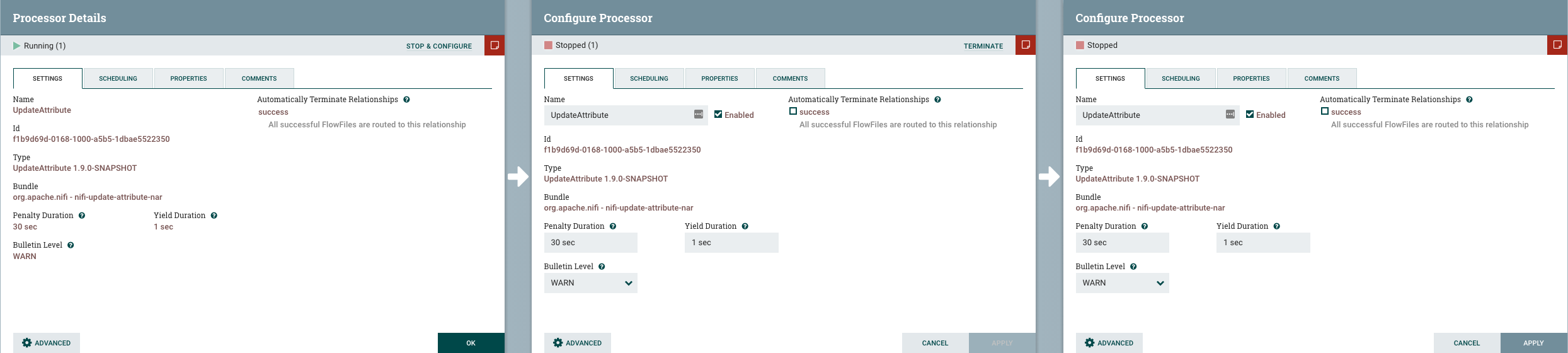 Note: I used a processor that has an 'Advanced' configuration button as well, as that is another thing competing for real estate in this space. The second dialog (center) is as if the user clicked the 'stop & configure' action and is now in the 'Configure Processor' dialog with editable fields. The processor status has changed to 'stopped', but the active thread continues. In this waiting state, the user can make changes, but the 'Apply' button is disabled and will remain so until the active thread completes. However, there is now a 'terminate' action available. This aligns with the current interactive convention seen from a processor's context menu (first you stop the processor, then the action is replaced with terminate if threads are running). The third dialog (right) would be as if a thread completed on its own, or the user clicked the 'terminate' action. Here you can see the 'Apply' button is available allowing the user to proceed and continue as normal. Interested in hearing your thoughts, along with @mcgilman 's as well.
----------------------------------------------------------------
This is an automated message from the Apache Git Service.
To respond to the message, please log on GitHub and use the
URL above to go to the specific comment.

For queries about this service, please contact Infrastructure at:
[email protected]


With regards,
Apache Git Services

