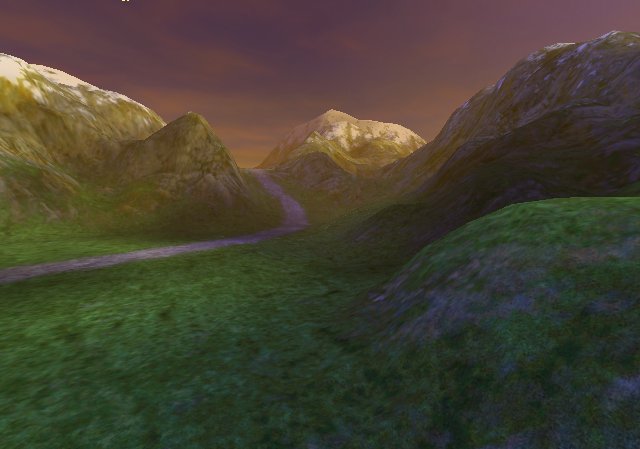
I found this article by Charles Bloom, it sounds pretty much like option 4:
http://www.cbloom.com/3d/techdocs/splatting.txt

It should be able to produce this:

http://www.vterrain.org/Textures/Image3.jpg


Dave

----- Original Message -----
From: "Kevin Glass" <[EMAIL PROTECTED]>
To: <[EMAIL PROTECTED]>
Sent: Wednesday, August 14, 2002 2:10 AM
Subject: Re: [JAVA3D] Advanced terrain texturing - help needed


David,

I've tried implementing points 1,3,4 from your mail. 1 working out fine
but hit the performance alot, especially with complicated terrains since
it required so much extra geometry. I tried 3 and 4 in a different
context when attempting to layer skins on top of a player model to
create "clothing". This appeared to pretty quick on my GF4 but neither
API seemed to work how I expected. I ended up getting incorrect results
in some cases.

Another option may be to generate a dynamic texture once as the quad
comes into the "bubble" by combining the textures by hand in a buffered
image and then using this texture. This would mean you'd get a single
hit as the square comes into view. You may even be able to implement
some sort of caching on these textures. Just an idea.

Kev

David Yazel wrote:

>Hello all!
>
>I am beta testing an unnamed online game.  This game is "state of the art"
>when it comes to the graphics and I have had a great deal of fun trying to
>figure out how they are doing a few things.  One of their outstanding
>features is the quality of their terrain and one feature in particular
>stands out.
>
>As you move through the world there is a bubble around you which textures
>the terrain at amazingly high detail.  In most cases this is a detail
>texture over a base texture, but in some cases they are doing something
>else.  In particular their roads have exceedingly fine detail, far beyond
>most of the ground.  One thing I observed is that the road textures seem to
>be built so that there is no "flow" to speak of and would look good flowing
>in any direction.  Bricks would of course violate this rule, so I am seeing
>irregular flagstones for example.  Why is this important? Because the
>technique I am thinking of would require that the "road" texture be
tilable,
>repeatable and non-directional.
>
>1. How I don't think it is working
>
>I do *not* beleive they are building specially built geometry on top of the
>terrain.  Because I see this technique applied to other terrainfeatures
>needing extra detail I do not think they are building sliced-coplanar
>greometry to hug the ground.  I think they are re-rendering the same
terrain
>patch multiple times to produce a final merged texture.
>
>2. How I think we could do it
>
>Justin's e-mail on alpha masking got me to thinking.  What if, for each
pass
>on the terrain patch, they combined and alpha mask with an underlying
>texture?  So lets say that each terrain patch 128m x 128m with a 128x128
>precomputed terrain texture + detail texture (thats what Magicosm uses),
Now
>lets say that when you are computing the base texture and you were
>calculating the road pixels, you also created an alpha mask matching the
>portion of the patch where the road was.  You then rendered a second pass
>for that patch which combined the road texture, say 256x256 (repeated 4
>times across the patch) with the alpha mask.  I think you could conceivably
>draw just the road against the terrain with a high level of detail.
>
>3. Multi-pass with multi-texturing.  I don't know if this would work, but
my
>understanding is that if you use more texture units than supported on the
>card then Java3d will fall back to multi-pass.  if this is true I think you
>could set up 4 texture units: base texture, detail noise, high density
path,
>alpha mask and it would merge all 4 when it rendered.
>
>tex unit 0=Base texture (modulate)
>tex unit 1=noise texture (add signed)
>tex unit 2=road texture (modulate)
>tex unit 3=alpha mask
>    texAttr.setCombineRgbSource(2 TextureAttributes.COMBINE_OBJECT_COLOR);

>    texAttr.setCombineAlphaSource(3,
>TextureAttributes.COMBINE_TEXTURE_COLOR);
>
>4. Using decal group. I am not sure if this would work, but you could have
>decal which used the alpha masking technique to only render over the patch,
>but only overwriting and updating the non-masked part.  So
>
>First layer:
>tex unit 0=Base texture (modulate)
>tex unit 1=noise texture (add signed)
>
>Second layer (decal)
>tex unit 0=road texture (modulate)
>tex unit 1=alpha mask
>    texAttr.setCombineRgbSource(0, TextureAttributes.COMBINE_OBJECT_COLOR);
>    texAttr.setCombineAlphaSource(1,
>TextureAttributes.COMBINE_TEXTURE_COLOR);
>
>
>Would either or both work?  If we used the multi-pass technique how would
>the combiner's be set up?
>
>5. Fading the "bubble"
>
>Since this high detail enchancment would only be applied to the level 0
>patches surrounding the user, we need a way to to move the bubble of this
>high detail as you move through the world.  These patches would be
rendering
>far more slowly because of the extra passes, so you would not want to just
>render every level 0 patch with this technique.  In addition you would not
>want the road "popping" in front of you as you moved, but rather to unroll
>smoothly.  Perhaps we could have the alpha mask texture as by-ref and
modify
>it at runtime each frame by masking out the edges?
>
>Any thoughts or suggestions would be appreciated!
>
>David Yazel
>
>===========================================================================
>To unsubscribe, send email to [EMAIL PROTECTED] and include in the body
>of the message "signoff JAVA3D-INTEREST".  For general help, send email to
>[EMAIL PROTECTED] and include in the body of the message "help".
>
>

===========================================================================
To unsubscribe, send email to [EMAIL PROTECTED] and include in the body
of the message "signoff JAVA3D-INTEREST".  For general help, send email to
[EMAIL PROTECTED] and include in the body of the message "help".

===========================================================================
To unsubscribe, send email to [EMAIL PROTECTED] and include in the body
of the message "signoff JAVA3D-INTEREST".  For general help, send email to
[EMAIL PROTECTED] and include in the body of the message "help".