User development,

The document "How to test (and build) JBoss Tools language packs", was updated
Jan 20, 2010
by Max Andersen.
To view the document, visit:
http://community.jboss.org/docs/DOC-13256#cf

Document:
--------------------------------------------------------------
h1. Pseudo langpacks in action

h1.
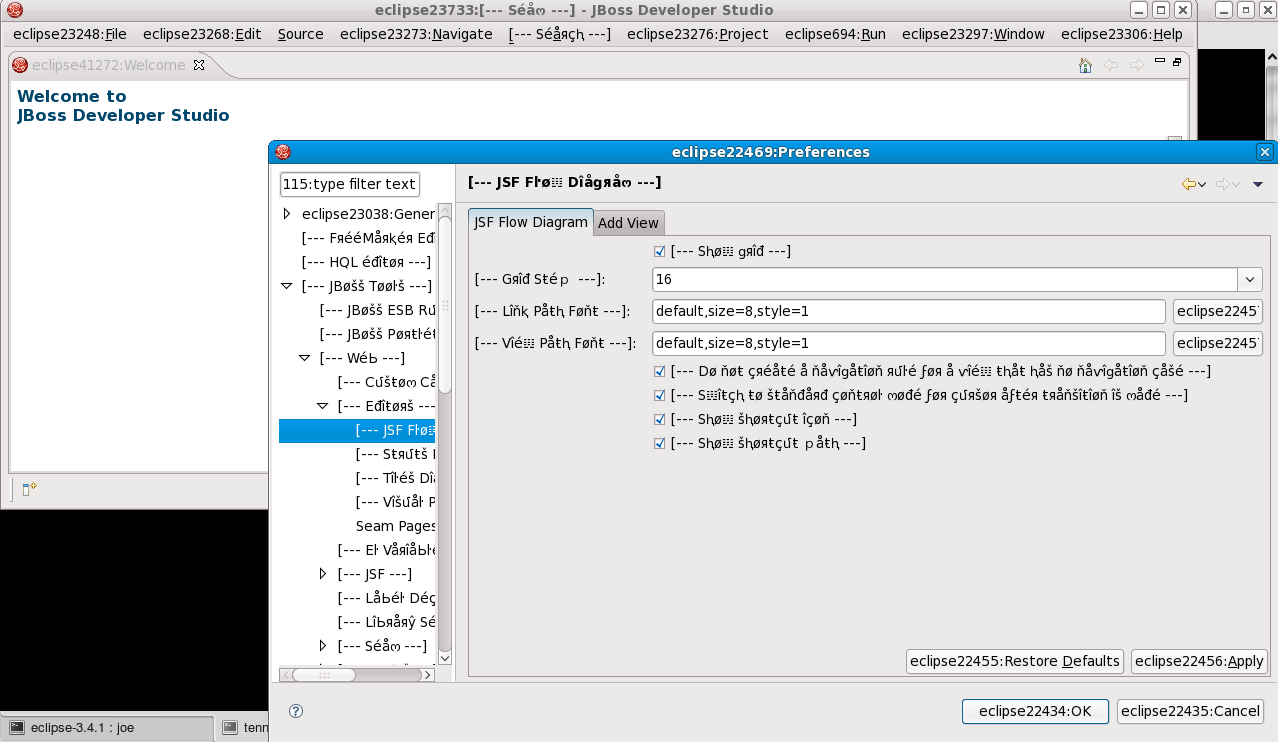
http://community.jboss.org/servlet/JiveServlet/showImage/102-13256-4-1130/JBDS-pseudo.png
This screenshot shows JBoss Developer Studio (dev version) together with Babel
and JBoss Tools pseudo langpacks.

The unusual Unicode characters surrounded by [--- ---] are provided by the
JBoss Tools langpacks.  The eclipseNNNN:Something strings are provided by the
Eclipse Babel langpacks. If we were using French langpacks, these strings would
naturally be in French, but pseudolocales (a) can be generated instantly from
English text and (b) remain readable as English (once you get used to them!).

Anything in plain English is most likely text which has been hard-coded, either
in Eclipse or in JBoss Tools, so the goal is to get rid of any plain English!
Any hard-coded text in the above screenshot is there purely for demonstration
purposes!
h1. Building langpacks
($jbt is the directory containing JBoss Tools source code)

In a terminal window:
* cd $jbt/i18n
* ant cleanpot #[temporary workaround]

* ant all

h1. Installing langpacks via update site (for precompiled JBT/JBDS)
NB: For now, you will need to build the langpacks yourself as shown above.

In Eclipse+JBoss Tools 3.0, or JBoss Developer Studio 2.0:
1. use Help/Software Updates/Available Software/Add Site to add the directory
$jbt/i18n/target/jars/ as an update site, and hit OK.
2. select the new entry "JBoss Tools Localization Update Site", open it up, and
select the entire group for Pseudo Locale (en_AA), or other language when real
translations become available
3. click Install, and follow your nose.

4. While you're at it, you should probably install one or more of the
translations for Eclipse, from the Babel project.  Use this update site:
http://download.eclipse.org/technology/babel/update-site/ganymede

If your operating system is set to a non-English locale, and you installed the
right langpack, Eclipse should come up in that language next time you run it.

On the other hand, if you are using a pseudolocale like en_AA, you will have to
force Eclipse to use that locale.  Just change your Eclipse/JBDS shortcut to
append the options "-nl en_AA"


h1. Installing langpacks the hard way (launching JBT from within Eclipse)

Eclipse 3.4's new update manager P2 doesn't work inside self-hosted Eclipse
instances, so we can't use the update site approach.  Instead, we use something
far more painful...


1. Download all the Babel plugins (v3.4) for your chosen language from one of
the mirrors here:
http://www.eclipse.org/downloads/download.php?file=/technology/babel/babel_language_packs/.
     (NB: If you don't want to download them one by one, you can use Firefox's
addon DownThemAll with the fast filter "en_AA_3.4".)
2. Unzip the plugin zips under $jbt/i18n/babel, for example:
** cd $jbt/i18n; mkdir babel; cd babel
** for f in ~/BabelLang*.zip; do unzip -qq $f; done
3. In Eclipse's Preferences, select Target Platform, click Reload, then click
Add to bring up a wizard, then select File System and Add the directories
$jbt/i18n/target/jars/plugins/ directory and $jbt/i18n/babel/eclipse/plugins/.
4. Create an Eclipse Application launch profile with "all workspace and enabled
plugins" and the extra command line "-nl en_AA".  (Or your preferred locale.)

Now, whenever you run that launch profile, you should get Babel and JBoss Tools
langpacks.

IMPORTANT: Whenever you recompile the langpack plugins with "ant all", you will
have to perform step 3 again, since the new build number causes the jar
filenames to change.  As a shortcut, you can use "ant quick" [formerly ant
reall] to rebuild langpacks with the same build number, but be aware that this
won't pick up new ResourceBundles.

NOTE: Sometimes, you will find that Eclipse refuses to compile the JBT source
code, and complains that it can't find basic classes like java.lang.Object or
org.eclipse.swt.SWT.  (This often happens if Eclipse has crashed and tries to
recompile the entire workspace.)  If this happens, you will have to go back to
Preferences/Target Platform, click Reload and OK to remove the extra plugins.
Then go back in and add the plugins directories again (step 3).


h1. Using and testing pseudo langpacks
Babel pseudo langpacks for en_AA prepend every string with something like
eclipseNNNN: or webtoolsNNNN:.

JBoss Tools langpacks replace "Finished building project {0}" with the Unicode
string "[--- Fîňîšⱨéđ Ьմîŀđîňց pяøʝéçŧ {0} ---]".

Any strings which appear in plain English have not been externalised. For each
string, we will have to work out whether it should be part of a Babel langpack
or JBoss Tools.
* Externalisation of JBoss Tools strings is covered by
https://jira.jboss.org/jira/browse/JBIDE-3557.

* Unexternalised strings in Eclipse.org projects should be reported to the
relevant project: https://bugs.eclipse.org/bugs/.

--------------------------------------------------------------
_______________________________________________
jboss-user mailing list
[email protected]
https://lists.jboss.org/mailman/listinfo/jboss-user