User development,

The document "ESB Action View", was updated Jan 20, 2010
by Max Andersen.
To view the document, visit:
http://community.jboss.org/docs/DOC-12950#cf

Document:
--------------------------------------------------------------
*Overview*

The ESB Action View is an Eclipse plug-in that shows ESB actions found on a
project's classpath. These actions are grouped by Java package, and the view
works with the Eclipse Java Development Tools (JDT) to show JavaDoc and open
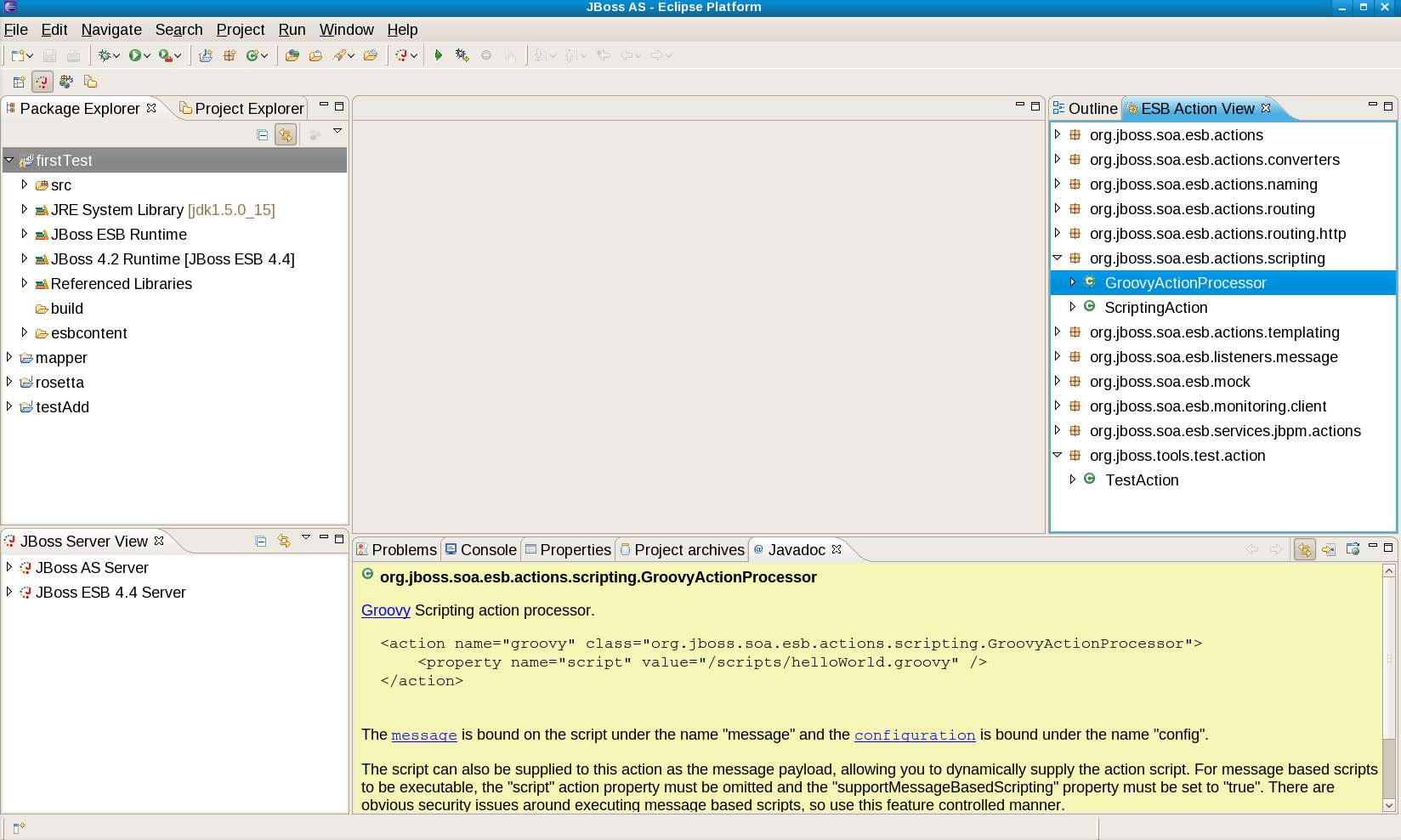
associated source code. This view is shown below:

http://community.jboss.org/servlet/JiveServlet/showImage/102-12950-9-1070/actionview.jpg
The ESB Action View appears on the right-hand side of the workbench. For the
selected project ("firstTest"), the ESB built-in action "GroovyActionProcessor"
is selected, and its JavaDoc appears in the JavaDoc view on the bottom. Notice
also that user-defined actions (here "TestAction" shown at the bottom of the
ESB Action View) also appear.

*Motivation*

Why is this view interesting? While is it certainly true that you can get the
same information directly from the Eclipse Java Package Explorer view (shown on
the left-hand side of the workbench), the ESB actions contained therein are
scattered across jar files, and you have to search for them yourself. The ESB
Action View takes care of this search, and presents the ESB actions in an easy
format for learning and using.

Further, the ESB Action View is associated with the Graphical Service Designer
(https://jira.jboss.org/jira/browse/JBIDE-2068). Since the main feature of the
Graphical Service Designer is the ability to diagram ESB action chains, we will
need something like the ESB Action View as a design palette.

*Installation and Usage*

The ESB Action View is available in JBoss Tools SVN at:

http://anonsvn.jboss.org/repos/jbosstools/workspace/jgraham/plugins

and was built using the
http://www.eclipse.org/downloads/packages/eclipse-ide-java-ee-developers/ganymedesr1.
 I've also installed the latest build of http://www.jboss.org/tools/. Finally,
since we've interested in JBoss ESB development, we'll also need the
http://www.jboss.org/jbossesb/ I used JBESB 4.4GA for development, though other
versions (including SOA-P) should be fine.

Once you have these installed, the next step is to create a Java project with
the ESB jars on the classpath. The easiest way to do this (and to deploy
directly to the ESB) is to use the ESB project wizard in JBT 3. Whichever way
you configure the classpath for the JBoss ESB jars, then next thing you'll want
to do is associate the JavaDoc (otherwise the JavaDoc view will complain that
no JavaDoc is found). For example, here is the Eclipse classpath container for
my installation of JBESB (which I've cleverly named "JBoss ESB Runtime"):

http://www.jboss.org/community/servlet/JiveServlet/downloadImage/1071/esb-classpath-container.jpg

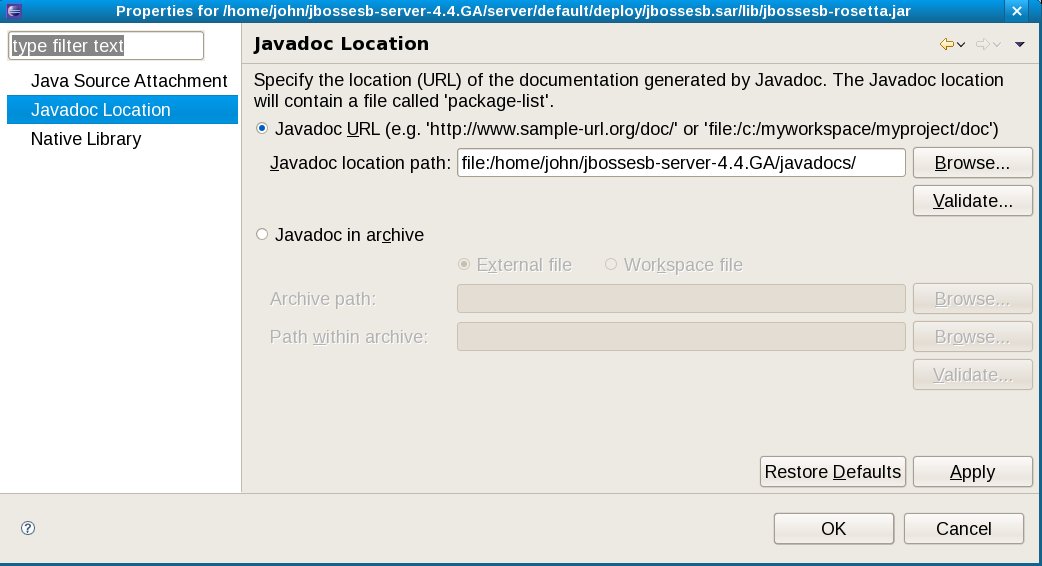
Since most of the ESB actions we're interested in are located in
jbossesb-rosetta.jar, I've located that jar in the JBoss ESB Runtime classpath
folder, right clicked, selected "Properties," and set the JavaDoc location to
that supplied with the JBESB install:

http://community.jboss.org/servlet/JiveServlet/showImage/102-12950-9-1072/setting-javadoc.jpg

In theory you should also do the same for the source files (so Eclipse can open
the Java source directly from the ESB Action View), but see below for a
problem....

*Note:* If you can just attach source, then you do not have to attach the
JavaDoc separately, as Eclipse will extract any JavaDoc from the provided
source files.

*Known Issues*

As a proof of concept and not a product-ready component, there currently are a
number of limitations to be aware of in the ESB Action View:

* Source code attachments: In theory you can point to a source code archive or
directory and JDT knows how to open source from there based on selected class
files. I can't seem to make this work at the moment, so if anyone has some
success, please let me know! Note that this mechanism is standard JDT -- the
ESB Action View does nothing special here -- so if you can make it work with
regular Eclipse JDT components, it should also work straight away with the ESB
Action View.

*Update, February 5, 2009:* This turns out to be a bug in how source code
attachments are handled in JBT/JBDS. See
https://jira.jboss.org/jira/browse/JBIDE-3733 for details.


* Transitive classpaths: The ESB Action View currently does not take into
account referenced projects (which could supply additional ESB actions). There
is no technical problem with doing this, it's just not implemented in the
current version.
* There's some stupid code ignoring re-initialization exceptions thrown if the
ESB Action View is closed and then re-opened in the same instance of the
Eclipse workbench. Interestingly, these exceptions don't prevent the view from
working correctly, so I've just coded around them for the moment. Obviously it
would be nice to figure out and correct what is actually wrong here.

*Lesson Learned*

Part of the reason for "executable comments" is to try out ideas and see how
they actually work in code. During the process of creating the ESB Action View,
a number of items emerged:

* We'll need some way of distributing the JBESB JavaDoc and source code in a
form that can be consumed by the tools. Currently (I believe) only the
community edition comes with JavaDoc, and neither the community editor nor
product come with source archives.
* It would be useful to have the server runtime tools in JBT attach JavaDoc and
source code (like the JRE configurations in Eclipse do), so different versions
of the ESB runtime can be supported by reference to the classpath container
given for a project.

* Likewise, it would be useful to configure JBESB configuration descriptors
(like jboss-esb.xsd) from a known location in the runtime definition, so tools
can dynamically drive configuration based on version-specific requirements.

https://www.jboss.org/community/docs/DOC-12949

--------------------------------------------------------------
_______________________________________________
jboss-user mailing list
[email protected]
https://lists.jboss.org/mailman/listinfo/jboss-user