Administrator Administrator [http://community.jboss.org/people/admin] modified
the document:
"Tooling Support for Multiple Run time Versions"

To view the document, visit: http://community.jboss.org/docs/DOC-13335

--------------------------------------------------------------
http://community.jboss.org/docs/DOC-11954 <-- Back to SOA Tooling

Introduction

h1. Case Study

In this case study we examine key features of multiple Java VM support in
http://www.eclipse.org Eclipse. We use this example not because it dictates how
support for multiple versions of run times must be handled in every situation,
but rather because it illustrates core design considerations for this problem.

Regardless of the Java version used to run Eclipse itself, the Eclipse Java
development environment allows the user to configure which Java VM will be used
for development. As will be seen below, a default choice is made for Java
development, and this default can be overridden on a per-project basis.

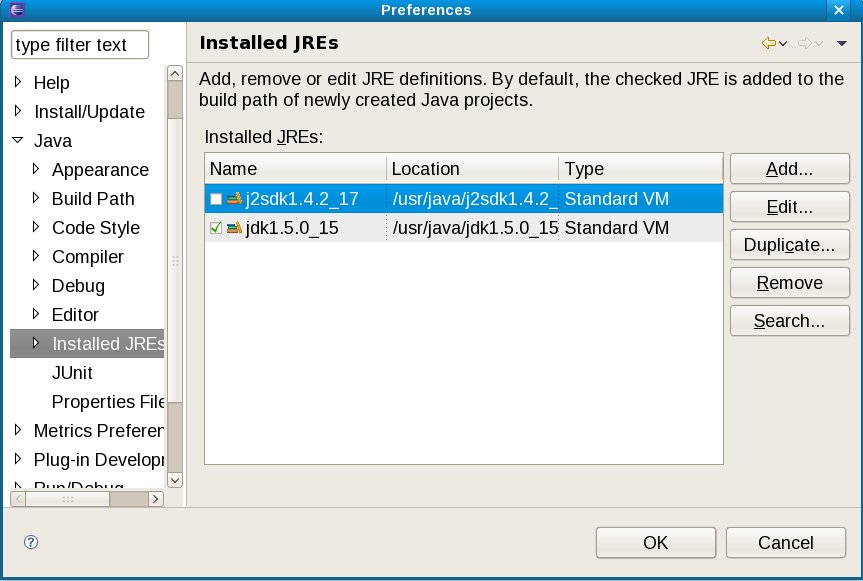
Within the Java development environment preferences, there is a section for
configuring Java run times:


http://community.jboss.org/servlet/JiveServlet/showImage/102-13335-5-1149/vm-list-dialog.jpg

http://community.jboss.org/servlet/JiveServlet/downloadImage/102-13335-5-1149/450-302/vm-list-dialog.jpg


In this case, we have two Java VM versions available, with a 1.5 VM set as
default. (Available Java VM run times actually can vary on two dimensions:
version and vendor. In this example, we will concentrate on version
differences, though the same applies to vendor differences as well.)

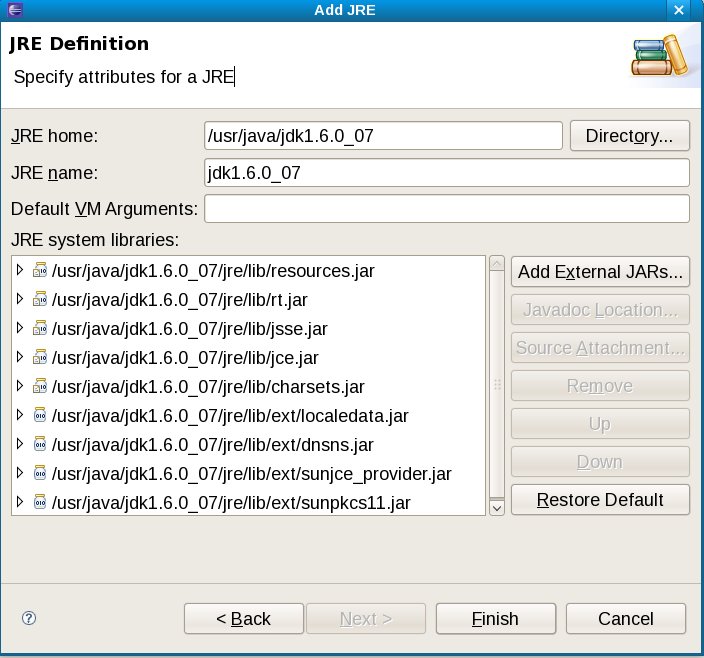
The user can add new Java VM options:


http://community.jboss.org/servlet/JiveServlet/showImage/102-13335-5-1150/add-vm-dialog.jpg

http://community.jboss.org/servlet/JiveServlet/downloadImage/102-13335-5-1150/450-420/add-vm-dialog.jpg


Here I have added a Java 1.6 VM. Note that there are a number of archives (jar
files) involved in the definition of a "Java 1.6 VM," and the tooling has
determined these based on the location chosen. Also notice that adjustments to
the archives list are possible (add, remove, etc.) using the buttons on the
right-hand side.

Since a Java 1.5 VM is the default, a Java code using generics will compile
without error and is supported by editor features such as code completion:


http://www.jboss.org/community/servlet/JiveServlet/downloadImage/1151/java5-code.jpg

http://www.jboss.org/community/servlet/JiveServlet/downloadImage/1151/java5-code.jpg


The user can, however, change the Java VM level at the default or project
level. For this example, I changed the Java VM level to 1.4 for the project
only. Doing so results in a rebuild and errors displayed in the editor:


http://www.jboss.org/community/servlet/JiveServlet/downloadImage/1152/java5-code-err.jpg

http://www.jboss.org/community/servlet/JiveServlet/downloadImage/1152/java5-code-err.jpg


With more detail in the Problem View:


http://community.jboss.org/servlet/JiveServlet/showImage/102-13335-5-1153/problem-view.jpg

http://community.jboss.org/servlet/JiveServlet/downloadImage/102-13335-5-1153/450-71/problem-view.jpg


Although this example seems very simple and obvious, it does illustrate a
number of features. In particular, we can ask how useful (and usable) the
Eclipse Java development environment would be if:

* The user could not choose the Java VM for development. Perhaps instead the
Java VM would be only the one used to run Eclipse, and hence the Eclipse launch
configuration would need to be changed to switch Java VM run times.

* The user could not choose a Java VM version on a per-project basis. Instead
the Java VM would be global, and changing it would impact all projects in the
workspace.
* When adding a new Java VM option the user had to specify the set of archives
by hand. That is, rather than thinking about add a "Java VM," the user had to
think about adding a set of archives that together comprise the "Java VM."
* The Java editor was not aware of specific features in Java VM versions.
Perhaps the Java editor would not support generics even though a Java 1.5 VM
was is use.
* Switching the Java VM version for a project (or on a global default basis)
did not register errors for code invalidated by the change.
* The Java editor and (Eclipse) incremental Java compiler did not show any
compile errors, but when a application was run, the Java VM threw an error for
invalid byte code.

Clearly these sorts of problems would seriously hamper efficient development of
Java applications in Eclipse, and users would not consider the Eclipse Java
tooling as particularly useful or usable. Luckily the Eclipse Java  development
environment does not suffer from these short-comings, and the relatively simple
features in support of Java VM versions are keys in achieving this cohesiveness.

Design Considerations
--------------------------------------------------------------

Comment by going to Community
[http://community.jboss.org/docs/DOC-13335]

Create a new document in JBoss Tools at Community
[http://community.jboss.org/choose-container!input.jspa?contentType=102&containerType=14&container=2128]
_______________________________________________
jboss-user mailing list
[email protected]
https://lists.jboss.org/mailman/listinfo/jboss-user