Fred Bricon [https://community.jboss.org/people/fbricon] created the document:
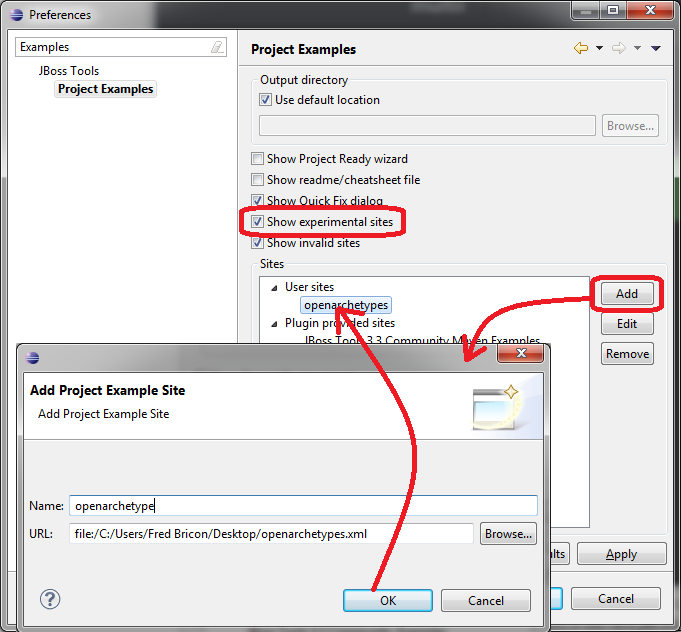
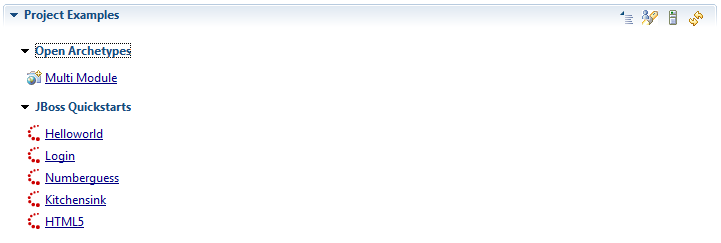
"Test archetypes in JBoss Central" To view the document, visit: https://community.jboss.org/docs/DOC-18203 -------------------------------------------------------------- One solution to test your archetypes in JBoss Central is to define a https://community.jboss.org/docs/DOC-14955 Project Example User site. First, grab a copy of the last version of http://anonsvn.jboss.org/repos/jbosstools/trunk/download.jboss.org/jbosstools/examples/ project-examples-shared-XXXX.xml and save it locally. Then, you need to edit it : remove all unwanted projects and keep the one you're interested in. You will have to change : * the <name> so it doesn't collide with existing names in JBT * The archetype coordinates : * <archetypeGroupId> * <archetypeArtifactd> * <archetypeVersion> * Add/change <archetypeRepository> to point to the location of the repository (local or remote) containing the archetype under test * The <tag> value must be set to *central* * You may change the rest of the example properties according to your needs. * Save your project example descriptor locally. You will end up with something like : <projects> <project> <category>Open Archetypes</category> <name>multi-helloworld</name> <included-projects>multi</included-projects> <shortDescription>Multi Module</shortDescription> <priority>1</priority> <description>This is an overly complex Hello world</description> <size>8192</size> <url/> <fixes> <fix type="wtpruntime"> <property name="allowed-types">org.jboss.ide.eclipse.as.runtime.70, org.jboss.ide.eclipse.as.runtime.71, org.jboss.ide.eclipse.as.runtime.eap.60</property> <property name="description">This project example requires JBoss AS 7.0/7.1 or EAP 6 </property> <property name="downloadId">org.jboss.tools.runtime.core.as.710</property> </fix> <fix type="plugin"> <property name="id">org.eclipse.m2e.core</property> <property name="versions">[1.0.0,1.2.0)</property> <property name="description">This project example requires m2e >= 1.0.</property> <property name="connectorIds">org.eclipse.m2e.feature</property> </fix> <fix type="plugin"> <property name="id">org.maven.ide.eclipse.wtp</property> <property name="versions">[0.13.1,0.17)</property> <property name="description">This project example requires m2eclipse-wtp >= 0.13.1.</property> <property name="connectorIds">org.maven.ide.eclipse.wtp</property> </fix> <fix type="plugin"> <property name="id">org.jboss.tools.maven.core</property> <property name="versions">[1.3.0,1.4.0)</property> <property name="description">This project example requires JBoss Maven Tools.</property> <property name="connectorIds">org.jboss.tools.maven.feature,org.jboss.tools.maven.cdi.feature,org.jboss.tools.maven.hibernate.feature,org.jboss.tools.maven.jaxrs.feature,org.jboss.tools.maven.portlet.feature,org.jboss.tools.maven.seam.feature</property> </fix> </fixes> <importType>mavenArchetype</importType> <importTypeDescription>The project example requires the m2e, m2eclipse-wtp and JBoss Maven Integration features.</importTypeDescription> <defaultMavenProfiles>arq-jbossas-remote</defaultMavenProfiles> <mavenArchetype> <!-- Archetype coordinates--> <archetypeGroupId>org.openarchetypes</archetypeGroupId> <archetypeArtifactId>multi-javaee6-archetype</archetypeArtifactId> <archetypeVersion>0.0.1-SNAPSHOT</archetypeVersion> <!-- You can remove the <archetypeRepository> if the archetype is available from Maven Central --> <archetypeRepository>http://open-archetypes.github.com/maven-repo/snapshots/</archetypeRepository> <!-- if you need to test with your local build <archetypeRepository>file:/path/to/your/local/mavenrepo/</archetypeRepository> --> <!-- Pre-populate the project wizard input texts--> <groupId>foo.bar</groupId> <artifactId>multi</artifactId> <version>0.0.1-SNAPSHOT</version> <javaPackage>foo.bar.multi</javaPackage> <!-- Override default archetype properties --> <properties> <property name="name" value="Java EE 6 webapp project"/> </properties> </mavenArchetype> <!-- use the tag 'central' to make this example appear in JBoss Central - Project Examples section --> <tags>central</tags> <!-- Icon to use in JBoss Central--> <icon path="icons/newwebprj_wiz.gif" /> <!-- Readme / Cheatsheet to open automatically when the project is generated --> <welcome type="editor" url="/${project[0]}/readme.md"/> </project> </projects> Now you need to open Eclipse's preferences and got to JBoss Tools > Project Examples. * Check 'Show experimental sites' * Click on the 'Add' button to add your customized project example descriptor as a User Site https://community.jboss.org/servlet/JiveServlet/showImage/102-18203-1-18531/add-user-site.png https://community.jboss.org/servlet/JiveServlet/downloadImage/102-18203-1-18531/450-417/add-user-site.png Back to JBoss Central, in the Project Examples section, click on the refresh button and see your archetype appear in the list : https://community.jboss.org/servlet/JiveServlet/showImage/102-18203-1-18532/archetype-central.png https://community.jboss.org/servlet/JiveServlet/downloadImage/102-18203-1-18532/450-150/archetype-central.png You can now test your custom archetype exactly as if it was a built-in project wizard from JBoss Central -------------------------------------------------------------- Comment by going to Community [https://community.jboss.org/docs/DOC-18203] Create a new document in JBoss Tools at Community [https://community.jboss.org/choose-container!input.jspa?contentType=102&containerType=14&container=2128]
_______________________________________________
jboss-user mailing list
[email protected]
https://lists.jboss.org/mailman/listinfo/jboss-user