Maciej Swiderski [https://community.jboss.org/people/swiderski.maciej] modified
the document:
"Simulation in jBPM"

To view the document, visit: https://community.jboss.org/docs/DOC-19261

--------------------------------------------------------------
This article describes main components of the jbpm simulation module that was
introduced
http://mswiderski.blogspot.com/2012/08/simulation-in-jbpm-draft.html on this
blog. It is recommended to read it first to be able to follow this article
which provides technical insight into the module while the blog talks mainly
about simulation in general with examples and references to jbpm simulation
module as a whole.

+*First of all - please keep in mind that this is an experimental module and
subject to change, none of the following components are considered stable and
can (and probably will) change so I would like to encourage you to leave your
feedback and requirements.*+

As mentioned in the blog, simulation module consist of two components:
* path finder
* simulation engine extension

*Path finder*
Path finder is responsible for determining alternative paths in a given
process. Following diagram illustrates main interfaces/classes of that
component:

https://community.jboss.org/servlet/JiveServlet/showImage/102-19261-1-19166/pathfinder.png

https://community.jboss.org/servlet/JiveServlet/downloadImage/102-19261-1-19166/450-254/pathfinder.png

As the diagram is rather simple and explains it self some clarification is
required about the interfaces and classes that realize them.

PathContext - representation of an alternative path of the process, that holds
both path elements such as nodes and sequence flows and some internal state
PathFinder - is the main interface that should be provided to build up a list
of PathContext instances
PathFormatConverter - provides a convenient hook into the path finder to
instruct it what should be the format returned from the finder if default
(PathContext) is not enough

PathFinderFactory - just a factory to create instances of PathFinder

BPMN2PathFinderImpl - default implementation that is capable of determining
paths of a BPMN2 process and supports following:
* determining paths of the entire process
* determining paths of a embedded sub process

JSONPathFormatConverter - converts result of the find path mechanism into JSON
data model that is consumed but jBPM web designer
SimulationFilterPathFormatConverter - converts result of the find path
mechanism that are required as input for simulation

*Simulation engine extension*

simulation engine extension allows to employ jBPM engine to execute processes
in simulation mode, meaning it does not run the process directly (like invoking
services, triggering events, relying on process variables) but instead it
relies on input data to calculate how the execution could look like. To run the
simulation based on this component drools simulator is utilized with its fluent
api. Simulation engine extension provides commands that are added to the
simulator on each step of execution. Let's have a quick look at the drools
simulator fluent api:


        SimulationFluent f = new DefaultSimulationFluent();
        // @formatter:off
        f.newKnowledgeBuilder()
        .add(
ResourceFactory.newClassPathResource("BPMN2-ExclusiveSplit.bpmn2"),
ResourceType.BPMN2 )
          .end(World.ROOT, KnowledgeBuilder.class.getName() )
        .newKnowledgeBase()
          .addKnowledgePackages()
          .end(World.ROOT, KnowledgeBase.class.getName() )
        .newPath("path1")
            .newStep( 0 )
                .newStatefulKnowledgeSession()
                    .end(World.ROOT, StatefulKnowledgeSession.class.getName())
        .runSimulation();
        // @formatter:on

So what it does? It's sort of recording what it should do (and when) after
simulation is triggered with runSimulation method. So in this example following
will happen:
* create knowledge builder and add a process into it
* create knowledge base with the builder
* create a path with unique identifier
* create a step at the time distance 0 meaning will be executed directly (in
case delays are executed it will advance clock with the specified amount of
time)
* create stateful knowledge session as part of the step
* and finally run the simulation

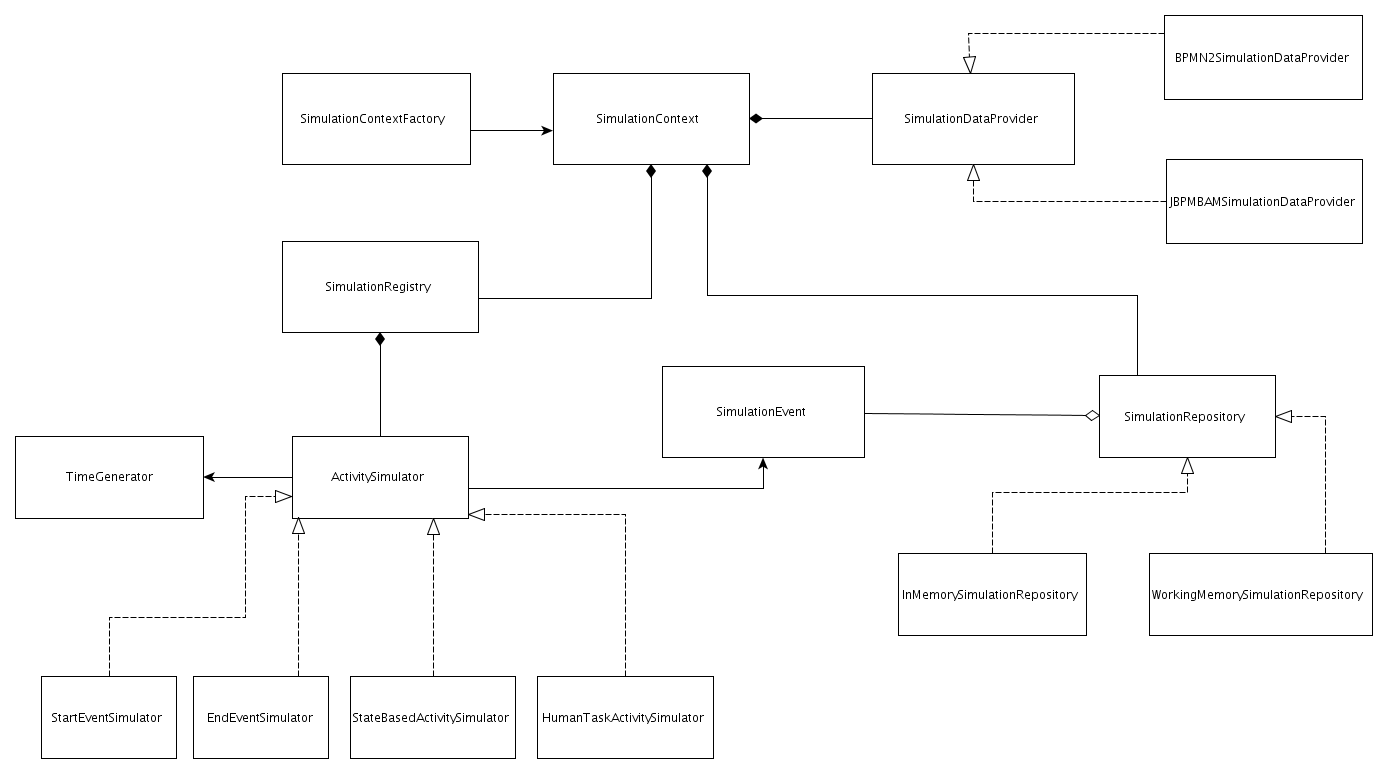
And this is pure drools simulator, let's take a look at the simulation engine
extension component and what it consists of and finally how it can e used with
drools simulator.


https://community.jboss.org/servlet/JiveServlet/showImage/19168/simulation-engine.png

https://community.jboss.org/servlet/JiveServlet/downloadImage/19168/simulation-engine.png


As you can see there are quite few classes involved so let me explain each of
their responsibility

SimulationDataProvider  - this one is responsible for providing information
(like simulation properties) for a given node
BPMN2SimulationDataProvider - fetches simulation properties directly from BPMN2
file that are stored as extension elements of each node or sequence flow as
meta data
JBPMBAMSimulationDataprovider - fetches information about given node from jBPM
Business Activity Monitoring module and attempts to convert them to simulation
properties (still under development meaning not yet fully functional)

TimeGenerator - provides simple way to manipulate time based properties to add
some sort of randomness while running simulation, for instance when duration of
an activity is given as 3 (+-1) minutes then time generator will be returning
values for following range 2 - 4 minutes

ActivitySimulator - this is the main component of the simulation engine
extension as it will be triggered for every node in the process and based on it
type various operations will be invoked
StartEventSimulator - records the start time
EndEventSimulator - records end time and calculates simulation instance
duration (execution time)
StateBasedActivitySimulator - calculates duration (execution time) for a given
activity
HumanTaskActivitySimulator - calculates human task related data like wait time
if users assigned to handle given task are fully booked, resource utilization,
etc

SimulationEvent - each ActivitySimulator produces event that contain all
relevant information for a particular node, that means that each simulator will
have a dedicated SimulationEvent

SimulationRepository - place holder for all SimulationEvents and depending on
the implementation event processor
InMemorySimulationRepository - simple implementation that collects all the
events in a list for further processing but does not do anything with the events
WorkingMemorySimulationRepository - implementation that employs WorkingMemory
(StatefulSession) as container for events and make use of rules and cep for
processing like event aggregation etc

This briefly describes main items of the simulation engine extension but you
could notice there is nothing that can actually run the simulation. For that
purpose there is a dedicated command SimulateProcessPathCommand that will be
used together with drools simulator to run the simulation. This command will
make sure that all prerequisites for running the simulation are met and will
start the process in the engine.

Currently the weakest part is the result of the simulation, in other words what
to do with all the events that were produced during simulation. Personally I
think that using rules and CEP can give a lot of power and flexibility to
produce various reports and statistics based on the events but I would
appreciate your comments in this (and not only this) area.

More will come so stay tuned!
--------------------------------------------------------------

Comment by going to Community
[https://community.jboss.org/docs/DOC-19261]

Create a new document in jBPM at Community
[https://community.jboss.org/choose-container!input.jspa?contentType=102&containerType=14&container=2034]
_______________________________________________
jboss-user mailing list
[email protected]
https://lists.jboss.org/mailman/listinfo/jboss-user