Max Rydahl Andersen [https://community.jboss.org/people/maxandersen] created
the blog post:
"Summer time with new release, SOA tools and a bit of Juno and Fedora news"

To view the blog post, visit:
https://community.jboss.org/community/tools/blog/2012/08/22/summer-time-with-new-release-soa-tools-and-a-bit-of-juno-and-fedora-news

--------------------------------------------------------------
We released back in July a new version of JBoss Tools 3.3.1 and JBoss Developer
Studio 5.0.1 which fixes the problem of installing on Eclipse 3.7.0 (Indigo)
and makes it possible, but not recommended to install on Eclipse 4.x (Juno).
The SOA Tools are also now available from JBoss Central and we got news from
the Fedora Java spin which includes parts of JBoss Tools. More below...

h2. SOA Tools
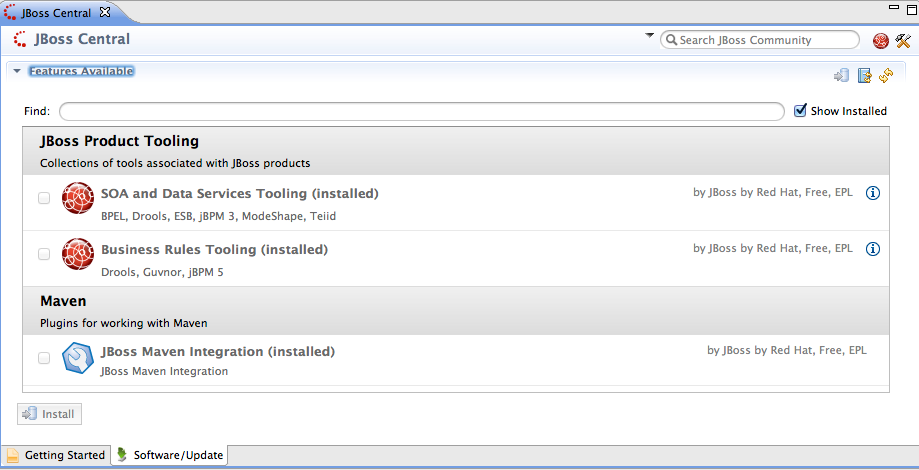
The SOA Tools (jbpm, drools, modeshape, teiid, etc.) are available from JBoss
Central in both JBoss Tools 3.3+ and Developer Studio 5+.


https://community.jboss.org/servlet/JiveServlet/showImage/38-5016-19268/soatoolsincentral.png

https://community.jboss.org/servlet/JiveServlet/downloadImage/38-5016-19268/450-230/soatoolsincentral.png

To get them open JBoss Central and go to the Software/Update tab and they
should be listed, ready to be installed.

The plugins have been updated to work with the latest release of
http://www.redhat.com/about/news/archive/2012/6/new-versions-of-jboss-enterprise-soa-and-enterprise-data-services-platforms-power-intelligent-integrated-enterprises
 JBoss SOA Platform and its components.

h2. Eclipse 3.7.0 - you still use that ?
JBoss Tools 3.3.0 came out requiring Eclipse 3.7.1 because there was some
rather nasty bugs we wanted to avoid to expose to users and we naively belived
most would be on 3.7.1+ by now - but oh boy we were wrong.

It turns out that when we released the final version of JBoss Tools 3.3.0 our
success install rate went up significantly (Yay!) but we also saw a
skyrocketing level of errored installs (Not good). Looking at those error logs
showed us that majority of Eclipse 3.7 (Indigo) users are still on the very
first version, i.e. 3.7.0.

In a perfect world Eclipse P2 update mechanisim would let you update to Eclipse
3.7.1+ at the same time as installing plugins that requires/suggest to use a
bugfixed version, but unfortunately Eclipse mechanism does not allow for this.

Therefore in this update we allowed JBoss Tools to depend on Eclipse 3.7.0 to
make it installable, but Eclipse 3.7.0 users will now get a warning dialog on
startup suggesting they should update their Eclipse to have a better experience.

h2. How about Eclipse 4.x/Juno ?
JBoss Tools 3.3.x and Developer Studio is tested and supported on Eclipse
3.7/Indigo - but what if I want to use Juno ?

There are two options:

A) You can *try* use JBoss Tools 3.3.x on Juno - but we do not recommend this.
B) You can use the
http://download.jboss.org/jbosstools/updates/nightly/core/trunk/ JBoss Tools
3.4.x nightly builds updatesite - this have been updated/adjusted to work with
Juno and is the basis for the next major update of tools and Developer Studio.

In both cases your mileage will vary, but if you are up for it please do try
out the nightly builds and report any issues found while using Juno with JBoss
Tools.

h2. Fedora Java Spin
 https://twitter.com/grdryn Gerard Ryan have been doing his Google Summer of
Code project about creating a Fedora Spin that would be good for Java
developers. In that progress he took on the task on trying to package JBoss
Tools, or at  https://apps.fedoraproject.org/packages/s/eclipse-jbosstools
least parts of it so it could be installed "the Fedora way".

 http://fedoraproject.org/static/images/fedora-logo.png
http://fedoraproject.org/static/images/fedora-logo.png

He actually succeded in making this happen and you can see his final report
about this at his
http://blog.grdryn.me/2012/08/20/fedora-java-remix-gsoc-update-13-final/ GSOC
blog.

You can try out the full Fedora Java spin by downloading the ISO images from
http://ryan.lt/fedora-java-remix/ Gerard or if you are already running Fedora
17 or newer, you can try it out by running:

yum install eclipse-jbosstools

This will actually be installed into Fedora's version of Eclipse Juno, so that
is third way to try Juno out with parts of JBoss Tools.

Hope you like that and if you find issues report it in our jra, but please
mention if you are using the Fedora package since there are some slight
differences.

Have fun,
Max

h2.
--------------------------------------------------------------

Comment by going to Community
[https://community.jboss.org/community/tools/blog/2012/08/22/summer-time-with-new-release-soa-tools-and-a-bit-of-juno-and-fedora-news]
_______________________________________________
jboss-user mailing list
[email protected]
https://lists.jboss.org/mailman/listinfo/jboss-user