Max Rydahl Andersen [https://community.jboss.org/people/maxandersen] modified
the blog post:
"JBoss Tools 4"

To view the blog post, visit:
https://community.jboss.org/community/tools/blog/2012/09/17/the-return-of-jboss-tools

--------------------------------------------------------------
Summer is over and it's time to start getting the JBoss Tools release train
moving again.

h4. JBoss Tools 4 Alpha 1
[ http://www.jboss.org/tools/download/dev/4_0.html Download] [
http://download.jboss.org/jbosstools/updates/development/juno/ Update Site] | [
http://docs.jboss.org/tools/whatsnew What's New] [
http://www.jboss.com/index.html?module=bb&op=viewforum&f=201 Forums] [
http://jira.jboss.com/jira/browse/JBIDE JIRA] [ http://twitter.com/jbosstools
Twitter]

h2. A new version ?

This year we are starting on JBoss Tools 4 (opposite to previous years where we
have been moving on JBoss Tools 3). Why the new version ? There are a bunch of
reasons why it was time, one is that our target platform on Eclipse.org also
changed (Eclipse 3.x to 4.x), the projects is growing bigger and bigger so its
time to clean up some of the API's and move from our big SVN semi-modularized
monolithic layout to smaller more independent but still aligned Git backed
projects. The groundworks for this does require splitting with things in the
past, at least on a technical level - but we do plan on making this transition
as transparent as possible on the user level.

We are also starting to use Alpha (A) instead of Milestone (M) in our
versioning - same meaning at user level (development releases/semi-bleeding
edge), but at technical levels it allow us to follow and use osgi/p2 friendly
version schemes that prevents and detects incompatible changes better than in
the past.

But enough about a single digit - on to the user visible changes/improvements...

h2. Installation
Recommended path to install is to have a clean Eclipse Juno install and use our
updatesite to install from.

This release you need Eclipse 4.2 but we recommend using the
http://www.eclipse.org/downloads/packages/eclipse-ide-java-ee-developers/indigosr2
 Eclipse 4.2 JEE Bundle since then you get most of the dependencies
preinstalled.

Once you have installed Eclipse, you either find us on
http://marketplace.eclipse.org/content/jboss-tools-indigo  Eclipse Marketplace
under "JBoss Tools (Indigo)" or use our update site directly.

The update site URL to use from Help > Install New Software... is:

http://download.jboss.org/jbosstools/updates/development/juno/

Note: SOA tooling such as Drools, jbpm, ESB, Teeid etc. are not included in the
JBoss Tools core releases at this time - they will be available separately.

+Note m2e-wtp users+: In case you already have m2e-wtp installed, then add the
updatesite first and then run "Help > Find Updates" before trying to run Help >
Install. This way you will get the old m2e-wtp updated automatically to
eclipse.org.
h2. Eclipse Juno & m2e-wtp
JBoss Tools 3.x could and can run on Juno but it did have its problems,
especially in context of Eclipse Dali/Hibernate integration since the Dali API
changed radically from Indigo to Juno. In JBoss Tools 4 Alpha1 all of this
should now be a thing of the past. Let us know if you find any discrepencencies
in this area.

Since m2eclipse-wtp is moving to Eclipse.org as
https://www.eclipse.org/m2e-wtp/ m2e-wtp. As such the existing dependency on
m2eclipse-wtp has been changed to
http://wiki.eclipse.org/M2E-WTP/New_and_Noteworthy/0.16 m2e-wtp 0.16.0. Since
the two plugins overlap and can not coexist you have to either uninstall the
old m2e-wtp before installing the new or perform a "Help > Check for
updates..." which will be able to do the uninstall old/install new
automatically. We wish it could be easier but a bug in p2 install UI prevents
this.
h2. Bugfixes
278 issues were fixed in this Alpha1, mainly targeted on issues reported and
found when working on Juno and of course a good bunch of bugfixes based on the
feedback from previous releases - please keep the feedback coming, its immensly
useful.
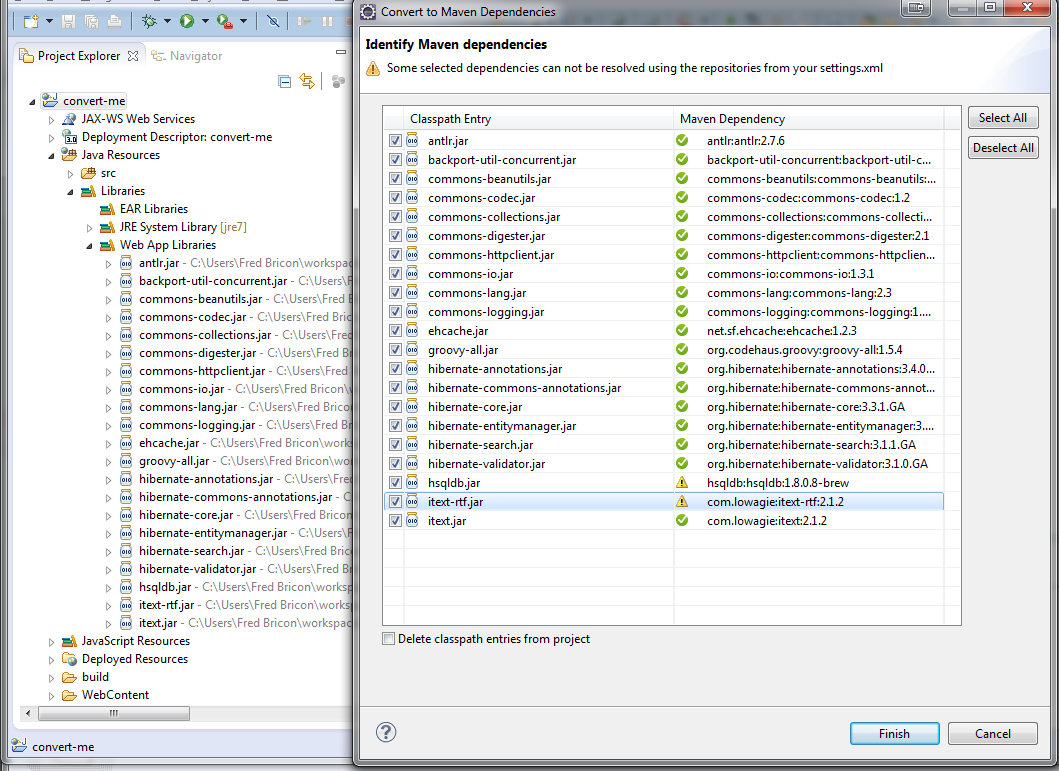
h2. Migrate jar-classpath to maven-classpath

The biggest in Maven tools are that we now use the eclipse.org m2e-wtp but
there are also work on making it easy to convert an eclipse project into a
Maven project by helping identifiying the proper Maven Group-Artifact-Version
id's of the various jars on your classpath.
http://docs.jboss.org/tools/whatsnew/maven/maven-news-4.0.0.Alpha1.html Maven
Tools What's'New has more about this.

 http://docs.jboss.org/tools/whatsnew/images/dependency_conversion.png
http://docs.jboss.org/tools/whatsnew/images/dependency_conversion.png

h2. "As-you-type" validation
 Our CDI and JSF/xhtml validation previously only ran when you saved your
file(s) and triggered the incremental-builds which would validate the changes
across the project. In JBoss Tools 4
we validate the file being edited as you type allowing you to get feedback
faster.

Alexey Kazakov recorded a video highlighting how it works:


h2.
h2. Next steps...

JBoss Tools 4 is planned to have a very short release cycle compared to
previous years - we want to GA in 2012, running on a well-performing Eclipse
4/Juno release inside JBoss Developer Studio 6.

Our
https://issues.jboss.org/browse/JBIDE#selectedTab=com.atlassian.jira.plugin.system.project%3Aroadmap-panel
 Jira contains the roadmap with tentative dates and in the upcoming weeks we'll
blog more about planned/upcoming features for JBoss Tools 4 and onward.

For now, take Alpha1 a spin and let us know what you think!

Have fun,
--------------------------------------------------------------

Comment by going to Community
[https://community.jboss.org/community/tools/blog/2012/09/17/the-return-of-jboss-tools]
_______________________________________________
jboss-user mailing list
[email protected]
https://lists.jboss.org/mailman/listinfo/jboss-user