https://bugs.kde.org/show_bug.cgi?id=500412
--- Comment #8 from John <[email protected]> ---
(In reply to Nate Graham from comment #4)
> We're just showing the truth here. The marketing tricks are unfortunate, but
> we don't have any control over them.
First, no, you're not showing the truth here!
The only truth shown here is the unit, being GiB, which is correct.
The value is not the truth as the calculation is wrong, it doesn't take all the
memory already reserved (used) to reach the proper total!

JEDEC is a standardization organization that mandates the use of binary (base
2) to calculate the values of sizes.
On the unit notation it uses (recommends) 3 prefixes: K, M and G.
K being 1024 (2 to the 10th power)
M being  K to the power of 2, where K = 1024.
G being  K to the power of 3, where K = 1024.
A standard that we have since 2002:
https://en.wikipedia.org/wiki/JEDEC_memory_standards#JEDEC_Standard_100B.01
We are lucky that all RAM manufacturers, without exception, follow the JEDEC
standard!
Maybe because all programming languages and programmers work with bits and
bytes (base 2) and everything would be a mess and a nightmare with the base 10
that doesn't aling nicely.
And it's not only RAM manufacturers that either follow the JEDEC standard or
just binary units without any relation to JEDEC, but also CPU GPU and hard
drive manufacturers when it comes to chaches sizes.
While it's harder to get a confirmation after a few searches for the chaches
sizes, I think the "Where used (mainly)" part of this answer confirms it:
https://cseducators.stackexchange.com/a/4446
And these 2 answers confirms it for the RAM sizes only:
https://www.reddit.com/r/explainlikeimfive/comments/13sc135/comment/jloxsvx/?utm_source=share&utm_medium=web3x&utm_name=web3xcss&utm_term=1&utm_content=share_button
https://www.reddit.com/r/explainlikeimfive/comments/13sc135/comment/jloykan/?utm_source=share&utm_medium=web3x&utm_name=web3xcss&utm_term=1&utm_content=share_button

UEFI / BIOSes seem to follow the JEDEC standard too, except that hey prefer to
show MB instead of just M as recommended in the standard:
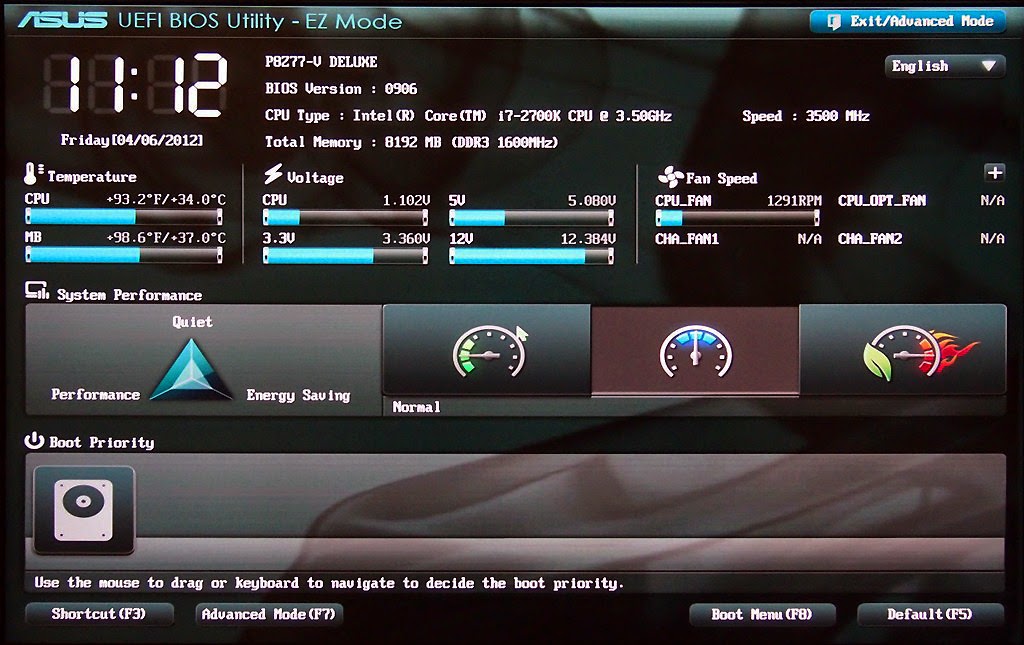
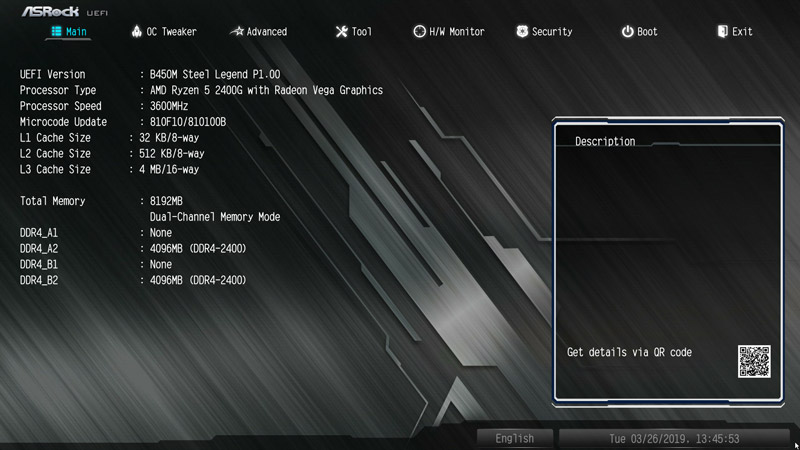
How UEFI / BIOSes is showing it -> 8192 MB + type + frequency:
https://4.bp.blogspot.com/-aOQT-q1cVnk/VTIU5qb2kqI/AAAAAAAAGWk/z2Rt2NWWXJg/s1600/20645-01-asus-uefi-11380626.jpg
https://www.ocinside.de/media/uploads/asrock_b450m_steel_legend_uefi_1.jpg

So, when it comes to physical RAM sticks, for which I opened this bug report,
the RAM sticks manufacturers (vendors) + marketers + UEFI / BIOS manufacturers
never lie as they count in base 2 (of course with the exception of the units
which are a bit wrong, showing MB or GB when JEDEC recommends M and G and IEC
recommends MiB and GiB).

The ones that clearly lie / trick you, are the hard drive manufactures which
prefer to use base 10, so K being 1000 instead of 1024, when it comes to the
big, non-cache part.
They can even rob / trick you of a whopping 2 TiB when they sell you a 22 TB
hard drive:
https://duckduckgo.com/?t=ffab&q=22+TB+in+TiB&ia=web
But still there, the small 256 or 512 chaches they come with should be MiB and
not MB.

And then there are also the networking equipment manufacturers that lie / trick
you, that are even worse than the hard drive manufacturers as they use bits
instead of bytes, so their numbers are not only 1.024 bigger like hard drive
manufacturers show, but a whopping 8 times.
A 100 Mb/s being in reality just 12.5 MiB/s.
You get the idea how much different is for 1,000 of for 5,000 Mb/s connections.

> Our options are:
> 1. Show the truth and confuse people who both care about technical details
> and also don't know about how marketers lie about memory and storage
> capacities (i.e. that "256 GB SSD" never exposes 256GB of space to the OS;
> it's the same with memory)
> 2. Lie like the marketers do, and make people think they have more memory
> than they actually do, compared to the other places like Info Center where
> we have to show the truth for technical reasons.
>
> As such, I'm inclined to choose #1 and say this is intentional.
I'm also inclined to choose #1, to show the truth!
And for consistency and easier calculation just use the binary (base 2, so 2 to
some power) everywhere, not only the RAM memory sizes.
So also for storage and download / upload speeds.
For me it would be fine for connection speeds too, so 12.5 or 125 MiB/s.
But I also agree that for some consistency with the tricks in the real world,
that we cannot change, to also show those, like KDE Partition Manager does for
storage devices  or for networking equipment where people might know better the
100 / 1000 / 1 Gbps connections instead of the real binary speeds.

But the big problem here and why I opened this bug report is that the total
memory size is not shown correctly here.
It shows the allocatable / usable one!
I want to see the real one, the full / complete / total one, like the UEFI /
BIOS of the computer shows!
UEFI / BIOS, being much more low level than QT / KDE software and even than the
Linux kernel, knows better what is the total size.
Probably it also has the advantage of being able to count it before it starts
reserving a portion of it like when the computer boots and after when the Linux
kernel reserves a portion too of it.

--
You are receiving this mail because:
You are watching all bug changes.