Public bug reported:

Hi,
I have issues with many linux systems on this new Acer. Windows was
working fine. I installed Windows to upgrade to the latest BIOS version.

When installing Linux, sometimes I succeed. But when running the system,
it freezes / hangs after a couple of minutes. I tried: Ubuntu, Lubuntu,
EndavourOS, Mangaro, ...

Now I am back on Ubuntu 21.04. The install hangs with "frozen state
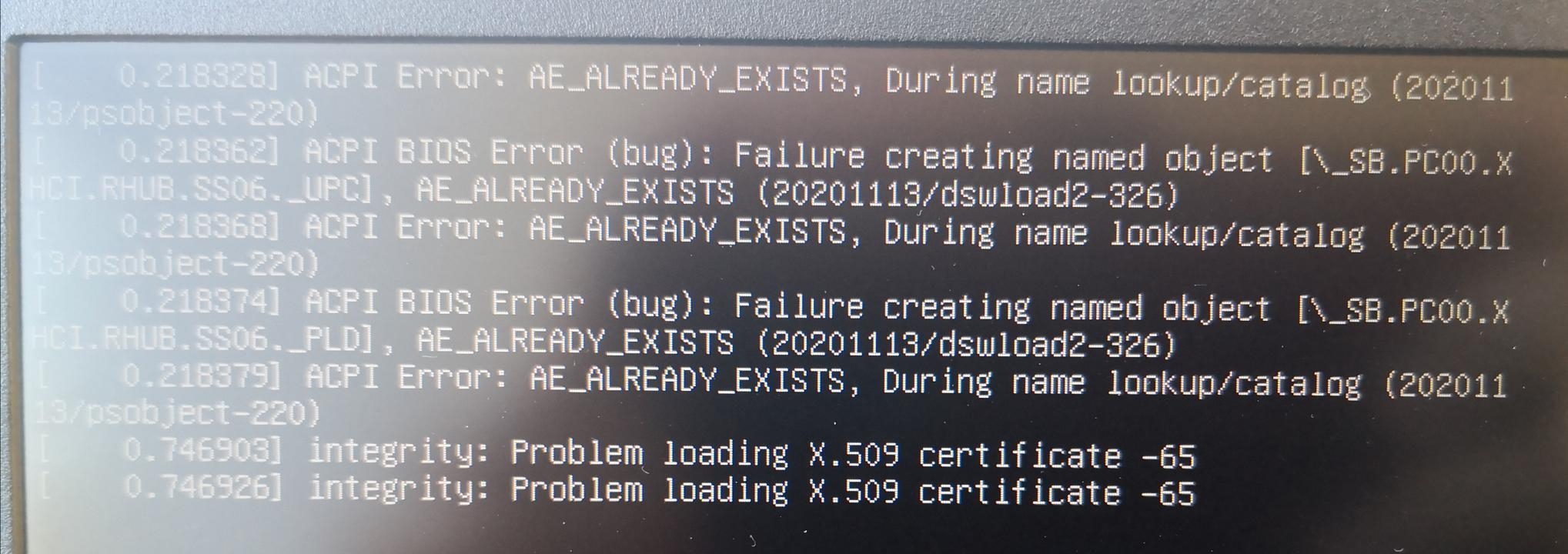
error detected" see screen print 1 attached. The second screen shot
shows the messages, when I go to the live_usb system.

I collected via "ubuntu-bug linux" the following information.

Thx for taking a look.

Best regards,

Jochen

** Affects: linux (Ubuntu)
     Importance: Undecided
         Status: Incomplete

** Attachment added: "IMG_20210513_084038_1280x720.jpg"

https://bugs.launchpad.net/bugs/1928300/+attachment/5496932/+files/IMG_20210513_084038_1280x720.jpg

--
You received this bug notification because you are a member of Kernel
Packages, which is subscribed to linux in Ubuntu.
https://bugs.launchpad.net/bugs/1928300

Title:
  install freezes on Acer Aspire 3 A317-33-P4X1

Status in linux package in Ubuntu:
  Incomplete

Bug description:
  Hi,

  I have issues with many linux systems on this new Acer. Windows was
  working fine. I installed Windows to upgrade to the latest BIOS
  version.

  When installing Linux, sometimes I succeed. But when running the
  system, it freezes / hangs after a couple of minutes. I tried: Ubuntu,
  Lubuntu, EndavourOS, Mangaro, ...

  Now I am back on Ubuntu 21.04. The install hangs with "frozen state
  error detected" see screen print 1 attached. The second screen shot
  shows the messages, when I go to the live_usb system.

  I collected via "ubuntu-bug linux" the following information.

  Thx for taking a look.

  Best regards,

  Jochen

To manage notifications about this bug go to:
https://bugs.launchpad.net/ubuntu/+source/linux/+bug/1928300/+subscriptions

--
Mailing list: https://launchpad.net/~kernel-packages
Post to     : [email protected]
Unsubscribe : https://launchpad.net/~kernel-packages
More help   : https://help.launchpad.net/ListHelp