https://bugs.koha-community.org/bugzilla3/show_bug.cgi?id=36589
            Bug ID: 36589
           Summary: Advanced cataloging - Expand clipboard
 Change sponsored?: ---
           Product: Koha
           Version: master
          Hardware: All
                OS: All
            Status: NEW
          Severity: enhancement
          Priority: P5 - low
         Component: Cataloging
          Assignee: [email protected]
          Reporter: [email protected]
        QA Contact: [email protected]
                CC: [email protected]

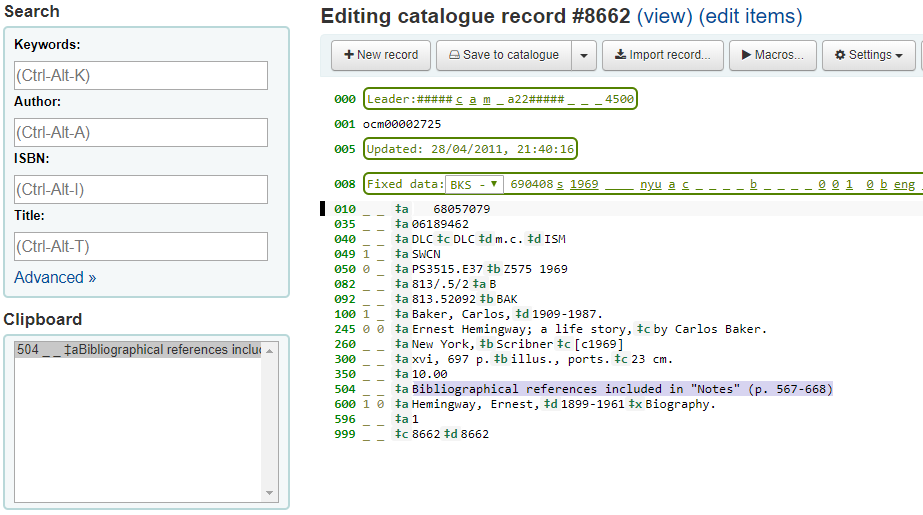
I was updating the screenshots for the manual in the advanced editor section
and noticed the clipboard is very small compared to before. I don't use the
advanced cataloging editor, so I don't know if it's a need for the clipboard to
be large or small, but just clicking around, I find it hard to use with it
being so small.

See the "before" screenshot:
https://koha-community.org/manual/23.05/en/html/_images/advancedcataloging.png

To get there:

1. Enable the EnableAdvancedCatalogingEditor syspref
2. Search the catalog for a record
3. Click Edit > Edit record
4. Toggle the editor to the advanced editor
5. Click on the content of a field and press Ctrl+C
   --> The field should be added to the clipboard section on the left side
6. Redo step 5 a couple of times
   --> All the fields are added to the clipboard section on the left side, but
only 1.5ish lines are shown

--
You are receiving this mail because:
You are watching all bug changes.
You are the assignee for the bug.
_______________________________________________
Koha-bugs mailing list
[email protected]
https://lists.koha-community.org/cgi-bin/mailman/listinfo/koha-bugs
website : http://www.koha-community.org/
git : http://git.koha-community.org/
bugs : http://bugs.koha-community.org/