I have been working with David Pollak on example code which exercises
the Lift paypal library.  This exercise is a prelude to using the
paypal library within buyafeature.com to allow customers to pay for
playing private “Buy A Feature” games.
The code for this example can be downloaded from
http://tunaforcats.com/paypal-example.tar.

The main touchpoints in the paypal library are the PayPalPDT and
PayPalIPN objects.

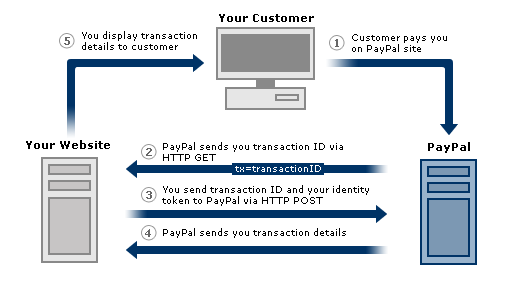
The PayPalPDT object supports the “Payment Data Transfer” transaction
processing.  This process is illustrated by the diagram available at
https://www.paypal.com/en_US/i/IntegrationCenter/scr/scr_ppPDTDiagram_513x282.gif
and further described at https://www.paypal.com/IntegrationCenter/ic_pdt.html
(you will need to sign up for a developer account to see this and
other paypal URLs – go to developer.paypal.com to get a developer
account - it's free).  Step 4  in the diagram triggers a call to
pdtResponse function.  This is where you can receive all of the
details about the transaction your user completed using PayPal.

The PayPalIPN object supports “Instant Payment Notification”
processing.  This process is illustrated by the diagram at
https://www.paypal.com/en_US/i/IntegrationCenter/scr/scr_ppIPNDiagram_555x310.gif
and further described at https://www.paypal.com/IntegrationCenter/ic_ipn.html.
This allows for asynchronous notification of the payment separate from
the PDT flow above.  Step 4 in the diagram triggers a call to the
PayPalIPN actions function.

Going to the paypal example code, in Boot.scala you will see objects
created for both PDT and IPN processing.  BAFOPayPalPDT utilizes the
PayPalPDT trait to redirect the user to a particular page in the
sample application.  BAFOPayIPN utilizes the PayPalIPN trait to
capture the paypal transaction information and persist it in the
database.

The classes I am using to persist to the paypal transaction to the
database are borrowed from Fowler’s Account pattern.  Basically there
is an AccountTransaction which represents the paypal transaction.  The
Account class in this example is being used to represent an inventory
of ‘game credits’ which are available to the user in advance of
playing a game.  The credit (or debit) from an account is represented
by the AccountEntry class.  All of these classes are housed within
model directory within the paypal example.

The paypal example is driven by logging into the application and going
to the ‘Account Admin’ page.  This page allows you to manage a set of
accounts (create, view, edit, delete).  Once you create an account,
you ‘buy’ credits by selecting the ‘view’ link associated with an
existing account.  This will bring you a page which shows a familiar
looking ‘Buy Now’ button.  This is the button which triggers the
paypal flow described above.  It will debit from the paypal buyer
account you specify and credit to the merchant account you have
previously setup.  Also, for this to work, you will need to be logged
into your developer paypal account (details below).

After going thru the paypal process, you should end up at the account
admin page where you can look to see if the account was credited.  You
can also go to developer.paypal.com to see if your buyer account was
debited and your merchant account was credited.

Running the Example

In order to bring up your lift app, do the following:

0) Extract file files from the paypal-example tarball to a location to
your liking.  The top-level directory should be called paypal-example.

1) Create developer paypal account – Go to developer.paypal.com and
hit the “Sign Up Now” button

2) Create merchant and buyer accounts - Go to “Test Accounts” and
create the merchant/buyer accounts using the “Preconfigured” link.

3) Stay logged into your developer account – this is required for the
paypal integration to work with your lift app.

4) Setup your properties file – in the src/main/resources directory
there is a file called default.props.  Copy this file to
<username>.props where <username> is the OS user you are logged in as
when you run the lift app.   You will need to follow the instructions
in the top comment section, fill in the paypal.authToken and specify
the paypal.ipnHost property with your host and path (i.e.
http://<hostname>.com:<port>).

5) Build and run – go to the paypal-example directory and run “mvn
jetty:run”

Thanks to David for helping me to get this to work.  Please let us
know if you have questions or suggestions.  There is probably a lot
more that could be done with the example to improve it or make it
easier to understand.


Dan

--~--~---------~--~----~------------~-------~--~----~
You received this message because you are subscribed to the Google Groups
"Lift" group.
To post to this group, send email to [email protected]
To unsubscribe from this group, send email to [EMAIL PROTECTED]
For more options, visit this group at
http://groups.google.com/group/liftweb?hl=en
-~----------~----~----~----~------~----~------~--~---