Thanks Juan,
Looking at your video makes me realise just how valuable it would be to
provide such a video for each application on the liveDVD.
This is something we could capture after the final release, then publish
on YouTube or similar. If we decide to go ahead with this, we should
link into it from the help page.
Of note:
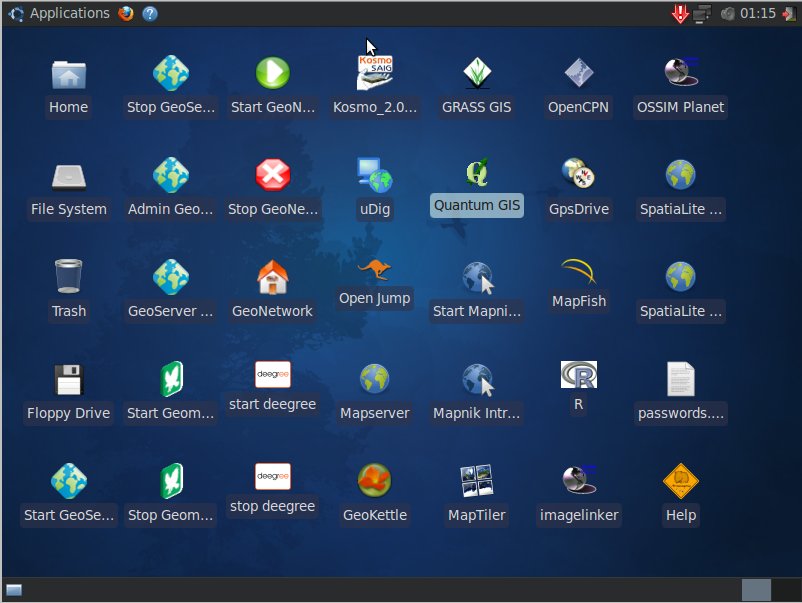
I like what has been done with the pull down menus, and think that we
should incorporate all applications under pull downs, and remove the
desktop icons.
I think groupings should be:

GeoSpatial->Server->
GeoSpatial->Server->GeoServer->Start/Stop GeoServer

GeoSpatial->Desktop->

GeoSpatial->Browser->

GeoSpatial->Beta->
Ideally, I'd like to see the GeoSpatial menu start from the top toolbar
(next to Applications), as well as from Applications->Geospatial pull down.
I'd also like to see the Help icon moved up to the top toolbar.

Juan Lucas Domínguez Rubio wrote:
can someone post a screenshot of the 3.0rc2 build's Desktop
so
we can see what icons we're talking about?

Hamish
Arramagong v3 rc2 @ 800x600:

http://gvsigmobileonopenmoko.files.wordpress.com/2010/02/arramagong_v3_rc2.jpg

http://www.youtube.com/watch?v=NZhfhCbxcHI

I still had no time to play with it.


Juan Lucas
_______________________________________________
Live-demo mailing list
[email protected]
http://lists.osgeo.org/mailman/listinfo/live-demo
http://wiki.osgeo.org/wiki/Live_GIS_Disc
--
Cameron Shorter
Geospatial Solutions Manager
Tel: +61 (0)2 8570 5050
Mob: +61 (0)419 142 254

Think Globally, Fix Locally
Geospatial Solutions enhanced with Open Standards and Open Source
http://www.lisasoft.com

_______________________________________________
Live-demo mailing list
[email protected]
http://lists.osgeo.org/mailman/listinfo/live-demo
http://wiki.osgeo.org/wiki/Live_GIS_Disc