Ye, saw that. He did a lot of great stuff.
I did a dry-fit test and have verified that simply piggybacking more
sram is all that's needed to go from 128K to 256K.
I got some of the same model of sram from ebay, because this model is
slightly unusual and it's possible the difference matters. P51256SL, the
SL actually means "slow". It's an explicit, named feature of the part,
not just "all old parts are slow compared to new parts" So it's possible
the circuit relies on the timings of this particular part.
I took 4 chips and soldered a bit of wire to pin 20 on each one to make
pin 20 longer, bent the pins in slightly to make them straight instead
of spread, and just pressed them onto the backs of the installed chips
with the pin 20s going out to the nearby via on the pcb and not touching
the chip below, all other pins touching the chip below. The legs all
made good enough contact from springiness & friction. I added a piece of
shipping foam on top of that so the enclosure lid holds the chips in
place against bumps.
And it worked just like that. RAMDSK now says 255k available!
https://photos.app.goo.gl/bJHsuVk7T5y4bvvQ7
And there is a much more convenient answer for the battery than what I
did there. I haven't done this yet, but looking at datasheets, a
standard CR2032 holder fits right in 2 of the existing holes for the old
battery. The pins, height, width, clearance from nearby parts and
enclosure screws etc all clear. A CR2032 needs a diode to protect
against charging, but does not need that 200 ohm resistor, which is
conveniently right there on the line the diode needs to go on. So just
remove the 200ohm resistor and replace it with another diode right in
the same spot, and boom, done. 3 or 4 years of memory, and no more
soldering to replace the coin cell after that. Can also remove the coin
cell for safety for long term storage.
I updated the readme on github to document all that.

--
bkw

On 8/21/23 20:03, [email protected] wrote:
Brian,
You are probably aware of the late Paul Globman's work for the Node RamPac,
Datapac, etc.
But in case not, you may want to look at his files and programs on Club100
(ref: http://www.club100.org/library/libpg.html).
Good luck,
        Bob

-----Original Message-----
From: M100 <[email protected]> On Behalf Of
[email protected]
Sent: Sunday, August 20, 2023 6:02 PM
To: [email protected]
Subject: Re: [M100] NODE DATAPAC

Brian,

Awesome reverse engineering!   Keep us posted on the progress.  This is
interesting.

As far as the 74161 counters, the counters can be preloaded by taking the not
load pin (pin 9) low.   In your schematic it is tied high so no parallel load
so it doesn't matter what they are.   It would seem tidier to tie them to
something and in the early days of CMOS we were told that open inputs make them
vulnerable to ESD.  I'd have to stare at it a bit longer to tell you what the
counters actually do.    (Not totally sure if this extended staring will
happen,)  😊

Good luck.
Lloyd

-----Original Message-----
From: M100 <[email protected]> On Behalf Of Brian K. White
Sent: Saturday, August 19, 2023 11:58 PM
To: [email protected]
Subject: [M100] NODE DATAPAC


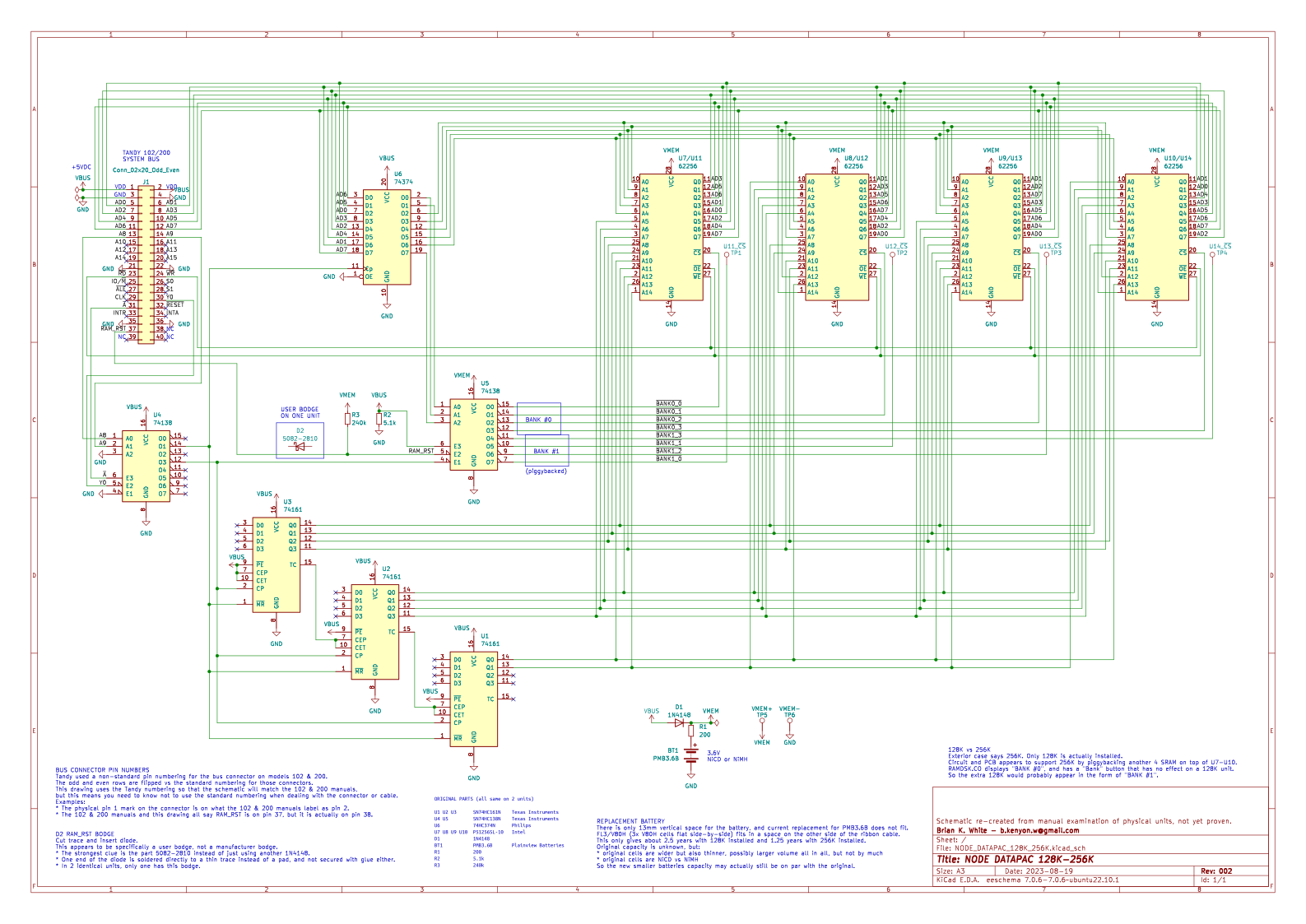
Don't ask me why, but I think I've replicated the NODE DATAPAC in KiCAD.

https://github.com/bkw777/NODE_DATAPAC
https://raw.githubusercontent.com/bkw777/NODE_DATAPAC/db347506f5eeb9908348710727fa3f3b53bfd047/PCB/NODE_DATAPAC_128K_256K.svg

This is from beeping out the connections of one with a meter and shining a
bright light through the pcb to try to see under the chips. The schematic is
not verified, I haven't actually built one, and I didn't desolder anything to
uncover the the board to see all the traces, so it might not be complete.

I may actually build one just to verify if the schematic is really complete,
and also I'm dying to test my guess about just adding piggyback chips to go
from 128 to 256k without needing anything else, but I don't want to hack on the
original units except the unavoidable removing the old battery and cleaning up
the residue. No problem on a new replica board.

But can someone explain the theory of operation from the parts & connections? I can
see that AD5,6,7 are used to select one of the 8 chips, but I don't understand what A8,
A9, /A, & Y0 are actually doing with those counters, nor why they all have all
their data inputs NC and not even grounded.

Also what is the likely purpose of that user bodge diode on RAM_RST?
Only one unit has that, and they both work the same, outwardly. I assume it
will have something to do with some weird issue that only happens in some
particular situation like you have a printer connected and the computer turned
off or something like that.

If I make an alternate updated pcb with a removable battery connector or
non-recharging coin cell or something, should I add that?

--
bkw
--
bkw