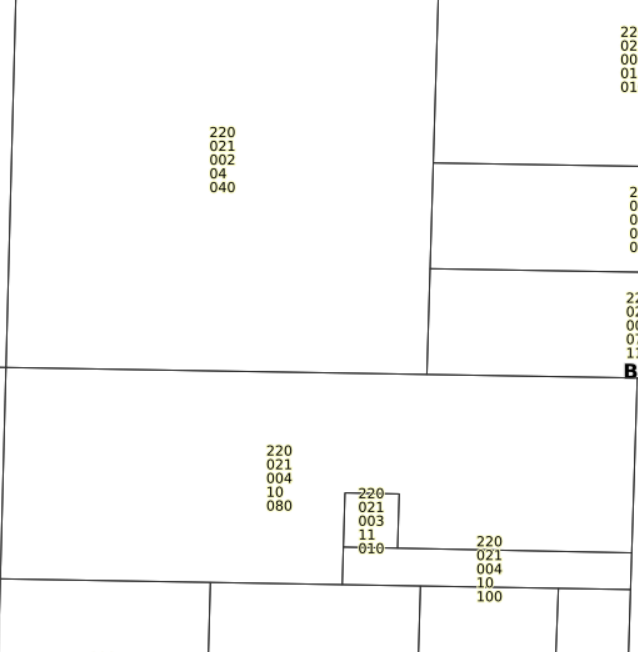
Great work Benjamin! (I was looking at that page but didn't think of
using substring) Benjamin's solution works great (assuming your data is
always in 111.222.333.44.555 Here is a working example:
map output: http://pasteboard.co/25N6NcOV.png
 layer snippet:

LAYER
  NAME "test"
  TYPE POINT
  STATUS ON
  CONNECTIONTYPE OGR
  CONNECTION "cities.shp"
DATA "SELECT
CONCAT(SUBSTR(PARCEL,1,3),'.+',SUBSTR(PARCEL,5,3),'.+',SUBSTR(PARCEL,9,3),'.+',SUBSTR(PARCEL,13,2),'.+',SUBSTR(PARCEL,16,4))
AS parcel_wrap from cities"
  LabelItem "parcel_wrap"
  CLASS
    NAME "mycities"
    LABEL
     COLOR  0 0 0
     FONT sans
     TYPE truetype
     SIZE 8
     POSITION AUTO
     PARTIALS FALSE
     OUTLINECOLOR 255 255 255
     WRAP "+"
    END
    STYLE
      SYMBOL 7
      SIZE 6
      COLOR 0 0 0
    END
  END
END # Layer


-jeff


--
Jeff McKenna
MapServer Consulting and Training Services
http://www.gatewaygeomatics.com/

On 2016-07-01 4:14 AM, Schepers, Benjamin wrote:
Hi Carrie,

in my opinion the easiest way would be converting the data to spatialite-DB
(you get a lot of database-functions in a file based-DB - no
client-server-architecture, just a file; at best you use ogr2ogr or QGIS for
conversion) and then use replace function in your SQL-QUERY

i.e. to dynamically insert pipe "|" as wrap-character it should look like that (fieldname
is "parcel_no"):
SELECT *, replace(parcel_no, '.', '.|') AS parcel_no_wrap FROM parcel_table

If you have a shapefile and your parcel-no have a strict pattern (ie. 2digits.3digits.4digits) then
it should also be possible to use OGR generic "concat" and
"substring"-function, which were introduced with GDAL 1.8 (according to documentation at
http://www.gdal.org/ogr_sql.html#ogr_sql_flist_ops and
http://www.gdal.org/ogr_sql.html#ogr_sql_functions):

Example, also with pipe as wrap-character:
SELECT *,
CONCAT(SUBSTR(parcel_no,1,2),'.|',SUBSTR(parcel_no,4,3),'.|',SUBSTR(parcel_no,8,4))
 AS parcel_no_wrap FROM parcel_table

In both examples the new virtual field "parcel_no_wrap" could be used for
displaying text with wrap character...

Sincerely,
Benjamin Schepers


Von: mapserver-users [mailto:[email protected]] Im
Auftrag von Mark Volz
Gesendet: Donnerstag, 30. Juni 2016 15:09
An: [email protected]
Betreff: Re: [mapserver-users] Map file, Label WRAP Function in mapbook removes
character it

Carrie,

Our trick is to wrap on a character that you would otherwise not normally see
in the string.

LAYER
        ....
        CLASS
                TEXT ([LastName] * [PIN])  #overrides LABELITEM
                .....
                LABEL
                        WRAP "*"
                END #Parcel Label
        END #Parcel Class
END #Parcel Layer


Sincerely,
Mark Volz, GISP

-----Original Message-----
From: mapserver-users [mailto:[email protected]] On
Behalf Of [email protected]
Sent: Wednesday, June 29, 2016 11:04 AM
To: [email protected]
Subject: mapserver-users Digest, Vol 101, Issue 37

Send mapserver-users mailing list submissions to
        [email protected]

To subscribe or unsubscribe via the World Wide Web, visit
        http://lists.osgeo.org/mailman/listinfo/mapserver-users
or, via email, send a message with subject or body 'help' to
        [email protected]

You can reach the person managing the list at
        [email protected]

When replying, please edit your Subject line so it is more specific than "Re:
Contents of mapserver-users digest..."


Today's Topics:

   1. Map file, Label WRAP Function in mapbook removes character it
      is wrapping on. (Carrie Quast)


----------------------------------------------------------------------

Message: 1
Date: Wed, 29 Jun 2016 15:58:59 +0000
From: Carrie Quast <[email protected]>
To: "'[email protected]'"
        <[email protected]>
Subject: [mapserver-users] Map file, Label WRAP Function in mapbook
        removes character it is wrapping on.
Message-ID: <[email protected]>
Content-Type: text/plain; charset="utf-8"

Hello - I'm working on updating my .MAP Documents to Mapserver 7.0.1.

I'm trying to get the labels in my Parcel Layer to wrap on the decimal point
(example 002.001.001.01.010) to make for a better a fit.  I'm using the WRAP
function, which works wonderfully , except it removes the character I am
wrapping on.  In this case, the point (.) In my parcel numbers.

Each of the numbers should have a decimal between it.   Any idea of how to get
the line to wrap on a character, but also keep it in the displayed label?  The
MAXLENGTH works well too, but still removes all decimal points.

I'm using Mapserver 7.0.1 with GeoMoose 2.9

Thank You - Carrie Quast, Brown County MN GIS Specialist

[cid:[email protected]]


-------------- next part --------------
An HTML attachment was scrubbed...
URL:
<http://lists.osgeo.org/pipermail/mapserver-users/attachments/20160629/8bda4b92/attachment.html>
-------------- next part --------------
A non-text attachment was scrubbed...
Name: image001.png
Type: image/png
Size: 66665 bytes
Desc: image001.png
URL:
<http://lists.osgeo.org/pipermail/mapserver-users/attachments/20160629/8bda4b92/attachment.png>
-------------- next part --------------
A non-text attachment was scrubbed...
Name: image002.png
Type: image/png
Size: 31355 bytes
Desc: image002.png
URL:
<http://lists.osgeo.org/pipermail/mapserver-users/attachments/20160629/8bda4b92/attachment-0001.png>

------------------------------

Subject: Digest Footer

_______________________________________________
mapserver-users mailing list
[email protected]
http://lists.osgeo.org/mailman/listinfo/mapserver-users

------------------------------

End of mapserver-users Digest, Vol 101, Issue 37
************************************************
_______________________________________________
mapserver-users mailing list
[email protected]
http://lists.osgeo.org/mailman/listinfo/mapserver-users
_______________________________________________
mapserver-users mailing list
[email protected]
http://lists.osgeo.org/mailman/listinfo/mapserver-users
_______________________________________________
mapserver-users mailing list
[email protected]
http://lists.osgeo.org/mailman/listinfo/mapserver-users