Thanks for the suggestions. The consensus seems to be that anti-aliasing is
causing the increased size. The documentation here
<https://mapserver.org/output/antialias.html> says "*Since version 6.0,
MapServer will produce aliased output for the “gd/” drivers, and
antialiased output for the “agg/” and “cairo/” ones*" and it's also
mentioned here
<https://lists.osgeo.org/pipermail/mapserver-users/2012-April/072011.html> in
Thomas Bonfort's reply. I actually found that 6.4 produced small, aliased
images with both the GD and AGG drivers and regardless of my ANTIALIAS
true/false setting.
Would anyone consider re-enabling the ANTIALIAS true/false option?

Thanks,
Rich


On Mon, May 17, 2021 at 3:40 AM Rahkonen Jukka (MML) <
[email protected]> wrote:

> Hi,
>
>
>
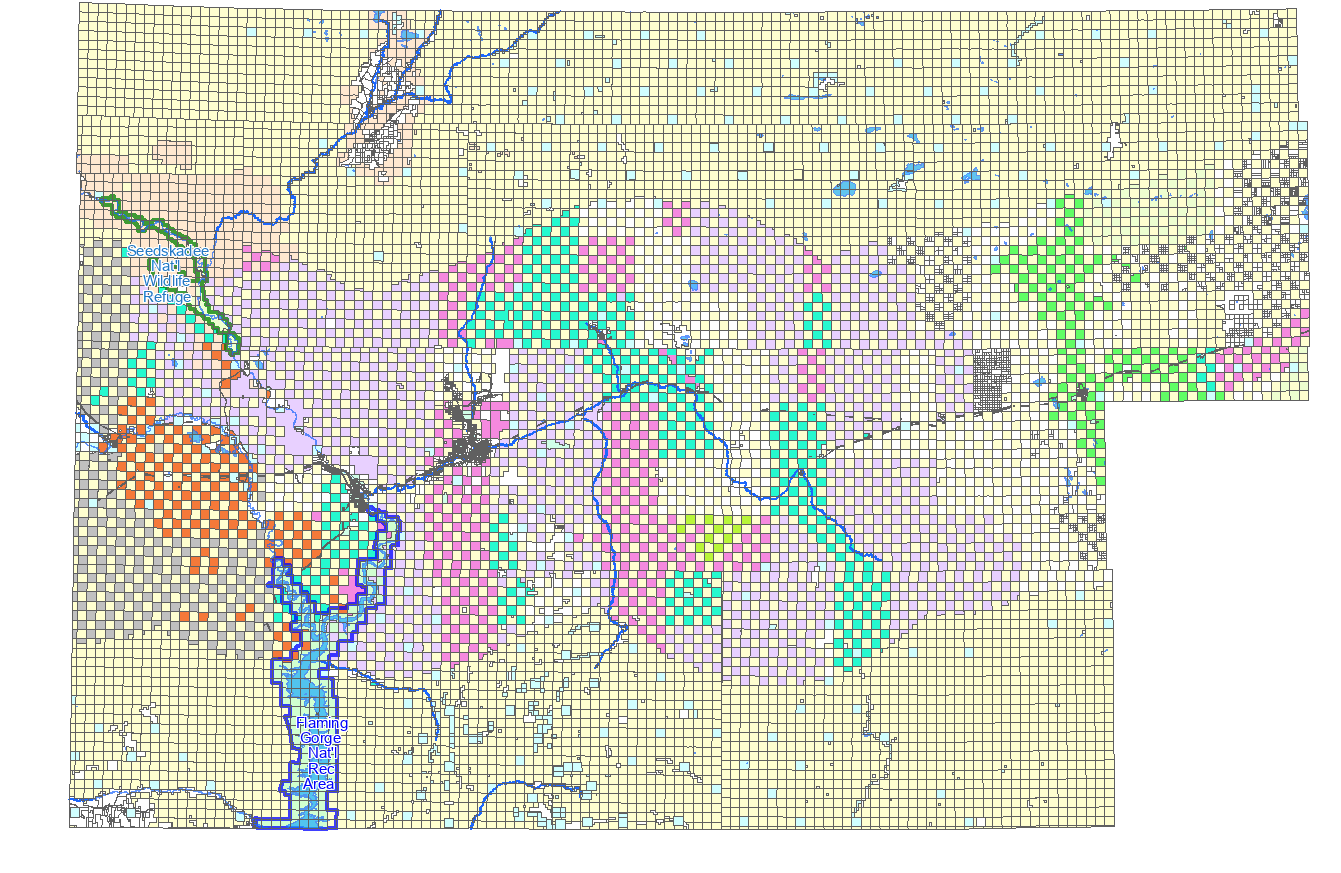
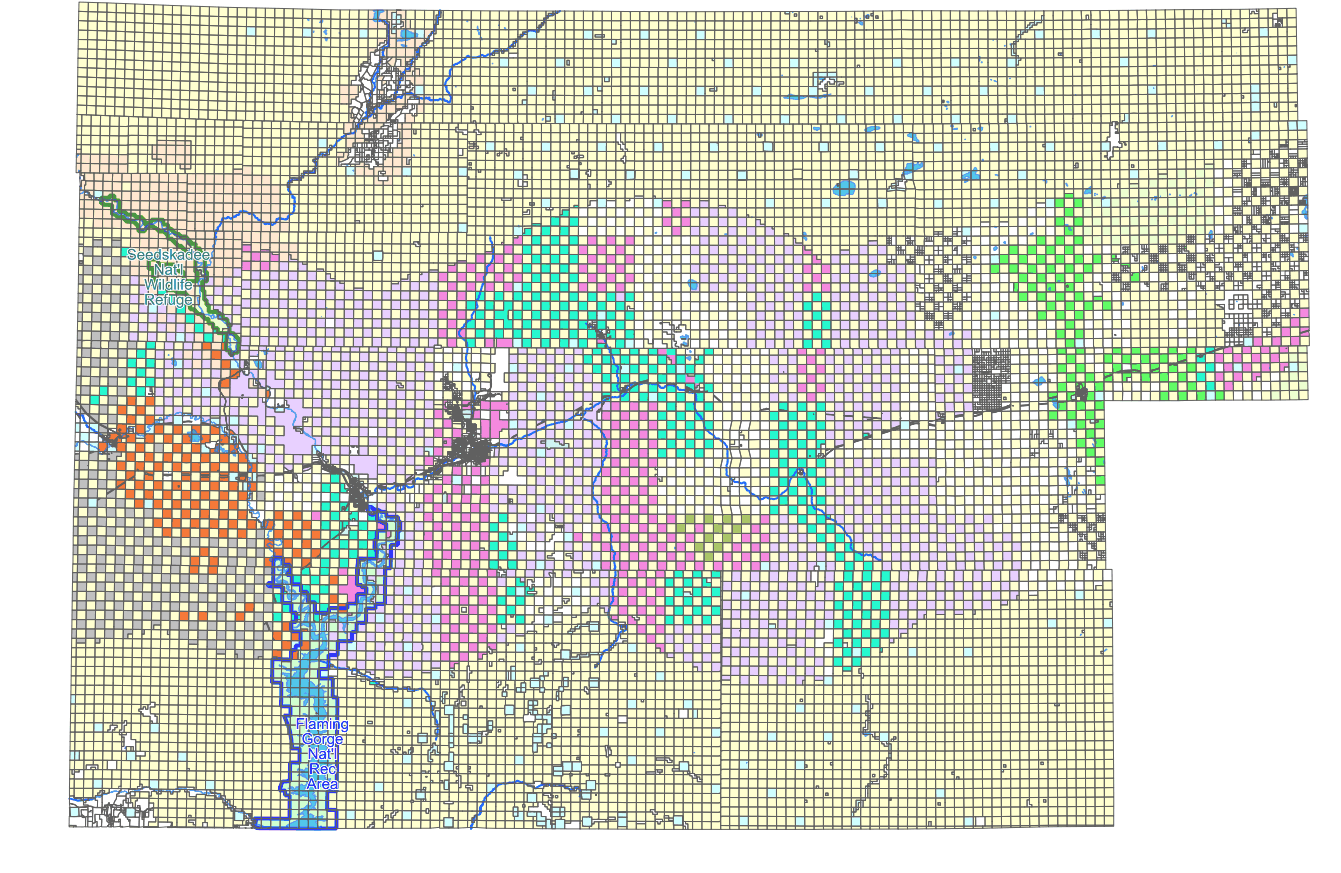
> I made a few tests with IrfanView and Gimp and it seems that the both
> images are antialized but the mapserv76 version is more fine-grained. The
> mapserv64 version has also less unique colors, 217 vs 250 colors. Saving
> the mapserv76 image with IrfanView or Gimp by using different settings does
> not reduce the file size much so the image obviously really has more
> details. Interlace mode (adam7) in Gimp made the image even bigger.
>
>
>
> The visual quality of mapserv76.png is not so much better that it would
> justify the doubled file size. At least the area with dense rectangles on
> the right look better in mapserv64.png. But I fear that for any systematic
> further studies you should prepare a test case with source data and
> mapfile. There are very many small rectangles in the image and it may be
> that different antializing near the narrow black lines makes the
> difference. It would be interesting to test the output size with more
> typical maps.
>
>
>
> -Jukka Rahkonen-
>
>
>
> *Lähettäjä:* mapserver-users <[email protected]>
> *Puolesta
> *Seth G
> *Lähetetty:* maanantai 17. toukokuuta 2021 11.27
> *Vastaanottaja:* Richard Greenwood <[email protected]>
> *Kopio:* [email protected]
> *Aihe:* Re: [mapserver-users] differing image size with different
> mapserver versions
>
>
>
> Hi Richard,
>
>
>
> In your OUTPUTFORMAT declaration maybe try setting the DRIVER to
> *AGG/PNG8*
>
> Also  IMAGEMODE PC256 was only for GD support that was removed in 7.0. Try
> IMAGEMODE RGB (or RGBA if you want transparency).
>
>
>
> Seth
>
>
>
> --
>
> web:http://geographika.co.uk
>
> twitter: @geographika
>
>
>
>
>
> On Sat, May 15, 2021, at 8:00 PM, Richard Greenwood wrote:
>
> I built from main and tested with ANTIALIAS ON and ANTIALIAS OFF. Assuming
> that my mapfile syntax below is correct, there is no difference in size and
> the resulting PNG is still approximately 3x larger than the MapServer 6.4
> one.
>
>   CLASS
>     STYLE
>       COLOR 255 255 208
>       ANTIALIAS ON
>     END
>   END
>
> Again, thank you for your suggestions.
>
> Rich
>
>
>
> On Sat, May 15, 2021 at 11:21 AM Even Rouault <[email protected]>
> wrote:
>
> Actually, I just tried to open mapserv64.png with gimp, and export it as a
> non-interlaced or interlaced PNG. And the non-interlaced version is 60 kB
> vs 96 kB for interlaced. So interlacing vs non-interlacing isn't the cause
> here.
>
> Looking more closely at mapserv64.png  vs mapserv76.png , they are
> visually different. I suspect the rendering to be of higher quality in 7.6
> due to anti-aliasing and perhaps better quantization to 8-bit. You could
> perhaps try to turn off antialiasing in your CLASS.STYLE. This has been
> re-vived very recently for AGG line rendering. It is master only however.
>
> Le 15/05/2021 à 19:07, Richard Greenwood a écrit :
>
> Even,
>
>
>
> Thank you. I had ignored the difference in the interlacing of the two
> images because I didn't think it would have affected the size.
>
>
>
> The maprgbapng.c file no longer exists in MapServer 6.4 or 7.6. There is
> an "if ( interlaced ..." code block in mapoutput.c that is the same in 6.4
> and 7.6. I tried forcing it ON and rebuilding 7.6 but the output image
> still is not interlaced. Maybe that code is just a left over. Or maybe AGG
> doesn't support interlacing as
> https://www.mapserver.org/mapfile/outputformat.html seems to suggest.
>
>
>
> In any case, thanks again.
>
> Rich
>
>
>
>
>
>
>
> On Sat, May 15, 2021 at 9:59 AM Even Rouault <[email protected]>
> wrote:
>
> Richard,
>
> your 6.4 image is a interlaced PNG, whereas the 7.6 is a non-interlaced
> one.
>
> I see in the git history a relevant commit:
>
>
>
> $ git show 9984b39cc8f74d60eb240728df660a172a118aad
>
> commit 9984b39cc8f74d60eb240728df660a172a118aad
>
> Author: Thomas Bonfort <[email protected]>
> <[email protected]>
>
> Date:   Sun Oct 5 15:59:44 2008 +0000
>
>
>
>     rgba_png: don't interlace by default
>
>
>
>
>
>     git-svn-id: http://svn.osgeo.org/mapserver/trunk@7960
> 7532c77e-422f-0410-93f4-f0b67bdd69e2
>
>
>
> diff --git a/maprgbapng.c b/maprgbapng.c
>
> index 105d8d61..c3615edd 100644
>
> --- a/maprgbapng.c
>
> +++ b/maprgbapng.c
>
> @@ -357,10 +357,13 @@ int msSaveImageRGBAQuantized(gdImagePtr img, gdIOCtx
> *ctx, outputFormatObj *form
>
>      int bot_idx, top_idx;
>
>      int remap[256];
>
>      int reqcolors = atoi(msGetOutputFormatOption( format,
> "QUANTIZE_COLORS", "256"));
>
> +    const char *interlace;
>
>      ms_png_info info;
>
>      info.width = gdImageSX(img);
>
>      info.height = gdImageSY(img);
>
> -    if( strcasecmp("ON", msGetOutputFormatOption( format, "INTERLACE",
> "ON" )) == 0 )
>
> +    interlace = msGetOutputFormatOption( format, "INTERLACE", "OFF" );
>
> +    if( strcasecmp("ON", interlace) == 0 || strcasecmp("YES", interlace)
> == 0
>
> +            || strcasecmp("1", interlace) == 0)
>
>          info.interlaced=1;
>
>      else
>
>          info.interlaced=0;
>
>
>
> But this predates 6.4 release by several years, so this doesn't explain
> why you see a different behavior, unless something in 6.4 still turned on
> interlacing on in that configuration.
>
> From what I can see in the doc, the interlacing mode was removed in the
> 7.0 release when GD went off, so I don't think you can do much. I guess
> that could be re-added but would require some coding.
>
> Even
>
>
>
> Le 15/05/2021 à 17:43, Richard Greenwood a écrit :
>
> I get significantly different image sizes between MapServer 6.4 and 7.6
> with the same output format definition. I've tried many variations of the
> following.
>
>
>
> OUTPUTFORMAT
>
>   NAME "png-test"
>
>   DRIVER "AGG/PNG"  # GD driver is same (6.4 only)
>
>   MIMETYPE "image/png; mode=8bit"
>
>   IMAGEMODE PC256
>
>   FORMATOPTION "QUANTIZE_FORCE=on"
>
>   FORMATOPTION "QUANTIZE_COLORS=256"
>
>   EXTENSION "png"
>
>   # TRANSPARENT on or off makes little difference
>
> END
>
>
>
> MapServer 6.4 <https://greenwoodmap.com/mapserv64.png> is 90kB, MapServer
> 7.6 <https://greenwoodmap.com/mapserv76.png> is 320kB. Any suggestions as
> to how I can get my MapServer 7.6 image sizes down closer to what I'm
> getting in MapServer 6.4?
>
>
>
> Thanks,
>
> Rich
>
>
>
> --
>
>
>
> Richard W. Greenwood, PLS
>
> www.greenwoodmap.com
>
>
>
> _______________________________________________
>
> mapserver-users mailing list
>
> [email protected]
>
> https://lists.osgeo.org/mailman/listinfo/mapserver-users
>
>
>
> --
>
> http://www.spatialys.com
>
> My software is free, but my time generally not.
>
>
>
>
>
> --
>
>
>
> Richard W. Greenwood, PLS
>
> www.greenwoodmap.com
>
> --
>
> http://www.spatialys.com
>
> My software is free, but my time generally not.
>
>
>
>
>
> --
>
> Richard W. Greenwood, PLS
>
> www.greenwoodmap.com
>
> _______________________________________________
>
> mapserver-users mailing list
>
> [email protected]
>
> https://lists.osgeo.org/mailman/listinfo/mapserver-users
>
>
>
>
>


--
Richard W. Greenwood, PLS
www.greenwoodmap.com
_______________________________________________
mapserver-users mailing list
[email protected]
https://lists.osgeo.org/mailman/listinfo/mapserver-users