I recommend a different approach.

Set up your select on page 2 as:
@proc.number   LI   /PROC

In footnotes on page 3 add:
AL START proc1

You won't need 'proc' then and won't have to worry about it. Anytime you
want to add procedures, just add them to proc1 like you have them. Be
sure to place a comma at the end of every line except the last and to
translate using number 3 on the process screen each time you make
changes.

The problem with 'proc' seems to be line termination.

Donald F. Stewart
Sr. Programmer Analyst
(706)647-8111 x1696
[EMAIL PROTECTED] <mailto:[EMAIL PROTECTED]>
Upson Regional Medical Center
801 W. Gordon St.
Thomaston, GA  30286


________________________________

From: [email protected] [mailto:[EMAIL PROTECTED] On Behalf
Of Joe George
Sent: Tuesday, April 17, 2007 11:17 AM
To: [email protected]
Subject: [MEDITECH-L] Magic Macro Assistance


Good Morning L'ers
        I'm trying to create a "simple" macro in OE.ORD where I want to
enter about 50 proc.number rather than "manually" keying them in every
time I run the report.  My report is crashing when loading page 1.
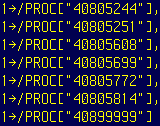
Here's my first and second macro.  What is coded incorrectly.  Thanks

proc:


proc1:


Joseph George
IT Director
Russell Medical Center

This email and any files transmitted with it are confidential and are
intended solely for the use of the individual or entity to whom they are
addressed.  This communication may contain material protected by legal
privileges or statutory protections.  If you are not the intended
recipient or the individual responsible for delivering the e-mail to the
intended recipient, please be advised that you have received this e-mail
in error and that any use, dissemination, forwarding, printing, or
copying of this e-mail is strictly prohibited.  If you have received
this e-mail in error, please immediately notify Joseph George by
telephone at 256-329-7111.  Upon request, we will reimburse you for
reasonable costs incurred in notifying us.


--

  This message has been scanned by the Securiant SpiderISA for spam and
viruses, and is believed to be safe and clean.
  Securiant SpiderISA <http://www.securiant.com/>

--

This message has been scanned by the Securiant SpiderISA for spam and viruses,
and is believed to be safe and clean.
 ole0.bmp
Description: ole0.bmp
 ole1.bmp
Description: ole1.bmp
=*=*=*=*=*=*=*=*=*=*=*=*=*=*=*=*=*=*=*=
To subscribe or unsubscribe to the meditech-l, visit MTUsers.NET.

To check the status of the meditech-l, visit MTUsers.NET.

For help, email [EMAIL PROTECTED]

Visit the MTUsers WikiPedia at MTUsers.NET/mwiki
______________________________________
meditech-l mailing list
[email protected]
http://mtusers.com/mailman/listinfo/meditech-l
