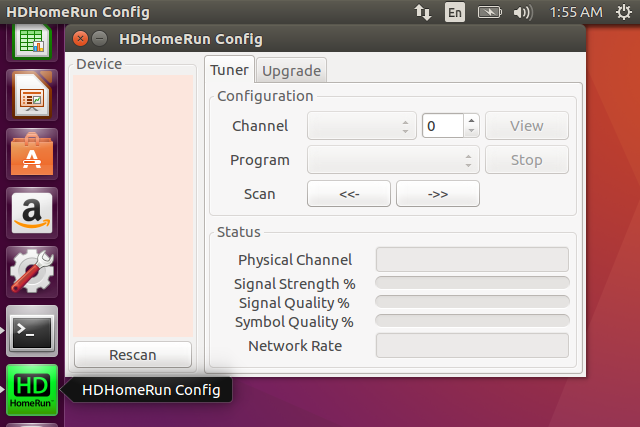
** Attachment added: "new-hdhomerun-icon-screenshot.png"

https://bugs.launchpad.net/ubuntu/+source/hdhomerun-config-gui/+bug/1652419/+attachment/4796000/+files/new-hdhomerun-icon-screenshot.png
** Description changed:

  Impact
  ======
  hdhomerun-config-gui does not show up in the Software app in Ubuntu 16.04 LTS
or 16.10.

  This is fixed by using .png icons and getting rid of the .xpm icon.

  http://appstream.ubuntu.com/yakkety/universe/issues/hdhomerun-config-gui.html
  https://wiki.debian.org/AppStream/Guidelines#Icon_best_practices

  This update also adds more icons at higher resolutions and uses a better
  looking icon from the OSX folder instead of from the WIN folder in the
  source.

  Finally, the .desktop title is changed from "HDHomeRun Config GUI" to
  "HDHomeRun Config" to match the app window title.

  Test Case
  =========
  Install the updated hdhomerun-config-gui
  Look for it in the Software app.

  Note that it takes a day or two after publishing for the appstream
  metadata to be updated.

  Regression Potential
  ====================
- It might be confusing to users to have the icon suddenly change. However I
think the new icon looks a lot better.
+ It might be confusing to users to have the icon suddenly change. However I
think the new icon looks a lot better. Before and after screenshots posted
below.

--
You received this bug notification because you are a member of Mythbuntu
Bug Team, which is subscribed to hdhomerun-config-gui in Ubuntu.
https://bugs.launchpad.net/bugs/1652419

Title:
  hdhomerun-config-gui missing from Software app

Status in hdhomerun-config-gui package in Ubuntu:
  Fix Released
Status in hdhomerun-config-gui source package in Xenial:
  In Progress
Status in hdhomerun-config-gui source package in Yakkety:
  In Progress

Bug description:
  Impact
  ======
  hdhomerun-config-gui does not show up in the Software app in Ubuntu 16.04 LTS
or 16.10.

  This is fixed by using .png icons and getting rid of the .xpm icon.

  http://appstream.ubuntu.com/yakkety/universe/issues/hdhomerun-config-gui.html
  https://wiki.debian.org/AppStream/Guidelines#Icon_best_practices

  This update also adds more icons at higher resolutions and uses a
  better looking icon from the OSX folder instead of from the WIN folder
  in the source.

  Finally, the .desktop title is changed from "HDHomeRun Config GUI" to
  "HDHomeRun Config" to match the app window title.

  Test Case
  =========
  Install the updated hdhomerun-config-gui
  Look for it in the Software app.

  Note that it takes a day or two after publishing for the appstream
  metadata to be updated.

  Regression Potential
  ====================
  It might be confusing to users to have the icon suddenly change. However I
think the new icon looks a lot better. Before and after screenshots posted
below.

To manage notifications about this bug go to:
https://bugs.launchpad.net/ubuntu/+source/hdhomerun-config-gui/+bug/1652419/+subscriptions

_______________________________________________
Mailing list: https://launchpad.net/~mythbuntu-bugs
Post to     : [email protected]
Unsubscribe : https://launchpad.net/~mythbuntu-bugs
More help   : https://help.launchpad.net/ListHelp