Hi Aaron,

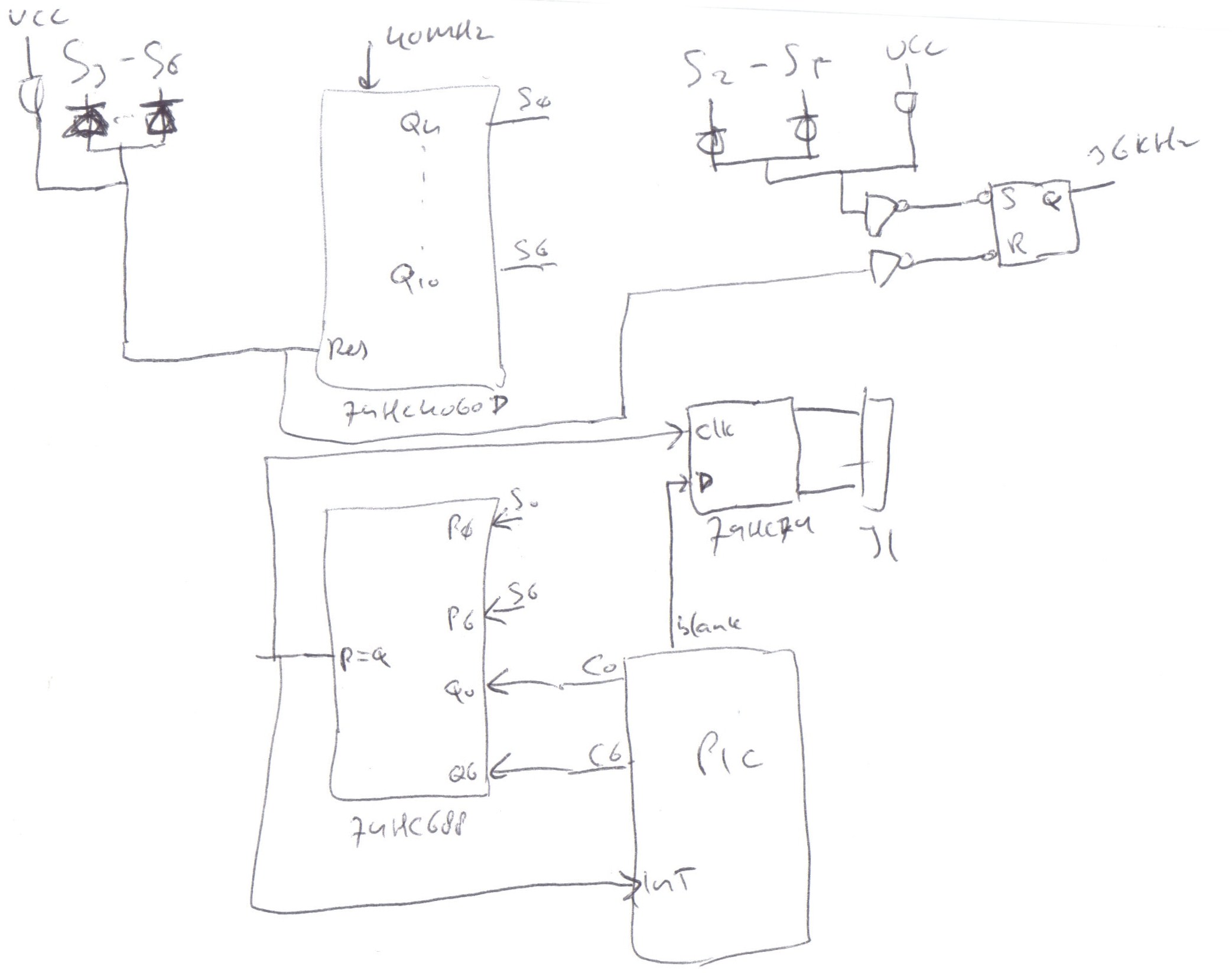
You might like this one. I figured out that without too much effort
you can actually divide your circles into 120 segments rather than 8.
It would be a nice feature as you can then use your outer circle on
the screen to indicate the seconds or let a pendulum move left and
right or something like that.
Have a look at this sketch, I might have forgotten something here or
there, but the basic principal should be clear.
http://xiac.com/Images/scopeclock.jpg

It basically works like this, you set an opening segment as to the
start of the circle part you want to display and set blank to "1".
When the angle has been reached, an interrupt will be generated and
the screen unblanked. Then you set the end segment and set blank to
"0". Once this angle is reached, again an interrupt will be generated
and at the same time the tube will be blanked.

Sure it generates a lot of interrupts, but if you keep the code very
simple, that should be just fine. And at the same time you can count
the number of circles rather than do a timed system.

Michel


On Sep 6, 12:01 pm, Michel <[email protected]> wrote:
> Hi Aaron,
>
> You're right indeed, timing the duration of displaying a segment will
> do pretty much the same as counting the number of circles elapsed
> while the segment is displayed. I just feel that counting the circles
> on interrupt base gives you more freedom in controller speeds and how
> you write the code. I don't know, you should compare the two systems
> side by side to see if it would actually make a difference or make the
> code less time critical. You can still use the 50Hz or 60Hz screen
> refresh rate of course, I didn't know that the unshielded CRT would be
> that sensitive.
>
> Michel
>
> On Sep 6, 11:32 am, "[email protected]" <[email protected]>
> wrote:
>
>
>
>
>
>
>
> > Hi Michel, you almost have it.
>
> > The clock already constructs a 'drawlist' and draws it top to bottom as
> > fast as it can, each segment displayed as many times as needed to have
> > proper intensity. Please see the code which is well-commented - draw.asm
> > and drawlist.asm is very helpful for you. There is no need for an interrupt
> > because the next segments are prepared while the previous segment is being
> > displayed (unblanked). The MCU has spare cycles at that instant. In fact,
> > for a screen displaying a small drawlist there are many spare cycles.
>
> > There is a throttle in the 'config' setup screen called "Delay", which you
> > can change to control how long the display is left unblanked for each
> > segment. Reducing this delay allows for very high refresh rates already! -
> > EXCEPT:
>
> > The display is currently deliberately timed to display one drawlist at 50Hz
> > or 60Hz refresh. This is to ensure stability in the vicinity of magnetic
> > fields. Remember the CRT does not have a shield, so electric wiring in the
> > house will cause the image to sway if the refresh rate is not aligned.
>
> > If we ignore this concern,  we can easily have super-high refresh rates
> > with only a code change. But to be honest for basic games this will not be
> > necessary. Look at the main menu, with a myriad of hundreds of segments
> > being displayed successfully at 60Hz.
>
> > Also, currently the clock is 20Mhz (okay, 19.xxxx). I may rework for a
> > 40Mhz (39)  clock, not difficult on the same board and same PIC.
>
> > But the proof is in the pudding. One day I'll upload something.
>
> > But I really like your ideas. It will be good to think about!
>
> > Aaron
>
> > On 2012/09/06, at 9:38, Michel <[email protected]> wrote:
>
> > > OK, I see the difference. David uses a timed system to display the
> > > arcs, while I would use a counter system. I would let the amount of
> > > displayed objects (arcs) determine the screen refresh rate rather than
> > > a pre-defined (timed) rate. For example, the smallest circle I would
> > > display exactly 1 time while the largest circle could be 20 times to
> > > make it appear with the same brightness. This way I would sequence a
> > > list of all the arcs to be displayed, and once at the bottom go
> > > immediately to the top. The refresh rate could then well be 200Hz for
> > > very few objects or 20Hz for many objects. If you want to make some
> > > games for your clock, this method would lead to a larger amount of
> > > arcs you can display on the screen, but you would need to hookup Q9 to
> > > an external interrupt and re-write the software a bit. You might also
> > > have to run the MCU at a higher frequency so that you can still update
> > > the D/A converters at the new rate.
>
> > > Michel
>
> > > On Sep 6, 9:51 am, Oscilloclock <[email protected]> wrote:
> > >> You have it, Michel!
>
> > >> I have several posts on theory in Draft state so be sure to subscribe or
> > >> check back once in a while. Until then, (and very likely even AFTER
> > >> then!), the best circuit theory explanation is on David's site:
>
> > >>  http://cathodecorner.com/sc200theory.html
>
> > >> My circuit has not veered greatly from his design.
>
> > >> Aaron
>
> > > --
> > > You received this message because you are subscribed to the Google Groups
> > > "neonixie-l" group.
> > > To post to this group, send an email to [email protected].
> > > To unsubscribe from this group, send email to
> > > [email protected].
> > > For more options, visithttps://groups.google.com/groups/opt_out.

--
You received this message because you are subscribed to the Google Groups
"neonixie-l" group.
To post to this group, send an email to [email protected].
To unsubscribe from this group, send email to
[email protected].
For more options, visit https://groups.google.com/groups/opt_out.