hf400159 commented on code in PR #7568:
URL: https://github.com/apache/apisix/pull/7568#discussion_r938689411
########## docs/en/latest/architecture-design/apisix.md: ########## @@ -21,25 +21,160 @@ title: APISIX # --> -## Apache APISIX : Software Architecture +APISIX is built on top of Nginx and [ngx_lua](https://github.com/openresty/lua-nginx-module) leveraging the power offered by LuaJIT. See [Why Apache APISIX chose Nginx and Lua to build API Gateway?](https://apisix.apache.org/blog/2021/08/25/why-apache-apisix-chose-nginx-and-lua/). - +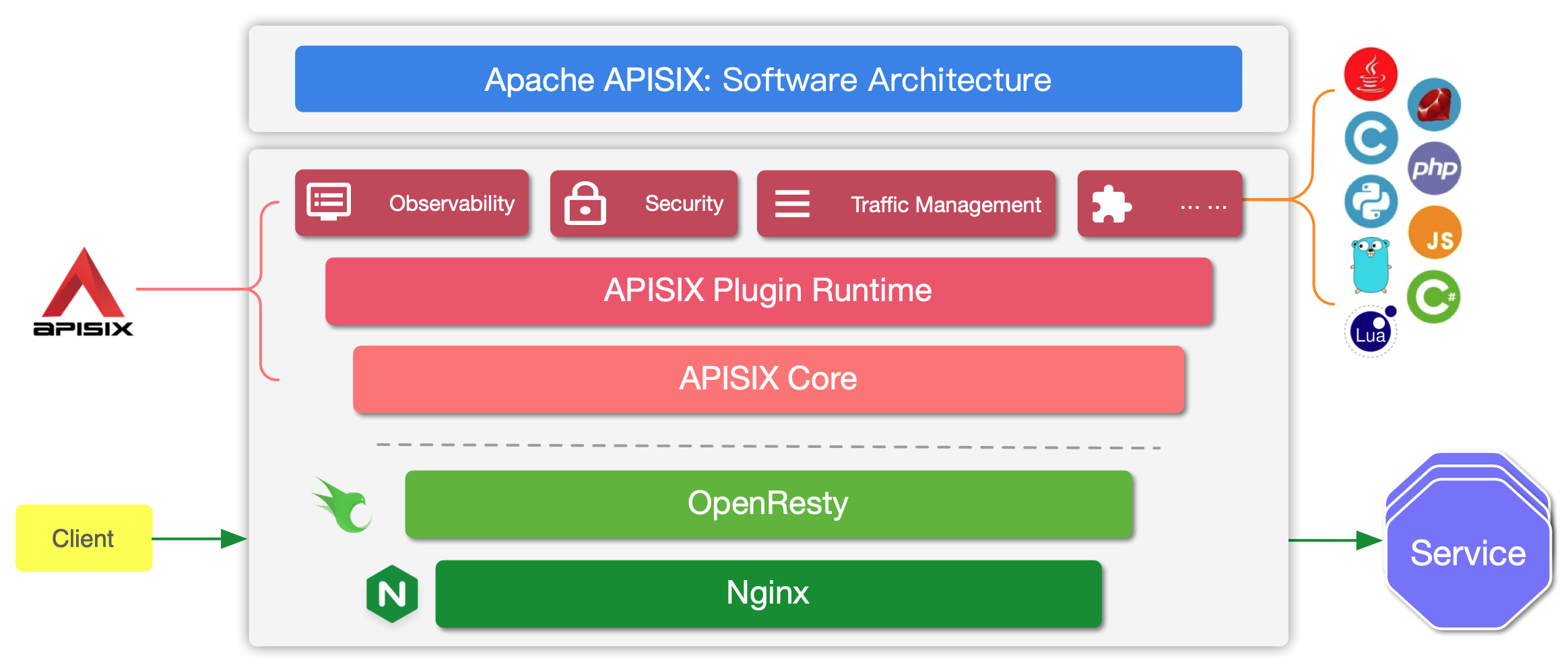 -Apache APISIX is a dynamic, real-time, high-performance cloud-native API gateway. It is built on top of NGINX + ngx_lua technology and leverages the power offered by LuaJIT. [Why Apache APISIX chose Nginx and Lua to build API Gateway?](https://apisix.apache.org/blog/2021/08/25/why-apache-apisix-chose-nginx-and-lua/) +APISIX has two main parts: -APISIX is divided into two main parts: +1. APISIX core, Lua plugin, multi-language Plugin runtime, and the WASM plugin runtime. +2. Built-in Plugins that adds features for observability, security, traffic control, etc. -1. APISIX core, including Lua plugin, multi-language plugin runtime, Wasm plugin runtime, etc. -2. Feature-rich variety of built-in plugins: including observability, security, traffic control, etc. +The APISIX core handles the important functions like matching Routes, load balancing, service discovery, configuration management, and provides a management API. It also includes APISIX Plugin runtime supporting Lua and multilingual Plugins (Go, Java , Python, JavaScript, etc) including the experimental WASM Plugin runtime. -In the APISIX core, important functions such as route matching, load balancing, service discovery, management API, and basic modules such as configuration management are provided. In addition, APISIX plugin runtime is also included, providing the runtime framework for native Lua plugins and multilingual plugins, as well as the experimental Wasm plugin runtime, etc. APISIX multilingual plugin runtime provides support for various development languages, such as Golang, Java, Python, JS, etc. +APISIX also has a set of [built-in Plugins](https://apisix.apache.org/docs/apisix/plugins/batch-requests) that adds features like authentication, security, observability, etc. They are written in Lua. -APISIX currently has various plugins built in, covering various areas of API gateways, such as authentication and authentication, security, observability, traffic management, multi-protocol access, and so on. The plugins currently built into APISIX are implemented using native Lua. For the introduction and usage of each plugin, please check the [documentation](https://apisix.apache.org/docs/apisix/plugins/batch-requests) of the relevant plugin. +## Deployment modes -## Plugin Loading Process +APISIX has three different deployment modes for different production use cases. The table below summarises the deployment modes: - +| Deployment mode | Roles | Description | +|-----------------|----------------------------|-----------------------------------------------------------------------------------------------------------| +| traditional | traditional | Data plane and control plane are deployed together. `enable_admin` attribute should be disabled manually. | +| decoupled | data_plane / control_plane | Data plane and control plane are deployed independently. | +| standalone | data_plane | Only data plane is deployed and the configurations are loaded from a local YAML file. | -## Plugin Hierarchy Structure +Each of these deployment modes are explained in detail below. - +### Traditional + +In the traditional deployment mode, one instance of APISIX will be both the data plane and the control plane. + +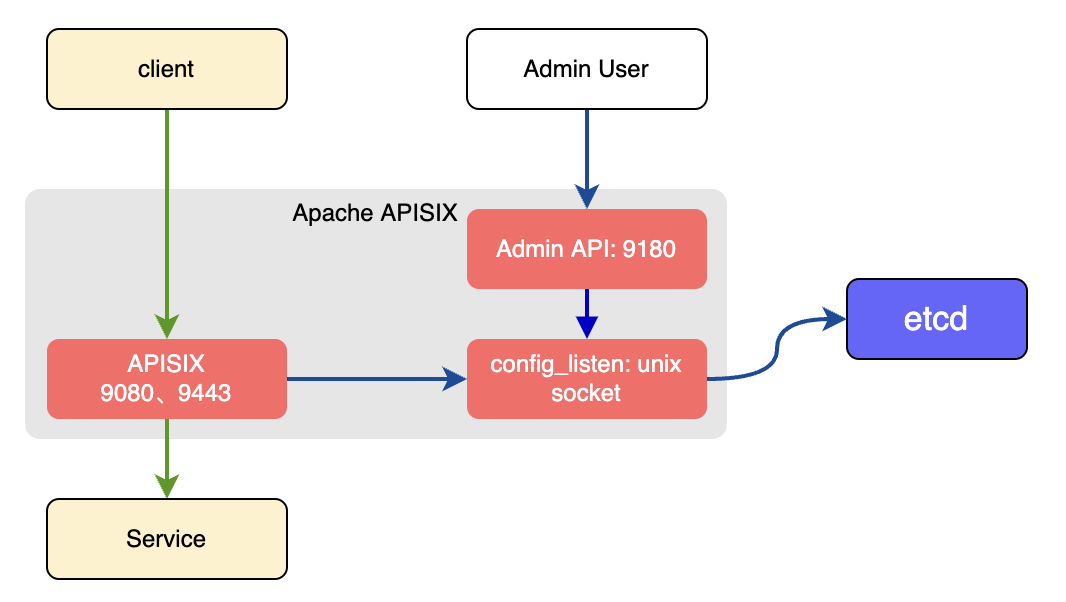 + +There will be a conf server that listens on the UNIX socket and acts as a proxy between APISIX and etcd. Both the data and the control planes connect to this conf server via HTTP. + +An example configuration of the traditional deployment mode is shown below: + +```yaml title="conf/config.yaml" +deployment: + role: traditional + role_traditional: + config_provider: etcd + etcd: + host: + - http://xxxx + prefix: /apisix + timeout: 30 +``` + +### Decoupled + +In the decoupled deployment mode the data plane and control plane instances of APISIX are deployed separately. i.e one instance of APISIX is configured to be a data plane and the other to be a control plane. + +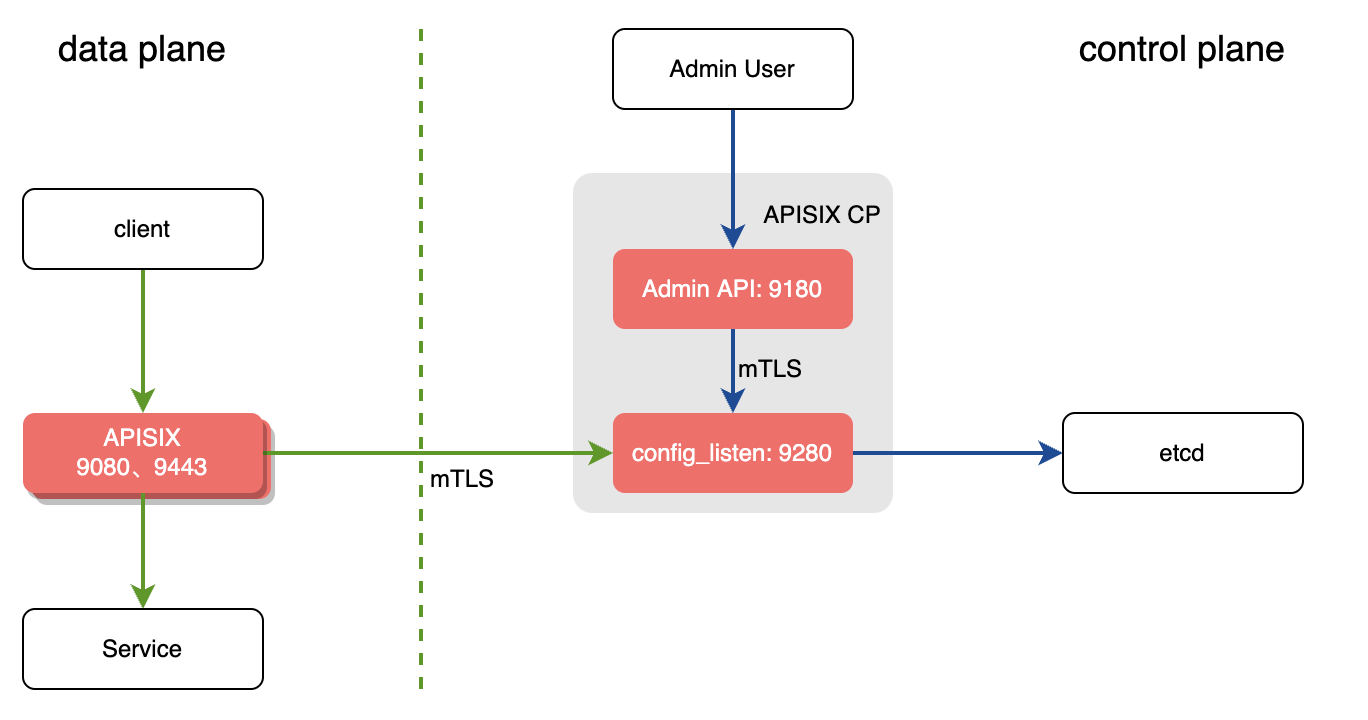 + +The instance of APISIX deployed as the data plane will: + +1. Fetch the configuration from the control plane. The default port is `9280`. +2. Performs a health check on all configured control plane addresses before starting the service. + 1. If the control plane addresses are unavailable, the startup fails and an exception is thrown. + 2. If at least one control plane address is available, it prints the unhealthy control planes logs, and starts the APISIX service. + 3. If all control planes are normal, APISIX service is started normally. +3. Once the service is started, it will handle the user requests. + +The example below shows the configuration of an APISIX instance as data plane in the decoupled mode: + +```yaml title="conf/config.yaml" +deployment: + role: data_plane + role_data_plane: + config_provider: control_plane + control_plane: + host: + - xxxx:9280 + timeout: 30 + certs: + cert: /path/to/ca-cert + cert_key: /path/to/ca-cert + trusted_ca_cert: /path/to/ca-cert +``` + +The instance of APISIX deployeas the control plane will: + +1. Listen on port `9180` and handle Admin API requests. +2. Provide the conf server which will listen on port `9280`. Both the control plane and the data plane will connect to this via HTTPS enforced by mTLS. + +The example below shows the configuration of an APISIX instance as control plane in the decoupled mode: + +```yaml title="conf/config.yaml" +deployment: + role: control_plane + role_control_plan: + config_provider: etcd + conf_server: + listen: 0.0.0.0:9280 + cert: /path/to/ca-cert + cert_key: /path/to/ca-cert + client_ca_cert: /path/to/ca-cert + etcd: + host: + - https://xxxx + prefix: /apisix + timeout: 30 + certs: + cert: /path/to/ca-cert + cert_key: /path/to/ca-cert + trusted_ca_cert: /path/to/ca-cert +``` + +:::tip + +As OpenResty <= 1.21.4 does not support sending mTLS requests, to accept connections from APISIX running on these OpenResty versions, you need to disable the client certificate verification in the control plane instance as shown below: + +```yaml title="conf/config.yaml" +deployment: + role: control_plane + role_control_plan: + config_provider: etcd + conf_server: + listen: 0.0.0.0:9280 + cert: /path/to/ca-cert + cert_key: /path/to/ca-cert + etcd: + host: + - https://xxxx Review Comment: ```suggestion - https://${IP}:${Port} ``` ########## docs/en/latest/architecture-design/apisix.md: ########## @@ -1,5 +1,5 @@ --- -title: APISIX +title: Architecture Review Comment: Can you add some keywords and descriptions? ########## docs/en/latest/architecture-design/apisix.md: ########## @@ -21,25 +21,160 @@ title: APISIX # --> -## Apache APISIX : Software Architecture +APISIX is built on top of Nginx and [ngx_lua](https://github.com/openresty/lua-nginx-module) leveraging the power offered by LuaJIT. See [Why Apache APISIX chose Nginx and Lua to build API Gateway?](https://apisix.apache.org/blog/2021/08/25/why-apache-apisix-chose-nginx-and-lua/). - + -Apache APISIX is a dynamic, real-time, high-performance cloud-native API gateway. It is built on top of NGINX + ngx_lua technology and leverages the power offered by LuaJIT. [Why Apache APISIX chose Nginx and Lua to build API Gateway?](https://apisix.apache.org/blog/2021/08/25/why-apache-apisix-chose-nginx-and-lua/) +APISIX has two main parts: -APISIX is divided into two main parts: +1. APISIX core, Lua plugin, multi-language Plugin runtime, and the WASM plugin runtime. +2. Built-in Plugins that adds features for observability, security, traffic control, etc. -1. APISIX core, including Lua plugin, multi-language plugin runtime, Wasm plugin runtime, etc. -2. Feature-rich variety of built-in plugins: including observability, security, traffic control, etc. +The APISIX core handles the important functions like matching Routes, load balancing, service discovery, configuration management, and provides a management API. It also includes APISIX Plugin runtime supporting Lua and multilingual Plugins (Go, Java , Python, JavaScript, etc) including the experimental WASM Plugin runtime. -In the APISIX core, important functions such as route matching, load balancing, service discovery, management API, and basic modules such as configuration management are provided. In addition, APISIX plugin runtime is also included, providing the runtime framework for native Lua plugins and multilingual plugins, as well as the experimental Wasm plugin runtime, etc. APISIX multilingual plugin runtime provides support for various development languages, such as Golang, Java, Python, JS, etc. +APISIX also has a set of [built-in Plugins](https://apisix.apache.org/docs/apisix/plugins/batch-requests) that adds features like authentication, security, observability, etc. They are written in Lua. -APISIX currently has various plugins built in, covering various areas of API gateways, such as authentication and authentication, security, observability, traffic management, multi-protocol access, and so on. The plugins currently built into APISIX are implemented using native Lua. For the introduction and usage of each plugin, please check the [documentation](https://apisix.apache.org/docs/apisix/plugins/batch-requests) of the relevant plugin. +## Deployment modes -## Plugin Loading Process +APISIX has three different deployment modes for different production use cases. The table below summarises the deployment modes: - +| Deployment mode | Roles | Description | +|-----------------|----------------------------|-----------------------------------------------------------------------------------------------------------| +| traditional | traditional | Data plane and control plane are deployed together. `enable_admin` attribute should be disabled manually. | +| decoupled | data_plane / control_plane | Data plane and control plane are deployed independently. | +| standalone | data_plane | Only data plane is deployed and the configurations are loaded from a local YAML file. | -## Plugin Hierarchy Structure +Each of these deployment modes are explained in detail below. - +### Traditional + +In the traditional deployment mode, one instance of APISIX will be both the data plane and the control plane. + + + +There will be a conf server that listens on the UNIX socket and acts as a proxy between APISIX and etcd. Both the data and the control planes connect to this conf server via HTTP. + +An example configuration of the traditional deployment mode is shown below: + +```yaml title="conf/config.yaml" +deployment: + role: traditional + role_traditional: + config_provider: etcd + etcd: + host: + - http://xxxx + prefix: /apisix + timeout: 30 +``` + +### Decoupled + +In the decoupled deployment mode the data plane and control plane instances of APISIX are deployed separately. i.e one instance of APISIX is configured to be a data plane and the other to be a control plane. + + + +The instance of APISIX deployed as the data plane will: + +1. Fetch the configuration from the control plane. The default port is `9280`. +2. Performs a health check on all configured control plane addresses before starting the service. + 1. If the control plane addresses are unavailable, the startup fails and an exception is thrown. + 2. If at least one control plane address is available, it prints the unhealthy control planes logs, and starts the APISIX service. + 3. If all control planes are normal, APISIX service is started normally. +3. Once the service is started, it will handle the user requests. + +The example below shows the configuration of an APISIX instance as data plane in the decoupled mode: + +```yaml title="conf/config.yaml" +deployment: + role: data_plane + role_data_plane: + config_provider: control_plane + control_plane: + host: + - xxxx:9280 Review Comment: ```suggestion - ${IP}:9280 ``` ########## docs/en/latest/architecture-design/apisix.md: ########## @@ -21,25 +21,160 @@ title: APISIX # --> -## Apache APISIX : Software Architecture +APISIX is built on top of Nginx and [ngx_lua](https://github.com/openresty/lua-nginx-module) leveraging the power offered by LuaJIT. See [Why Apache APISIX chose Nginx and Lua to build API Gateway?](https://apisix.apache.org/blog/2021/08/25/why-apache-apisix-chose-nginx-and-lua/). - + -Apache APISIX is a dynamic, real-time, high-performance cloud-native API gateway. It is built on top of NGINX + ngx_lua technology and leverages the power offered by LuaJIT. [Why Apache APISIX chose Nginx and Lua to build API Gateway?](https://apisix.apache.org/blog/2021/08/25/why-apache-apisix-chose-nginx-and-lua/) +APISIX has two main parts: -APISIX is divided into two main parts: +1. APISIX core, Lua plugin, multi-language Plugin runtime, and the WASM plugin runtime. +2. Built-in Plugins that adds features for observability, security, traffic control, etc. -1. APISIX core, including Lua plugin, multi-language plugin runtime, Wasm plugin runtime, etc. -2. Feature-rich variety of built-in plugins: including observability, security, traffic control, etc. +The APISIX core handles the important functions like matching Routes, load balancing, service discovery, configuration management, and provides a management API. It also includes APISIX Plugin runtime supporting Lua and multilingual Plugins (Go, Java , Python, JavaScript, etc) including the experimental WASM Plugin runtime. -In the APISIX core, important functions such as route matching, load balancing, service discovery, management API, and basic modules such as configuration management are provided. In addition, APISIX plugin runtime is also included, providing the runtime framework for native Lua plugins and multilingual plugins, as well as the experimental Wasm plugin runtime, etc. APISIX multilingual plugin runtime provides support for various development languages, such as Golang, Java, Python, JS, etc. +APISIX also has a set of [built-in Plugins](https://apisix.apache.org/docs/apisix/plugins/batch-requests) that adds features like authentication, security, observability, etc. They are written in Lua. -APISIX currently has various plugins built in, covering various areas of API gateways, such as authentication and authentication, security, observability, traffic management, multi-protocol access, and so on. The plugins currently built into APISIX are implemented using native Lua. For the introduction and usage of each plugin, please check the [documentation](https://apisix.apache.org/docs/apisix/plugins/batch-requests) of the relevant plugin. +## Deployment modes -## Plugin Loading Process +APISIX has three different deployment modes for different production use cases. The table below summarises the deployment modes: - +| Deployment mode | Roles | Description | +|-----------------|----------------------------|-----------------------------------------------------------------------------------------------------------| +| traditional | traditional | Data plane and control plane are deployed together. `enable_admin` attribute should be disabled manually. | +| decoupled | data_plane / control_plane | Data plane and control plane are deployed independently. | +| standalone | data_plane | Only data plane is deployed and the configurations are loaded from a local YAML file. | -## Plugin Hierarchy Structure +Each of these deployment modes are explained in detail below. - +### Traditional + +In the traditional deployment mode, one instance of APISIX will be both the data plane and the control plane. + + + +There will be a conf server that listens on the UNIX socket and acts as a proxy between APISIX and etcd. Both the data and the control planes connect to this conf server via HTTP. + +An example configuration of the traditional deployment mode is shown below: + +```yaml title="conf/config.yaml" +deployment: + role: traditional + role_traditional: + config_provider: etcd + etcd: + host: + - http://xxxx + prefix: /apisix + timeout: 30 +``` + +### Decoupled + +In the decoupled deployment mode the data plane and control plane instances of APISIX are deployed separately. i.e one instance of APISIX is configured to be a data plane and the other to be a control plane. + + + +The instance of APISIX deployed as the data plane will: + +1. Fetch the configuration from the control plane. The default port is `9280`. +2. Performs a health check on all configured control plane addresses before starting the service. + 1. If the control plane addresses are unavailable, the startup fails and an exception is thrown. + 2. If at least one control plane address is available, it prints the unhealthy control planes logs, and starts the APISIX service. + 3. If all control planes are normal, APISIX service is started normally. +3. Once the service is started, it will handle the user requests. + +The example below shows the configuration of an APISIX instance as data plane in the decoupled mode: + +```yaml title="conf/config.yaml" +deployment: + role: data_plane + role_data_plane: + config_provider: control_plane + control_plane: + host: + - xxxx:9280 + timeout: 30 + certs: + cert: /path/to/ca-cert + cert_key: /path/to/ca-cert + trusted_ca_cert: /path/to/ca-cert +``` + +The instance of APISIX deployeas the control plane will: + +1. Listen on port `9180` and handle Admin API requests. +2. Provide the conf server which will listen on port `9280`. Both the control plane and the data plane will connect to this via HTTPS enforced by mTLS. + +The example below shows the configuration of an APISIX instance as control plane in the decoupled mode: + +```yaml title="conf/config.yaml" +deployment: + role: control_plane + role_control_plan: + config_provider: etcd + conf_server: + listen: 0.0.0.0:9280 + cert: /path/to/ca-cert + cert_key: /path/to/ca-cert + client_ca_cert: /path/to/ca-cert + etcd: + host: + - https://xxxx Review Comment: ```suggestion - https://${IP}:${Port} ``` ########## docs/en/latest/architecture-design/apisix.md: ########## @@ -21,25 +21,160 @@ title: APISIX # --> -## Apache APISIX : Software Architecture +APISIX is built on top of Nginx and [ngx_lua](https://github.com/openresty/lua-nginx-module) leveraging the power offered by LuaJIT. See [Why Apache APISIX chose Nginx and Lua to build API Gateway?](https://apisix.apache.org/blog/2021/08/25/why-apache-apisix-chose-nginx-and-lua/). - + -Apache APISIX is a dynamic, real-time, high-performance cloud-native API gateway. It is built on top of NGINX + ngx_lua technology and leverages the power offered by LuaJIT. [Why Apache APISIX chose Nginx and Lua to build API Gateway?](https://apisix.apache.org/blog/2021/08/25/why-apache-apisix-chose-nginx-and-lua/) +APISIX has two main parts: -APISIX is divided into two main parts: +1. APISIX core, Lua plugin, multi-language Plugin runtime, and the WASM plugin runtime. +2. Built-in Plugins that adds features for observability, security, traffic control, etc. -1. APISIX core, including Lua plugin, multi-language plugin runtime, Wasm plugin runtime, etc. -2. Feature-rich variety of built-in plugins: including observability, security, traffic control, etc. +The APISIX core handles the important functions like matching Routes, load balancing, service discovery, configuration management, and provides a management API. It also includes APISIX Plugin runtime supporting Lua and multilingual Plugins (Go, Java , Python, JavaScript, etc) including the experimental WASM Plugin runtime. -In the APISIX core, important functions such as route matching, load balancing, service discovery, management API, and basic modules such as configuration management are provided. In addition, APISIX plugin runtime is also included, providing the runtime framework for native Lua plugins and multilingual plugins, as well as the experimental Wasm plugin runtime, etc. APISIX multilingual plugin runtime provides support for various development languages, such as Golang, Java, Python, JS, etc. +APISIX also has a set of [built-in Plugins](https://apisix.apache.org/docs/apisix/plugins/batch-requests) that adds features like authentication, security, observability, etc. They are written in Lua. -APISIX currently has various plugins built in, covering various areas of API gateways, such as authentication and authentication, security, observability, traffic management, multi-protocol access, and so on. The plugins currently built into APISIX are implemented using native Lua. For the introduction and usage of each plugin, please check the [documentation](https://apisix.apache.org/docs/apisix/plugins/batch-requests) of the relevant plugin. +## Deployment modes -## Plugin Loading Process +APISIX has three different deployment modes for different production use cases. The table below summarises the deployment modes: - +| Deployment mode | Roles | Description | +|-----------------|----------------------------|-----------------------------------------------------------------------------------------------------------| +| traditional | traditional | Data plane and control plane are deployed together. `enable_admin` attribute should be disabled manually. | +| decoupled | data_plane / control_plane | Data plane and control plane are deployed independently. | +| standalone | data_plane | Only data plane is deployed and the configurations are loaded from a local YAML file. | -## Plugin Hierarchy Structure +Each of these deployment modes are explained in detail below. - +### Traditional + +In the traditional deployment mode, one instance of APISIX will be both the data plane and the control plane. + + + +There will be a conf server that listens on the UNIX socket and acts as a proxy between APISIX and etcd. Both the data and the control planes connect to this conf server via HTTP. + +An example configuration of the traditional deployment mode is shown below: + +```yaml title="conf/config.yaml" +deployment: + role: traditional + role_traditional: + config_provider: etcd + etcd: + host: + - http://xxxx Review Comment: ```suggestion - http://${IP}:${Port} ``` -- This is an automated message from the Apache Git Service. To respond to the message, please log on to GitHub and use the URL above to go to the specific comment. To unsubscribe, e-mail: [email protected] For queries about this service, please contact Infrastructure at: [email protected]



