hf400159 commented on code in PR #1312:
URL: https://github.com/apache/apisix-website/pull/1312#discussion_r962681763
########## blog/en/blog/2022/09/09/kubernetes-ingress-with-apisix.md: ########## @@ -0,0 +1,248 @@ +--- +title: "Hands-On: Set Up Ingress on Kubernetes With Apache APISIX Ingress Controller" +authors: + - name: Navendu Pottekkat + title: Author + url: https://github.com/navendu-pottekkat + image_url: https://avatars.githubusercontent.com/u/49474499 +keywords: +- Ingress controller +- Kubernetes ingress +- Apache APISIX +- APISIX ingress controller +description: A tutorial on using Ingress in your Kubernetes cluster with Apache APISIX. +tags: [Ingress, Kubernetes] +image: https://mermaid.ink/img/pako:eNp9kttKAzEQhl9ljDctdLVdQXARwRNaFJFuLwTjRZqdtqE5rDm0lLbv4aP4PD6J2W61ithc_cz_5Z8ZkgXhpkCSkaE0Mz5m1sN9j2reuJQCtW_CaZKcwZKSHr5mcDhN4ea6T6nuoSszuEUpDQytUXD-2IVpetDeo2QJjGoG1UXXaVDy8fYOA2YxUUILFVTCSpFMO5Q0v7BlzwSPS3Dpv3i6xgXfALFd3n2Crh5ZdA640d4aKdFGLEYmUP4Gq_FGzOOMzddBzs8lQgkuXptgBvt4nHbSE6ql0JN8bbZ3meku8-ivSTXE48JgZFk5hslzPd1dGKDV6DGuIIPz1fwvNVsdtpWu80OntUZd_ElmMbne-VdSISxyL4yG_sW2KvhWl9-ZpEUUWsVEEf_FoipT4seokJIsyoLZCSWtuu7wNaDma2tRJ8Ti2MzyjfEQVFzRVb63AStkRfUq9ghlER_kuhDeWJINmXTYIix4k881J1lFf0FXgsXt1IZafQIiC97o Review Comment: ```suggestion image: https://static.apiseven.com/2022/09/05/6315bd71d6846.png ``` ########## blog/en/blog/2022/09/09/kubernetes-ingress-with-apisix.md: ########## @@ -0,0 +1,248 @@ +--- +title: "Hands-On: Set Up Ingress on Kubernetes With Apache APISIX Ingress Controller" +authors: + - name: Navendu Pottekkat + title: Author + url: https://github.com/navendu-pottekkat + image_url: https://avatars.githubusercontent.com/u/49474499 +keywords: +- Ingress controller +- Kubernetes ingress +- Apache APISIX +- APISIX ingress controller +description: A tutorial on using Ingress in your Kubernetes cluster with Apache APISIX. +tags: [Ingress, Kubernetes] +image: https://mermaid.ink/img/pako:eNp9kttKAzEQhl9ljDctdLVdQXARwRNaFJFuLwTjRZqdtqE5rDm0lLbv4aP4PD6J2W61ithc_cz_5Z8ZkgXhpkCSkaE0Mz5m1sN9j2reuJQCtW_CaZKcwZKSHr5mcDhN4ea6T6nuoSszuEUpDQytUXD-2IVpetDeo2QJjGoG1UXXaVDy8fYOA2YxUUILFVTCSpFMO5Q0v7BlzwSPS3Dpv3i6xgXfALFd3n2Crh5ZdA640d4aKdFGLEYmUP4Gq_FGzOOMzddBzs8lQgkuXptgBvt4nHbSE6ql0JN8bbZ3meku8-ivSTXE48JgZFk5hslzPd1dGKDV6DGuIIPz1fwvNVsdtpWu80OntUZd_ElmMbne-VdSISxyL4yG_sW2KvhWl9-ZpEUUWsVEEf_FoipT4seokJIsyoLZCSWtuu7wNaDma2tRJ8Ti2MzyjfEQVFzRVb63AStkRfUq9ghlER_kuhDeWJINmXTYIix4k881J1lFf0FXgsXt1IZafQIiC97o +--- + +> A tutorial on using Ingress in your Kubernetes cluster with Apache APISIX. + +<!--truncate--> + +In Kubernetes, [Ingress](https://kubernetes.io/docs/concepts/services-networking/ingress/) is a native object that allows you to access your services externally by defining a set of rules. Using a reverse proxy, an [Ingress controller](https://kubernetes.io/docs/concepts/services-networking/ingress-controllers/) implements these defined rules and routes external traffic to your services. + +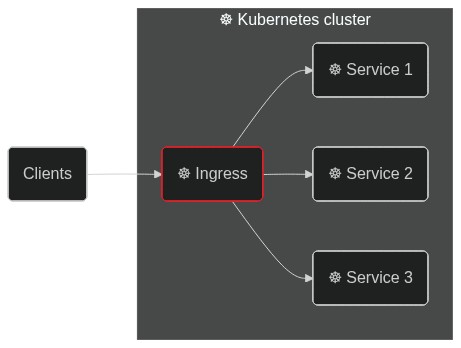 + +[Apache APISIX](https://apisix.apache.org/) is an open source API gateway (a souped-up reverse proxy) that provides features like authentication, traffic routing, load balancing, canary releases, monitoring, and more. APISIX also supports custom Plugins and integrates with popular open source projects like [Apache SkyWalking](https://apisix.apache.org/docs/apisix/next/plugins/skywalking/) and [Prometheus](https://apisix.apache.org/docs/apisix/next/plugins/prometheus/). To learn more about APISIX, you can see the [official documentation](https://apisix.apache.org/docs/apisix/getting-started/). + +The [Apache APISIX Ingress controller](https://apisix.apache.org/docs/ingress-controller/next/getting-started/) sits between the defined Ingress rules and the APISIX API gateway. It configures the proxy to route traffic based on the defined rules. + +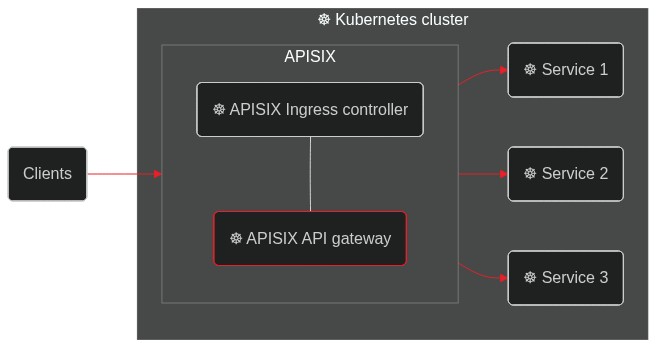 + +This hands-on tutorial will teach you how to set up the APISIX Ingress controller on your Kubernetes cluster and route traffic to your services. + +Before you move on, make sure you: + +1. Have access to a Kubernetes cluster. This tutorial uses [minikube](https://minikube.sigs.k8s.io/) for creating a cluster. +2. Install and configure `kubectl` to communicate with your cluster. +3. [Install Helm](https://helm.sh/docs/intro/install/) to deploy the APISIX Ingress controller. + +## Deploying a Sample Application + +We will use a sample HTTP server application ([bare-minimum-api](https://github.com/navendu-pottekkat/bare-minimum-api)) to demonstrate the working of the Ingress controller. + +While running the application, you can set a "version" and a port to listen to. For this example, we will create two "versions" of this application which will return different responses as shown below: + +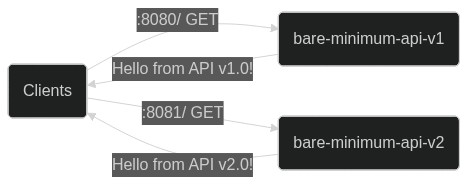 Review Comment: ```suggestion 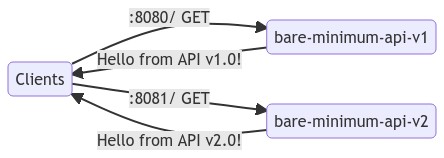 ``` ########## blog/en/blog/2022/09/09/kubernetes-ingress-with-apisix.md: ########## @@ -0,0 +1,248 @@ +--- +title: "Hands-On: Set Up Ingress on Kubernetes With Apache APISIX Ingress Controller" +authors: + - name: Navendu Pottekkat + title: Author + url: https://github.com/navendu-pottekkat + image_url: https://avatars.githubusercontent.com/u/49474499 +keywords: +- Ingress controller +- Kubernetes ingress +- Apache APISIX +- APISIX ingress controller +description: A tutorial on using Ingress in your Kubernetes cluster with Apache APISIX. +tags: [Ingress, Kubernetes] +image: https://mermaid.ink/img/pako:eNp9kttKAzEQhl9ljDctdLVdQXARwRNaFJFuLwTjRZqdtqE5rDm0lLbv4aP4PD6J2W61ithc_cz_5Z8ZkgXhpkCSkaE0Mz5m1sN9j2reuJQCtW_CaZKcwZKSHr5mcDhN4ea6T6nuoSszuEUpDQytUXD-2IVpetDeo2QJjGoG1UXXaVDy8fYOA2YxUUILFVTCSpFMO5Q0v7BlzwSPS3Dpv3i6xgXfALFd3n2Crh5ZdA640d4aKdFGLEYmUP4Gq_FGzOOMzddBzs8lQgkuXptgBvt4nHbSE6ql0JN8bbZ3meku8-ivSTXE48JgZFk5hslzPd1dGKDV6DGuIIPz1fwvNVsdtpWu80OntUZd_ElmMbne-VdSISxyL4yG_sW2KvhWl9-ZpEUUWsVEEf_FoipT4seokJIsyoLZCSWtuu7wNaDma2tRJ8Ti2MzyjfEQVFzRVb63AStkRfUq9ghlER_kuhDeWJINmXTYIix4k881J1lFf0FXgsXt1IZafQIiC97o +--- + +> A tutorial on using Ingress in your Kubernetes cluster with Apache APISIX. + +<!--truncate--> + +In Kubernetes, [Ingress](https://kubernetes.io/docs/concepts/services-networking/ingress/) is a native object that allows you to access your services externally by defining a set of rules. Using a reverse proxy, an [Ingress controller](https://kubernetes.io/docs/concepts/services-networking/ingress-controllers/) implements these defined rules and routes external traffic to your services. + + Review Comment: ```suggestion  ``` ########## blog/en/blog/2022/09/09/kubernetes-ingress-with-apisix.md: ########## @@ -0,0 +1,248 @@ +--- +title: "Hands-On: Set Up Ingress on Kubernetes With Apache APISIX Ingress Controller" +authors: + - name: Navendu Pottekkat + title: Author + url: https://github.com/navendu-pottekkat + image_url: https://avatars.githubusercontent.com/u/49474499 +keywords: +- Ingress controller +- Kubernetes ingress +- Apache APISIX +- APISIX ingress controller +description: A tutorial on using Ingress in your Kubernetes cluster with Apache APISIX. +tags: [Ingress, Kubernetes] +image: https://mermaid.ink/img/pako:eNp9kttKAzEQhl9ljDctdLVdQXARwRNaFJFuLwTjRZqdtqE5rDm0lLbv4aP4PD6J2W61ithc_cz_5Z8ZkgXhpkCSkaE0Mz5m1sN9j2reuJQCtW_CaZKcwZKSHr5mcDhN4ea6T6nuoSszuEUpDQytUXD-2IVpetDeo2QJjGoG1UXXaVDy8fYOA2YxUUILFVTCSpFMO5Q0v7BlzwSPS3Dpv3i6xgXfALFd3n2Crh5ZdA640d4aKdFGLEYmUP4Gq_FGzOOMzddBzs8lQgkuXptgBvt4nHbSE6ql0JN8bbZ3meku8-ivSTXE48JgZFk5hslzPd1dGKDV6DGuIIPz1fwvNVsdtpWu80OntUZd_ElmMbne-VdSISxyL4yG_sW2KvhWl9-ZpEUUWsVEEf_FoipT4seokJIsyoLZCSWtuu7wNaDma2tRJ8Ti2MzyjfEQVFzRVb63AStkRfUq9ghlER_kuhDeWJINmXTYIix4k881J1lFf0FXgsXt1IZafQIiC97o +--- + +> A tutorial on using Ingress in your Kubernetes cluster with Apache APISIX. + +<!--truncate--> + +In Kubernetes, [Ingress](https://kubernetes.io/docs/concepts/services-networking/ingress/) is a native object that allows you to access your services externally by defining a set of rules. Using a reverse proxy, an [Ingress controller](https://kubernetes.io/docs/concepts/services-networking/ingress-controllers/) implements these defined rules and routes external traffic to your services. + + + +[Apache APISIX](https://apisix.apache.org/) is an open source API gateway (a souped-up reverse proxy) that provides features like authentication, traffic routing, load balancing, canary releases, monitoring, and more. APISIX also supports custom Plugins and integrates with popular open source projects like [Apache SkyWalking](https://apisix.apache.org/docs/apisix/next/plugins/skywalking/) and [Prometheus](https://apisix.apache.org/docs/apisix/next/plugins/prometheus/). To learn more about APISIX, you can see the [official documentation](https://apisix.apache.org/docs/apisix/getting-started/). + +The [Apache APISIX Ingress controller](https://apisix.apache.org/docs/ingress-controller/next/getting-started/) sits between the defined Ingress rules and the APISIX API gateway. It configures the proxy to route traffic based on the defined rules. + + + +This hands-on tutorial will teach you how to set up the APISIX Ingress controller on your Kubernetes cluster and route traffic to your services. + +Before you move on, make sure you: + +1. Have access to a Kubernetes cluster. This tutorial uses [minikube](https://minikube.sigs.k8s.io/) for creating a cluster. +2. Install and configure `kubectl` to communicate with your cluster. +3. [Install Helm](https://helm.sh/docs/intro/install/) to deploy the APISIX Ingress controller. + +## Deploying a Sample Application + +We will use a sample HTTP server application ([bare-minimum-api](https://github.com/navendu-pottekkat/bare-minimum-api)) to demonstrate the working of the Ingress controller. + +While running the application, you can set a "version" and a port to listen to. For this example, we will create two "versions" of this application which will return different responses as shown below: + + + +You can deploy the application on your Kubernetes cluster by running: + +```shell +kubectl run bare-minimum-api-v1 --image navendup/bare-minimum-api --port 8080 -- 8080 v1.0 +kubectl expose pod bare-minimum-api-v1 --port 8080 +``` + +To test the application outside the cluster, you can use `port-forward`: + +```shell +kubectl port-forward bare-minimum-api-v1 8080:8080 +``` + +Now, if you open up a new terminal window and run: + +```shell +curl http://127.0.0.1:8080 +``` + +You will get back a response from the application: + +```shell {title="output"} +Hello from API v1.0! +``` + +Similarly, you can deploy another "version" of the application by running: + +```shell +kubectl run bare-minimum-api-v2 --image navendup/bare-minimum-api --port 8081 -- 8081 v2.0 +kubectl expose pod bare-minimum-api-v2 --port 8081 +``` + +Now, we can deploy APISIX Ingress and expose these applications to external traffic. + +## Deploying APISIX Ingress + +APISIX and APISIX Ingress controller can be installed using Helm: + +```shell +helm repo add apisix https://charts.apiseven.com +helm repo add bitnami https://charts.bitnami.com/bitnami +helm repo update +kubectl create ns ingress-apisix +helm install apisix apisix/apisix \ + --set gateway.type=NodePort \ + --set ingress-controller.enabled=true \ + --namespace ingress-apisix \ + --set ingress-controller.config.apisix.serviceNamespace=ingress-apisix +kubectl get service --namespace ingress-apisix +``` + +:::note + +We are using `NodePort` as the Gateway service type. You can also set it to `LoadBalancer` if your cluster has one. + +::: + +Helm will create five resources in your cluster: + +1. `apisix-gateway`: The data plane that handles external traffic. +2. `apisix-admin`: Control plane that processes configuration changes. +3. `apisix-ingress-controller`: The ingress controller. +4. `apisix-etcd` and 5. `apisix-etcd headless`: To store configuration and handle internal communication. + +Once all the pods and services are running, you can test APISIX by accessing the Admin API: + +```shell +kubectl exec -it -n ingress-apisix apisix-<rest of the pod name> -- curl http://127.0.0.1:9180/apisix/admin/routes -H 'X-API-Key: edd1c9f034335f136f87ad84b625c8f1' +``` + +:::note + +Replace the pod name with your APISIX gateway pod name. + +::: + +If you get a response similar to the one shown below, APISIX is up and running: + +```json {title="output"} +{ + "action": "get", + "node": { + "key": "/apisix/routes", + "dir": true, + "nodes": [] + }, + "count": 0 +} +``` + +## Configuring APISIX Ingress + +Once you have verified that the APISIX gateway and Ingress controller is running, you can create [Routes](https://apisix.apache.org/docs/apisix/terminology/route/) to expose the deployed application to external traffic. + +This will route traffic between the two application versions based on the client request: + +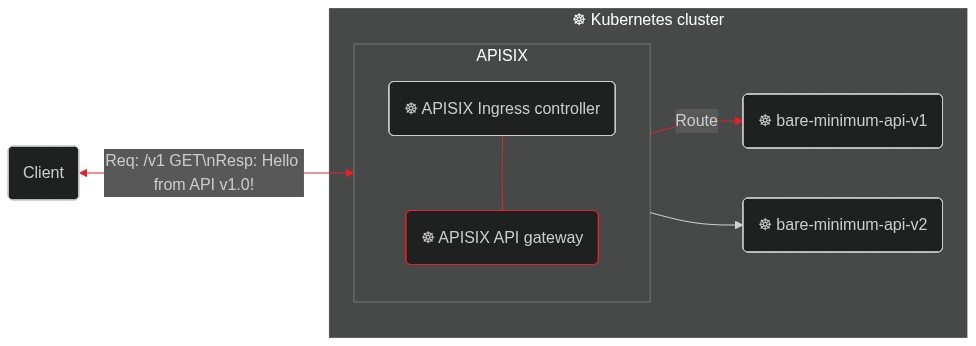 + +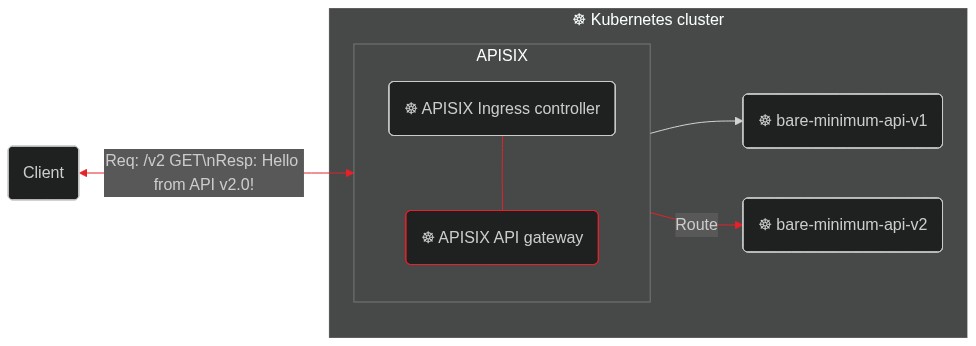 Review Comment: ```suggestion  ``` ########## blog/en/blog/2022/09/09/kubernetes-ingress-with-apisix.md: ########## @@ -0,0 +1,248 @@ +--- +title: "Hands-On: Set Up Ingress on Kubernetes With Apache APISIX Ingress Controller" +authors: + - name: Navendu Pottekkat + title: Author + url: https://github.com/navendu-pottekkat + image_url: https://avatars.githubusercontent.com/u/49474499 +keywords: +- Ingress controller +- Kubernetes ingress +- Apache APISIX +- APISIX ingress controller +description: A tutorial on using Ingress in your Kubernetes cluster with Apache APISIX. +tags: [Ingress, Kubernetes] +image: https://mermaid.ink/img/pako:eNp9kttKAzEQhl9ljDctdLVdQXARwRNaFJFuLwTjRZqdtqE5rDm0lLbv4aP4PD6J2W61ithc_cz_5Z8ZkgXhpkCSkaE0Mz5m1sN9j2reuJQCtW_CaZKcwZKSHr5mcDhN4ea6T6nuoSszuEUpDQytUXD-2IVpetDeo2QJjGoG1UXXaVDy8fYOA2YxUUILFVTCSpFMO5Q0v7BlzwSPS3Dpv3i6xgXfALFd3n2Crh5ZdA640d4aKdFGLEYmUP4Gq_FGzOOMzddBzs8lQgkuXptgBvt4nHbSE6ql0JN8bbZ3meku8-ivSTXE48JgZFk5hslzPd1dGKDV6DGuIIPz1fwvNVsdtpWu80OntUZd_ElmMbne-VdSISxyL4yG_sW2KvhWl9-ZpEUUWsVEEf_FoipT4seokJIsyoLZCSWtuu7wNaDma2tRJ8Ti2MzyjfEQVFzRVb63AStkRfUq9ghlER_kuhDeWJINmXTYIix4k881J1lFf0FXgsXt1IZafQIiC97o +--- + +> A tutorial on using Ingress in your Kubernetes cluster with Apache APISIX. + +<!--truncate--> + +In Kubernetes, [Ingress](https://kubernetes.io/docs/concepts/services-networking/ingress/) is a native object that allows you to access your services externally by defining a set of rules. Using a reverse proxy, an [Ingress controller](https://kubernetes.io/docs/concepts/services-networking/ingress-controllers/) implements these defined rules and routes external traffic to your services. + + + +[Apache APISIX](https://apisix.apache.org/) is an open source API gateway (a souped-up reverse proxy) that provides features like authentication, traffic routing, load balancing, canary releases, monitoring, and more. APISIX also supports custom Plugins and integrates with popular open source projects like [Apache SkyWalking](https://apisix.apache.org/docs/apisix/next/plugins/skywalking/) and [Prometheus](https://apisix.apache.org/docs/apisix/next/plugins/prometheus/). To learn more about APISIX, you can see the [official documentation](https://apisix.apache.org/docs/apisix/getting-started/). + +The [Apache APISIX Ingress controller](https://apisix.apache.org/docs/ingress-controller/next/getting-started/) sits between the defined Ingress rules and the APISIX API gateway. It configures the proxy to route traffic based on the defined rules. + + Review Comment: ```suggestion  ``` ########## blog/en/blog/2022/09/09/kubernetes-ingress-with-apisix.md: ########## @@ -0,0 +1,248 @@ +--- +title: "Hands-On: Set Up Ingress on Kubernetes With Apache APISIX Ingress Controller" +authors: + - name: Navendu Pottekkat + title: Author + url: https://github.com/navendu-pottekkat + image_url: https://avatars.githubusercontent.com/u/49474499 +keywords: +- Ingress controller +- Kubernetes ingress +- Apache APISIX +- APISIX ingress controller +description: A tutorial on using Ingress in your Kubernetes cluster with Apache APISIX. +tags: [Ingress, Kubernetes] +image: https://mermaid.ink/img/pako:eNp9kttKAzEQhl9ljDctdLVdQXARwRNaFJFuLwTjRZqdtqE5rDm0lLbv4aP4PD6J2W61ithc_cz_5Z8ZkgXhpkCSkaE0Mz5m1sN9j2reuJQCtW_CaZKcwZKSHr5mcDhN4ea6T6nuoSszuEUpDQytUXD-2IVpetDeo2QJjGoG1UXXaVDy8fYOA2YxUUILFVTCSpFMO5Q0v7BlzwSPS3Dpv3i6xgXfALFd3n2Crh5ZdA640d4aKdFGLEYmUP4Gq_FGzOOMzddBzs8lQgkuXptgBvt4nHbSE6ql0JN8bbZ3meku8-ivSTXE48JgZFk5hslzPd1dGKDV6DGuIIPz1fwvNVsdtpWu80OntUZd_ElmMbne-VdSISxyL4yG_sW2KvhWl9-ZpEUUWsVEEf_FoipT4seokJIsyoLZCSWtuu7wNaDma2tRJ8Ti2MzyjfEQVFzRVb63AStkRfUq9ghlER_kuhDeWJINmXTYIix4k881J1lFf0FXgsXt1IZafQIiC97o +--- + +> A tutorial on using Ingress in your Kubernetes cluster with Apache APISIX. + +<!--truncate--> + +In Kubernetes, [Ingress](https://kubernetes.io/docs/concepts/services-networking/ingress/) is a native object that allows you to access your services externally by defining a set of rules. Using a reverse proxy, an [Ingress controller](https://kubernetes.io/docs/concepts/services-networking/ingress-controllers/) implements these defined rules and routes external traffic to your services. + + + +[Apache APISIX](https://apisix.apache.org/) is an open source API gateway (a souped-up reverse proxy) that provides features like authentication, traffic routing, load balancing, canary releases, monitoring, and more. APISIX also supports custom Plugins and integrates with popular open source projects like [Apache SkyWalking](https://apisix.apache.org/docs/apisix/next/plugins/skywalking/) and [Prometheus](https://apisix.apache.org/docs/apisix/next/plugins/prometheus/). To learn more about APISIX, you can see the [official documentation](https://apisix.apache.org/docs/apisix/getting-started/). + +The [Apache APISIX Ingress controller](https://apisix.apache.org/docs/ingress-controller/next/getting-started/) sits between the defined Ingress rules and the APISIX API gateway. It configures the proxy to route traffic based on the defined rules. + + + +This hands-on tutorial will teach you how to set up the APISIX Ingress controller on your Kubernetes cluster and route traffic to your services. + +Before you move on, make sure you: + +1. Have access to a Kubernetes cluster. This tutorial uses [minikube](https://minikube.sigs.k8s.io/) for creating a cluster. +2. Install and configure `kubectl` to communicate with your cluster. +3. [Install Helm](https://helm.sh/docs/intro/install/) to deploy the APISIX Ingress controller. + +## Deploying a Sample Application + +We will use a sample HTTP server application ([bare-minimum-api](https://github.com/navendu-pottekkat/bare-minimum-api)) to demonstrate the working of the Ingress controller. + +While running the application, you can set a "version" and a port to listen to. For this example, we will create two "versions" of this application which will return different responses as shown below: + + + +You can deploy the application on your Kubernetes cluster by running: + +```shell +kubectl run bare-minimum-api-v1 --image navendup/bare-minimum-api --port 8080 -- 8080 v1.0 +kubectl expose pod bare-minimum-api-v1 --port 8080 +``` + +To test the application outside the cluster, you can use `port-forward`: + +```shell +kubectl port-forward bare-minimum-api-v1 8080:8080 +``` + +Now, if you open up a new terminal window and run: + +```shell +curl http://127.0.0.1:8080 +``` + +You will get back a response from the application: + +```shell {title="output"} +Hello from API v1.0! +``` + +Similarly, you can deploy another "version" of the application by running: + +```shell +kubectl run bare-minimum-api-v2 --image navendup/bare-minimum-api --port 8081 -- 8081 v2.0 +kubectl expose pod bare-minimum-api-v2 --port 8081 +``` + +Now, we can deploy APISIX Ingress and expose these applications to external traffic. + +## Deploying APISIX Ingress + +APISIX and APISIX Ingress controller can be installed using Helm: + +```shell +helm repo add apisix https://charts.apiseven.com +helm repo add bitnami https://charts.bitnami.com/bitnami +helm repo update +kubectl create ns ingress-apisix +helm install apisix apisix/apisix \ + --set gateway.type=NodePort \ + --set ingress-controller.enabled=true \ + --namespace ingress-apisix \ + --set ingress-controller.config.apisix.serviceNamespace=ingress-apisix +kubectl get service --namespace ingress-apisix +``` + +:::note + +We are using `NodePort` as the Gateway service type. You can also set it to `LoadBalancer` if your cluster has one. + +::: + +Helm will create five resources in your cluster: + +1. `apisix-gateway`: The data plane that handles external traffic. +2. `apisix-admin`: Control plane that processes configuration changes. +3. `apisix-ingress-controller`: The ingress controller. +4. `apisix-etcd` and 5. `apisix-etcd headless`: To store configuration and handle internal communication. + +Once all the pods and services are running, you can test APISIX by accessing the Admin API: + +```shell +kubectl exec -it -n ingress-apisix apisix-<rest of the pod name> -- curl http://127.0.0.1:9180/apisix/admin/routes -H 'X-API-Key: edd1c9f034335f136f87ad84b625c8f1' +``` + +:::note + +Replace the pod name with your APISIX gateway pod name. + +::: + +If you get a response similar to the one shown below, APISIX is up and running: + +```json {title="output"} +{ + "action": "get", + "node": { + "key": "/apisix/routes", + "dir": true, + "nodes": [] + }, + "count": 0 +} +``` + +## Configuring APISIX Ingress + +Once you have verified that the APISIX gateway and Ingress controller is running, you can create [Routes](https://apisix.apache.org/docs/apisix/terminology/route/) to expose the deployed application to external traffic. + +This will route traffic between the two application versions based on the client request: + + Review Comment: ```suggestion  ``` -- This is an automated message from the Apache Git Service. To respond to the message, please log on to GitHub and use the URL above to go to the specific comment. To unsubscribe, e-mail: [email protected] For queries about this service, please contact Infrastructure at: [email protected]





